Visible Workings (redux)

For me, one of the 2008’s most important (but least remarked-upon) ideas was spelled out in this post which details how Ward Cunningham implemented Brian Marick’s notion of Visible Workings. The idea, briefly, is that businesses can wear (non-confidential aspects of) their business logic on their sleeves, observable to all.

In a year of devastating consequences ensuing from the lack of transparency in business, you’d think Ward and Brian would be celebrated for this work. No such luck. Partly, I’m sure, because their insights flow from the realm of software development and software testing, and don’t generalize in an obvious way.

It struck me this morning that yesterday’s item on using del.icio.us to manage trusted feeds may help to broaden the appeal of the idea.

In that item I mainly talked about the logistical benefits of the approach. You write less code, and you get to leverage existing infrastructure for data management, web UI, collaboration, and syndicated alerts. That’s all good. But there’s also a transparency benefit which I neglected to point out.

At this moment, for example, del.icio.us/elmcity is a snapshot of the feeds and contributors known to, and classified by, the live version of my service at elmcity.info/events. That version uses private lists of trusted feeds, and of new and trusted contributors. I haven’t yet cut over to the newly-rewritten Azure version, but when I do, it will use these public lists instead.

The del.icio.us/elmcity snapshot reports that there are 41 Eventful contributors of which 37 are trusted and 4 are new.

Why are the four new contributors still sitting in the holding tank? One I mentioned yesterday. jheslin created a venue, but no events. I plan to delete that contributor and wait to see if he or she shows up again with actual event contributions.

That leaves TallWilly, blahblah25, and michellelewis. Why are they still sitting in the holding tank? Here’s the crucial point: I’m not sure. I know that I reviewed them when they showed up, and applied a policy. If it were written down, which until now it hasn’t been, it would use language like “legitimate” and “substantive” to define the kinds of contributions that move a new contributor into the trusted bucket. But I can’t actually say how I applied that policy in these cases.

So let’s investigate. First, TallWilly. Clicking through, I find that TallWilly is no longer an Eventful user. Obviously I’ll want to remove him from the new bucket. Implicit rule now stated: Must be an Eventful user.

Second, blahblah25. Clicking through, I find only one event. Seems legit, and so far I haven’t required more evidence than a single legit event, so why didn’t I promote blahblah25? Oh, I see. Jan 4, 1900 12:30 AM isn’t a reasonable start date. Implicit rule now stated: Date must be reasonable.

(Of course there’s more to the story here. blahblah25’s bogus date was either a human error or a software error, or both. Ideally the aggregator, when rejecting a contribution on that basis, would notify the contributor and invite a correction.)

Third, michellelewis. Why didn’t I decide to trust her? Turns out it was just a mistake! Clicking through, I find an entire schedule of concerts, including this one at Fritz Belgian Fries on April 3, 2009. That event, and future events posted by michellelewis, absolutely belong on the calendar.

I only discovered this mistake by reviewing the lists of new and trusted contributors. In the existing version of the system, I’m the only one who can do that. But in the new version, everyone can. More eyeballs, fewer bugs.

Even more interesting, to me, is notion of developing and applying policy-driven business logic in a transparent way. Of course business processes can’t always work that way. But the default, now, is that none do. Sometimes, maybe more often than we imagine, we could flip that default. It would be an interesting experiment to try.

Databasing trusted feeds with del.icio.us

In my last entry, I sketched a strategy for maintaining lists of the Eventful and Flickr accounts that I consider trusted sources for the elmcity.info event and photo streams. I didn’t spell out exactly how I plan to maintain those lists, in the Azure rewrite of the service that I’m now doing, but David Hochman read my mind:

It sure would be interesting to syndicate those lists from a trusted del.icio.us feed, leveraging tags as a public data store, and allowing others to trust your trusted lists.

It sure would. And that’s just what I’m doing.

Part One: The User’s View

Here’s the del.icio.us account:

delicious.com/elmcity

Here are the trusted ICS feeds:

elmcity/trusted+ics+feed

Here are the trusted Eventful contributors:

elmcity/trusted+eventful+contributor

Here are the new Eventful contributors — that is, ones I’ve not yet marked as trusted:

elmcity/new+eventful+contributor

This is wildly convenient in several ways. For starters, I get a feed of new Eventful contributors for free:

feeds.delicious.com/v2/rss/elmcity/eventful+new+contributor

Anyone who subscribes to that feed is alerted to the appearance of a previously-unseen contributor of events within 15 miles of Keene. Here’s one:

eventful.com/users/jheslin

Clicking that link reveals that jheslin has created one venue, but so far no events. That’s not enough evidence on which to base a trust/no-trust decision. So what I’d do, in that case, is just delete the del.icio.us bookmark. If the aggregator were to see another event from jheslin, he (or she) will show up again in the feed. In that case, if jheslin has created events that look legitimate, I can decide to trust him (or her). How? Trivially, by editing the bookmark and changing the new tag to trusted.

That’s easy enough, but I don’t want to be forever responsible for monitoring this feed and making trust decisions. And thankfully I needn’t be. When I delegate that job to somebody else, I’ll just need to transfer the credentials to the del.icio.us/elmcity account, and explain what it means for an Eventful account to be bookmarked at del.icio.us/elmcity with a new or trusted tag, and how to decide when to promote an Eventful account from new to trusted.

The same technique can apply to other account-based event sources — for example, upcoming.org. It also applies to feed-based sources. I’ve been encouraging event publishers in Keene to create iCalendar feeds. Those feeds have URLs, and to include them in the aggregation, somebody just needs to bookmark them under the elmcity account with the tags trusted and ics and feed. Like this.

Same for new and trusted Flickr accounts that feed the photos page, for blogs that feed the blog directory, and for any other class of resource that might be contributed.

Part Two: The Developer’s View

Notice that I haven’t had to write any Web forms, any Ajax code, any database CRUD (create/read/update/delete) logic. Del.icio.us, a database with a Web user interface, takes care of all that. Which is fine by me, because life’s too short to write any more CRUD or Web UI than I have to. I’d rather do more interesting things.

By the same token, life’s too short to write more than a few lines of code to drive the CRUD apparatus. As I mentioned last time, I’m writing the core of the Azure event aggregator in C# rather than Python, because IronPython isn’t yet ready for prime time on Azure. I worried that a C# implementation would be too verbose, but I’ve been pleasantly surprised.

Here’s a C# method that reads a del.icio.us RSS feed and returns a dictionary (aka hashtable, aka associative array) of titles and links:

00 const string rssbase = "http://feeds.delicious.com/v2/rss/elmcity";

01 public static Dictionary<string,string> get_delicious_feed(string args)
02  {
03  var dict = new Dictionary<string,string>();
04  string url = String.Format("{0}/{1}", rssbase, args);
05  var response = Utils.FetchUrl(url);
06  var xdoc = Utils.xdoc_from_xml_bytes(response.data);
07  var items = from item in xdoc.Descendants("item")
08  select new { Title = item.Element("title").Value,
09     Link = item.Element("link").Value, };
10  foreach (var item in items)
11    dict[item.Link] = item.Title;
12  return dict;
13  }

The Python equivalent is more concise, but not by much. I am, admittedly, deferring any discussion of the Utils class which I’m using to make the .NET Framework’s HttpWebRequest/HttpWebResponse classes feel more Pythonic to me.

Also noteworthy here is the use of the generic collection class, Dictionary (lines 3, 11, 12), instead of the more Pythonic (and Java-like) Hashtable. I’ll also defer discussion of tradeoffs between Dictionary and Hashtable until I’ve learned more about them.

Finally, I’ll defer discussion of the LINQ-to-XML idioms (lines 6-10) until I’ve learned more about the tradeoffs between LINQ-to-XML and the XPath style which I’m more familiar with, and which is more widely available.

For now, I’ll just observe that this C# method is readable, debuggable, and Azure-deployable.

Here are some of the ways the above method will be used in the service:

get_delicious_feed("trusted+feed+ics")
get_delicious_feed("trusted+eventful+contributor")
get_delicious_feed("new+flickr+contributor")

For example, here’s the method that the aggregator uses to check whether or not to include an Eventful event contributed by a given Eventful account:

01 public static bool isTrustedEventfulContributor(string accountname)
02  {
03  var dict = get_delicious_feed("trusted+eventful+contributor");
04  var re = new Regex("eventful.com/users/([^/]+)/created/events");
05  return match_url(dict, re, accountname);
06  }

The regular expression at line 4 matches URLs like this:

eventful.com/users/judell/created/events

If you check the corresponding Eventful page you’ll see why the aggregator posts bookmarks with addresses in this format. That way, the human who’s monitoring the feed can easily click through to eyeball the events created by a new user whose legitimacy needs to be checked.

To see how isTrustedEventfulContributor makes its yes/no determination, we need to unpack the match_url method. Here’s the first version I wrote:

private static bool match_url(Dictionary<string,string> dict, 
  Regex re, string url)
  {
  bool isTrusted = false;
  Match m;
  foreach (string key in dict.Keys)
    {
    m = re.Match(key);
    if (m.Groups[1].Value == url)
      {
      isTrusted = true;
      break;
      }
    }
    return isTrusted;
  }

This worked, but didn’t have the concise, functional, Pythonic feel that I like. So I went back to the drawing board and came up with another version:

private static bool match_url(Dictionary<string,string> dict, 
  Regex re, string url)
  {
  var keys = dict.Keys.ToList();
  var matched = keys.FindAll(x => re.Match(x).Groups[0].Value == url);
  return matched.Count == 1;
  } 

This works identically, and it’s much closer to what I’d do in Python: Filter a list using a lambda expression.

Part Three: Conclusion

If you’re not a programmer — and in particular, a programmer who would be interested in Azure, or in a comparison between C# and Python — your eyes glazed over when you got to part two. That’s fine. There’s still an important takeway for you. Del.icio.us (and any del.icio.us-like service) is a database! You can use it, without doing any programming, to maintain lists of arbitrary sets of resources that can be queried and edited, with equal ease, by humans and by programs.

Whatever you can identify with a URL is fair game. You can invent your own simple business logic by defining rules for what tags to use, and when and how to change them. You can monitor RSS feeds, in any feedreader, in order to be alerted when monitored items change. You can share or delegate the work by sharing or delegating access to the del.icio.us account. And last but not least, when you need to get a programmer to make use of this database you and your collaborators have built, that person’s job will be drop-dead simple.

Lightweight event syndication with trusted feeds

If you check the elmcity.info events page for March 7, 2008 you’ll see that Beau Bristow is performing at Keene State College at 8PM. The Eventful item that has syndicated to the events page doesn’t say anything else. There’s no link to beaubristow.com, though it’s easy enough to find. And there’s no more precise venue than Keene State College, though that’ll be easy enough to find as well, when the time comes.

But the item carries enough information to participate in a (still mostly nascent) network of calendar events. Beau Bristow doesn’t know that his concert shows up at elmcity.info, or that on March 7 it’ll show up at citizenkeene.ning.org and cheshiretv.org. And he shouldn’t need to know. But he ought to be able to take it for granted that events he posts to some kind of syndication source — could be Eventful, could be another public service, could be a personal iCalendar feed — will propagate.

I am particularly fascinated by the lightweight, ad-hoc interaction between Eventful, Beau Bristow, and elmcity.info. This lightness is a powerful enabler. If you’re Beau, and you need to promote 18 events in 18 towns, some of which you may only visit once in your career, you don’t have time — and can’t pay for the help — to build relationships in all those places. But you can assert that you’ll be in those places, on specified dates, doing a specified thing. And under the right circumstances, that’s enough.

The question I’ve been exploring is how to create those circumstances. One aspect of the answer, and the one I want to focus on here, is trusted feeds.

Originally, at elmcity.info, any Flickr photo mentioning “Keene NH” showed up in the photo stream, and any Eventful event located within 15 miles of the center of Keene showed up in the event stream. That arrangement was clearly open to abuse. Even though Flickr and Eventful try to take responsibility for their stuff, my aggregator had to take more responsibility for the subsets of their stuff it manages. So I created two lists of trusted contributors. One is a list of Flickr account names, and the other is a list of Eventful account names.

When the aggregator runs, a couple of times a day, it puts previously-unseen account names into a holding tank and writes those names to RSS feeds which I monitor here and here.

Yesterday I found Dan York in the Flickr holding tank, and Beau Bristow in the Eventful holding tank. I happen to know Dan, but even if I didn’t, it only takes a minute to judge that his Flickr portfolio is legitimate. I don’t know Beau, but again it’s easy to determine that his Eventful presence is legitimate. So I marked both accounts as trusted, and today their contributions appear on the site.

If a trusted account ever abuses that trust, it’s easily revoked.

When I tell folks about this model of event syndication, they sooner or later realize that it’s an invitation to spam and ask about that. My answer is trusted feeds. It would be impossible to moderate every event flowing through your network. But it’s easy to moderate a much smaller number of event sources.

Azure calendar aggregator: Part 1

For about a week now, I’ve been running a service in the Azure cloud that aggregates calendar events from Eventful.com and from a diverse set of iCalendar feeds. As I mentioned last month, my aim is to recreate and then extend my experimental elmcity.info community information hub, while exploring and documenting the evolution of Azure and the layered services emerging on top of it.

I haven’t written a whole lot about programming here for a while, because I’ve trying to to explain the whys and wherefores of syndication-oriented communication to a wider audience. But as I build out this service I’m learning a lot about cloud-based software development in general, and about Azure in particular, and I want to narrate this work. I’ll try to do it in a way that will inform developers who currently use Microsoft tools and technologies, as well as those who don’t. But I’ll also try to be accessible to folks who don’t write software, yet would like to learn something about the opportunities that cloud computing is creating as well as the challenges it poses.

The service, as it currently exists, is running as an Azure worker role. That means it does input, processing, and output, but presents no user interface. The inputs are Eventful.com, accessed by way of its API, and a growing set of public iCalendar feeds. The processing involves reading calendar events and normalizing them to a common intermediate format. The output is currently XML to the Azure blob store, one file for Eventful and another for the iCalendar feeds.

I’m only allocating one instance of this worker process, and that’s probably enough horsepower for any single community’s events. But I’d like to be able to scale out the aggregator to serve other communities as well, potentially many others. Turning up the dial to do that would be a nice illustration — and test — of the cloud computing fabric.

The existing aggregator at elmcity.info is written in Python, and my original plan was to port it with minimal change to IronPython on Azure. That didn’t work out because, although bare-bones IronPython code runs on Azure as I show here, you quickly run into restrictions imposed by Azure’s security sandbox. The trust policy, defined here, is based on a feature of the .NET platform known as code access security (CAS).

When you upload code to the Azure cloud, or run it in the local development fabric, the hosting environment only partly trusts your code, and also only partly trusts any components used by your code. This is part of a layered, defense-in-depth security strategy, prudent for the same reason that it’s prudent to run your own computer as a partly-trusted user instead of an all-powerful administrator. It is also problematic for the same reason. A lot of Windows applications used to require administrative privilege in order to run properly, and some — though fewer month by month — still do. Similarly, a lot of .NET components that run happily in the fully-trusted environment of your local computer won’t run in Azure’s medium-trust environment, or (what’s nearly equivalent) in Internet Information Server 7 (IIS 7) when its security mode is set to medium trust.

I am no expert on the subject of code access security, but here’s what I think:

  • The medium-trust policy is probably a good thing.
  • It does, however, impede instant gratification when you’re mixing components from various sources.
  • But that impedance will diminish as more component builders adopt the good practice of not making their components unnecessarily require full trust.

I think that IronPython is likely to become such a component, once the dust settles from the recent 2.0 release. (If you care about this issue, you can vote up its priority.) Meanwhile I’ve been working in C#, which has been a fascinating experience. On the one hand, I believe that dynamic languages like Python are excellent choice for agile development everywhere, and especially in the fluid environment of the cloud. On the other hand, I’m not a language bigot and have always appreciated the virtues of statically-typed languages.

My basic philosophy has always been to use a mix of best-of-breed tools in order to gain maximum leverage. The combination of IronPython and C#, on the .NET platform, is a really powerful one, for the same reason that the Jython/Java combo is. On this project, even though I am not yet deploying any code written in IronPython, I often use IronPython to test C# components that I’ve written or acquired.

Along the way, I’ve been recalling something IronPython’s creator, Jim Hugunin, said at the Professional Developers Conference back in October. Jim’s talk followed one by Anders Hejlsberg, the creator of C#. Anders showed an experimental future version of C# that makes use of the Dynamic Language Runtime which supports IronPython and IronRuby on .NET. The effect was to create an island of dynamic typing within C#’s otherwise statically-typed world. We all appreciated the delicious irony of a static type called ‘dynamic’.

Jim might have sounded a bit wistful when he said: “I’m not sure what a dynamic language is any more.” But I think this blurring of boundaries is a wonderful thing. Many smart people I deeply respect value the static typing of C#. Some of the same smart people, and many different ones, value the dynamic typing in languages like Ruby and Python. If I can leverage the union of what all of those smart people find valuable, I’ll happily do so.

I’ll have more to say about this project, and of course code to share, as things evolve. Meanwhile, though, I want to acknowledge Doug Day at DDay Software. When I switched from Python to C#, the key component I needed was an iCalendar module equivalent to MaxM’s excellent Python iCalendar module, which I’m using at elmcity.info. Doug’s DDay.iCal met the need. It’s a solid, cleanly-built, open source .NET component that enables code written in any of the .NET family of languages to parse, and generate, iCalendar (RFC 2445) files.

And now back to the project, which reminds me of the era at BYTE during which I got to build stuff while writing about what I was building. It’s great fun. And as John Leeke so eloquently says, it engages the mind, the hands, and the heart.

My rationalization for buying a Wii Balance Board

This week’s ITConversations show features a cameo appearance by my wife Luann, who came home a couple of weeks ago raving about the Wii Balance Board that she’d been using in physical therapy. I talked with Luann about how her therapists, Anna Domyancic and Darren Gerber, are using the Balance Board — and the Wii Fit software — to help retrain her proprioceptors. Then I visited Keene Physical Therapy and Sports Medicine where Anna gave me a demo of their Wii setup and talked about how and why physical therapists are adopting the technology.

I still haven’t bought one, but there are 6 shopping days until Christmas so there’s plenty of time.

A recipe for industrial transformation

When Tom Raftery pointed me to this gloomy assessment I had to go back and remind myself of what I found hopeful in Saul Griffith’s extraordinary energy talk at ETech.

Saul concedes a 2-degree-C rise in temperature by 2033. The question is what it will take to hold the line. He thinks we’ll need to build and deploy something like this mix of clean new energy production:

100 sq meters of solar voltaic cells per second for the next 25 years (2TW)

50 sq meters of solar thermal mirrors per second for the next 25 years (2TW)

1 100 megawatt wind turbine every 5 minutes for the next 25 years(2TW)

1 3 gigawatt nuclear plant every week for the next 25 years (3TW)

3 100 megawatt geothermal steam turbines every day for the next 25 years (2TW)

1250 sq meters of bio-fuel-producing algae every second for the next 25 years (.5TW)

Can we do it? The recipe calls for 11.5 terawatts of new (and carbon-free) power supply over the next 25 years, and we created 6 in the last 25 years. So, it’s “within the scale of what we know how to do.”

Now consider these existing capacities:

Cans. We produce 110 billion aluminum cans per year. Turned into thermal mirrors, that’s 200GW solar thermal/year. “If you make Coke and Pepsi into solar thermal companies, in 10 years you get to your 2 terawatts of solar thermal. It’s within our industrial capacity to do that.”

Phones. “Nokia makes 9 phones/second. Within Nokia + Intel + AMD there is roughly the capacity to make the needed photovoltaics.”

Cars. “GM makes 1 car every 2 minutes. GM + Ford = 1 wind turbine every 5 minutes.”

Of course it’s crazy to imagine retargeting our industrial capacity in such dramatic fashion, and turning it on a dime, isn’t it?

Not necessarily. For months I’ve been meaning to blog a segment from a Lester Brown podcast, which I can’t find now, but here’s the same point from his book Plan B 3.0: Mobilizing to Save Civilization:

In his State of the Union address on January 6, 1942, one month after the bombing of Pearl Harbor, President Roosevelt announced the country’s arms production goals. The United States, he said, was planning to produce 45,000 tanks, 60,000 planes, 20,000 anti-aircraft guns, and 6 million tons of merchant shipping. He added, “Let no man say it cannot be done.”

No one had ever seen such huge arms production numbers. But Roosevelt and his colleagues realized that the world’s largest concentration of industrial power at that time was in the U.S. automobile industry. Even during the Depression, the United States was producing 3 million or more cars a year. After his State of the Union address, Roosevelt met with automobile industry leaders and told them that the country would rely heavily on them to reach these arms production goals. Initially they wanted to continue making cars and simply add on the production of armaments. What they did not yet know was that the sale of new cars would soon be banned. From early 1942 through the end of 1944, nearly three years, there were essentially no cars produced in the United States.

In addition to a ban on the production and sale of cars for private use, residential and highway construction was halted, and driving for pleasure was banned. Strategic goods—including tires, gasoline, fuel oil, and sugar—were rationed beginning in 1942. Cutting back on private consumption of these goods freed up material resources that were vital to the war effort.

The year 1942 witnessed the greatest expansion of industrial output in the nation’s history—all for military use. Wartime aircraft needs were enormous. They included not only fighters, bombers, and reconnaissance planes, but also the troop and cargo transports needed to fight a war on distant fronts. From the beginning of 1942 through 1944, the United States far exceeded the initial goal of 60,000 planes, turning out a staggering 229,600 aircraft, a fleet so vast it is hard even today to visualize it. Equally impressive, by the end of the war more than 5,000 ships were added to the 1,000 or so that made up the American Merchant Fleet in 1939.

In her book No Ordinary Time, Doris Kearns Goodwin describes how various firms converted. A sparkplug factory was among the first to switch to the production of machine guns. Soon a manufacturer of stoves was producing lifeboats. A merry-go-round factory was making gun mounts; a toy company was turning out compasses; a corset manufacturer was producing grenade belts; and a pinball machine plant began to make armor-piercing shells.

In retrospect, the speed of this conversion from a peacetime to a wartime economy is stunning. The harnessing of U.S. industrial power tipped the scales decisively toward the Allied Forces, reversing the tide of war. Germany and Japan, already fully extended, could not counter this effort. Winston Churchill often quoted his foreign secretary, Sir Edward Grey: “The United States is like a giant boiler. Once the fire is lighted under it, there is no limit to the power it can generate.”

This mobilization of resources within a matter of months demonstrates that a country and, indeed, the world can restructure the economy quickly if convinced of the need to do so. Many people—although not yet the majority—are already convinced of the need for a wholesale economic restructuring. The purpose of this book is to convince more people of this need, helping to tip the balance toward the forces of change and hope.

And FDR engineered that transformation in less time than we’ve been occupying Iraq. So as Jan 20 approaches, I find myself wondering if maybe, just maybe, the new guy can galvanize a similar response.

Two IronPythonic spreadsheets

I should get a life, I know, but I can’t help myself, one of my favorite pastimes is figuring out new ways to wrangle information. One of the reasons that IronPython had me at hello is that, my fondness for the Python programming language notwithstanding, IronPython sits in an interesting place: on Windows, side by side with Office, where a lot of information gets wrangled — particularly in spreadsheets.

There are now two interestingly different IronPython applications that marry Python and the spreadsheet. The first, Resolver One, I wrote about last year and featured in a screencast. In this case, IronPython runs the whole show. It drives the user interface, and it also drives the recalculation engine.

More recently Blue Reference, whose Inference suite integrates statistical and analytical tools like MATLAB and R into Office, has taken a different tack. Its Inference for .NET taps the general-purpose scripting capabilities of the dynamic .NET languages, including IronPython and IronRuby.

Now to be clear, I’m not in Blue Reference’s target market. Their customers are doing scientific and technical work that benefits from the ability to embed live R or MATLAB analysis into documents. I don’t know, but would be curious to find out, how those folks — or others — might also want to leverage more general-purpose glue languages like IronPython or IronRuby.

In any case, there are clear tradeoffs between the two approaches. With Inference, the IronPython engine is loosely coupled to the Office apps. That buys you the full fidelity of the applications, but costs you Pythonic impedance.

With Resolver One there is no impedance. The application and your data are made of Pythonic stuff. You give up a ton of affordances in order to get that unification, but it enables some really interesting things.

Here’s one example: row- and column-level formulae. This is a pretty handy idea all by itself. Instead of putting a formula into the first row of a column and then copying it down, you put it into the column header where it applies to the whole column automatically.

Michael Foord has a nice example (screencast, article) that shows how to do some nifty data aggregation using Python list comprehensions.

He starts with a worksheet of People:

Name Age Country Job
Stan 23 USA Blogger
Wendy 66 AUS Analyst
Eric 33 UK Developer

In a second worksheet, he aggregates by Country, like so:

Country People Number of People Average Age
USA [<Stan>,<Kenny>,<Craig>] 3 30.7
UK [<Eric>,<Kyle>] 3 41.3

Here’s the column-level formula that does that:

=[person for person in <People>.ContentRows if person[‘Country’] == #Name#_]

In other words, for each row make a list of People whose Country attribute equals the value in the Name column of the row. And stick that value into the current cell. If you’re familiar with Python, you’ll notice that the syntax — [<Eric>,<Kyle>] — looks like how Python prints out a list. That because it really is a Python list sitting in that cell.

Now the other columns can refer to that list. Here’s Number of People:

=len(#People#_)

Here’s Average Age:

=AVERAGE(person[‘Age’] for person in #People#_)

This idea of having live Python objects sitting in a spreadsheet is what really grabbed me the first time I saw Resolver, and it still does.

Here’s another little example of my own. Yesterday I was revisiting some of the code I used in my crime analysis project. These kinds of projects invariably turn into pipelines that transform data one stage at a time. Typically I store those intermediate results in files, which tends to be awkward.

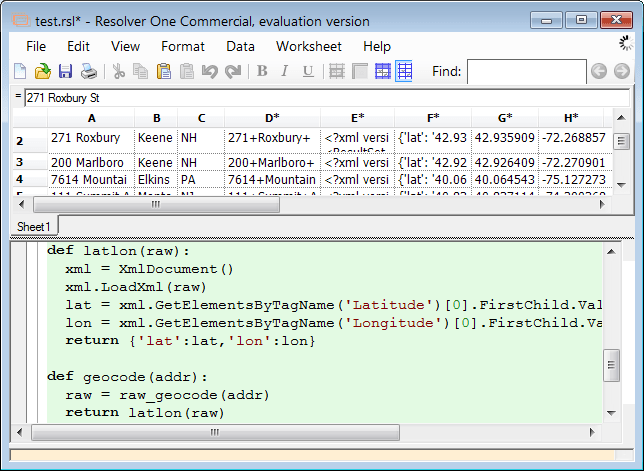
This time around, I did the pipeline as a Resolver spreadsheet like so:

The column-level formula on D combines the fields in A, B, and C into an URL-encoded string in D.

The formula on E calls a geocoding service with an URL made from the string in D and puts the XML result in E.

The formula on F parses the XML in E, creates a Python dictionary, and dumps that into F.

The formulae on G and H extract the lat and lon values out of the object in F and stick them into G and H.

I dunno, maybe it’s just me, but I think that’s cool.

Wiring the web (redux)

Information technologists often recite David Wheeler’s famous aphorism:

Any problem in computer science can be solved with another layer of indirection.

Often, though, they omit the corollary:

But that usually will create another problem.

Those problems used to plague only IT folk. But now we’re all involved. Effective social information management is quite severely constrained by the fact that regular folks are not (yet) taught the basics of computational thinking.

For example, when I explain my community calendar project to prospective contributors, they invariably assume that I’m asking them to enter their data into my database. It’s quite hard to convey: that the site isn’t a database of events, only a coordinator of event feeds; that I’m only asking them to create feeds and give me pointers to their feeds; that this arrangement empowers them to control their information and materialize it in contexts other than the one I’m creating.

I’m having some success explaining this model, but it’s slow going. People don’t take naturally to the indirection and abstraction.

Here’s another example. I know various folks who are trying to create online resource directories of one kind or another. I’ve identified a pattern, which I call collaborative list curation, that is an ideal way to solve this problem. Consider this directory of blogs for the Monadnock region. It looks like any other such directory, but it’s made differently. Again, there is no explicit database. Entries come from the del.icio.us tag delicious.com/judell/monadnockblog — a personal collection whose items are, currently, the same as those in the global collection delicious.com/tag/monadnockblog.

I’m subscribed to the global collection at feeds.delicious.com/v2/rss/tag/monadnockblog which means I can monitor it for new items, vet them, and transfer those I want to include to my personal collection. If I wanted to delegate that editorial control, I would point my directory-making service at the del.icio.us account of a trusted associate and have it camp on that account’s monadnockblog tag instead of (or in addition to) my own.

Of course this is all way too indirect for any normal person to grok, which is why nothing has been added to the global collection. Even many IT-savvy folks, I’m finding, don’t take naturally to this model.

That said, I’m finding that once I can get people to walk through one of these experiences, and see the connection — OK, I do this over here, and that happens over there, and it can also happen somewhere else, and I’m in control — the light bulb does go on.

Now we need to take forward-thinking evangelists like me out of the loop, and get people to discover for themselves how to wire the web. If Live Clipboard didn’t exist, we’d have to invent it. Oh wait. It doesn’t, and we do.

Mind, hands, and heart: John Leeke on Internet video for sharing knowledge about historic home preservation

This week’s ITConversations show suffered a tragic glitch that rendered the audio unusable, but I was able to transcribe it as text. My guest is John Leeke, a carpenter who takes care of old buildings and shares his knowledge of the tools and best practices involved in doing that. His methods of sharing have evolved over many years. He started in the early 1980s as a writer for magazines like Old House Journal and Fine Woodworking, transitioned to Internet publishing when that became possible, and more recently has become a leader in the use of Internet video to communicate knowledge that’s embodied, as he likes to say, in the mind, the hands, and the heart.

His approach to Internet video exemplifies and weaves together a number of themes that I’ve focused on in recent years, including narration of work, online apprenticeship, tacit knowledge, screencasting to document our work in the virtual world, and video to document our work in the physical world.


JU: We got introduced by way of the folks at the Open University, whom I met when I visited the UK in January 2007 to speak at the Technology, Knowledge, and Society conference. They were showing me their FlashMeeting videoconferencing system, and they cited you as an example of somebody who’s making very practical use of the medium in your work, which is historic home renovation.

JL: Right. I’d been using FlashMeeting for about a year and half then. They had singled me out because I wasn’t doing education, or developing the FlashMeeting system, like they were there at the Knowledge Media Institute, I was out in the real world doing things with it, demonstrating the horizontal movement of knowledge.

JU: That absolutely grabbed me. Ever since I got involved in Internet video, I saw there was a huge opportunity for horizontal, or direct, or peer-to-peer transfer of knowledge. In particular, of knowledge that is embodied, literally — it’s in your hands…

JL: It’s in your mind, your hands, and your heart. I’ve been sharing what I know through print media since the early 1980s. I grew up working in my father’s shop, in the 1950s, and then was out in the field working on historic buildings as a preservation carpenter for fifteen years. Then I fell into writing about my work: Homebuilding Magazine, Fine Woodworking, Old House Journal. I got pretty practiced at that by the late 1990s.

JU: You’ve published books too, right?

JL: Yes, I’ve self-published a series on caring for older buildings. Through the 1990s I knew that video would be important for my work, but I never came around to publishing anything in video. I didn’t have the time or dollars to put into it. But but 2003 and 2004, it was getting streamlined enough and easy enough to do over the Internet.

JU: As much use of online video as there is, I think we’ve barely scratched the surface when it comes to the sort of sharing of practical knowledge that you’ve been doing.

JL: It’s starting to happen. Just yesterday a colleague sent me a link to a YouTube video about how to draw and sketch the classical forms, like Ionic capitals. It was an architect showing how he sketched, and how he developed a balustrade for a fancy classical building. It showed him actually doing it. This wasn’t happening in the 1990s. You could do it, but it was a huge expensive production. Now you can do it for a couple of hundred dollars, and sometimes even less.

JU: Of course there’s still the question of why someone would do this. And in fact, the theme of the talk I gave at that conference was network-enabled apprenticeship. The idea was that throughout human history, people have learned trades and crafts by direct observation and imitation.

JL: Yeah, workers working side by side. And it’s more than observation. It’s the guiding of hands that makes that work. Internet video, even when it’s live, doesn’t get you all the way there. But it’s certainly a dramatic next level beyond print media, that’s for sure.

Expositional work online — presentation of words and pictures and even videos — it’s all presentational. Someone develops it, and as a separate event in time someone else comes and watches and learns. But when it’s live and interactive, that’s when you jump to the next level. Being there in person is best, of course, but this is a really valuable and powerful intermediate level because it opens up access to many more people than I can get together with personally, side by side.

JU: Can you give an example?

JL: In our work we’re often restoring old windows. This is the time of year when you have to take care of them. One of the details of that work is reglazing, where the glass meets the sash — the wooden frame that slides up and down. There’s a material called glazing compound, or putty, and it’s easy enough to use so that any handy person can do it, but it’s hard to get it so that it looks nice and smooth and even, if you haven’t done it before. Once you learn, it’s a cinch. And it’s easy to show someone how. I’ve taught eight-year-olds and eighty-year-olds how to run a perfect line. But you can’t do that with even a detailed series of photos.

JU: And you’ve tried…

JL: Yes, I’ve written three or four articles over the years, and each one is better, and you can learn a certain kind of thing from print and photos. You can learn what kind of putty to use, you can learn how to hold the putty knife. But until you see a putty knife in motion, and can respond in realtime — adjust the angle, a little more pressure — you can get it in thirty seconds if you’re side by side, and in a few minutes over interactive video.

JU: So you’re talking about a couple of levels here. The first is direct observation and imitation. My first revelation on that front was when I had to fix an old HP laser printer. I found a parts kit online that came with a video on a CD, and it enabled me to successfully disassemble and reassemble that printer. Later I realized there was no other way I could have done the job successfully. No written instruction would have gotten me there.

JL: Right, that’s one level and it works well when the printer you’re repairing is just like the one in the video. And when the job involves mechanical parts that lock and fit together.

But with the window putty, it’s different. You’re working with a plastic material. It’s as if you had to make those printer parts yourself. It’s basic stuff, not manufactured stuff.

JU: The motor skills are subtler, and the nonverbal communication is more critical.

JL: Right, and with the nonverbal communication as well as the visual, you really need to be able to go back and forth between the learner and the teacher. If you can do that within seconds — or if you’re standing next to someone, microseconds — that feedback between the eyes, the mind, the hand, the muscles, the tool, the material the tool is shaping — that’s how they learn so fast in person. And it can happen in seconds when you’re doing interactive video over the Internet.

JU: What’s your setup for doing these interactive training sessions over the Internet?

JL: I take my notebook computer, plug in my Sony HandyCam, and shoot whatever it is we’re teaching or discussing. It’s getting to the point where it’s all plug and play, and if I can do it, many people can.

JU: So that’s the broadcast piece of it, what’s the setup for interacting with people who are following along?

JL: That happens on a page at my website, HistoricHomeworks.com. Other people log in there to the FlashMeeting system, and if they have camera and audio at their end, I can see and hear them. Typical numbers are two or three participants, up to eight or ten. The live sessions are also catalogued for later viewing.

JU: The FlashMeeting system has some interesting features, including a method of visualizing the conversation so you can see who spoke when and for how long.

JL: That helps support the Knowledge Media Institute’s principal mission, which is to study and understand how knowledge spreads from person to person around the world. The analytical features built into FlashMeeting serve that mission.

It fascinates me. For example, you can see displayed on a map of the world the locations of viewers of these recorded sessions showing how to restore historic windows, or painting and restoring exterior woodwork. I can see where the interest is, and it turns out that people everywhere care about this stuff, because there are wooden buildings all around the world. On six of the seven continents there are people using these videos streaming from my office in Portland, Maine. At KMI they joke that they’re waiting for someone to start watching in Antarctica.

JU: It’s an interesting point because in the world of online media there’s a lot of emphasis on what’s new, but you’re operating out on the long tail. Your piece on interior storm windows was very relevant to me because I just went through the exercise of doing the stretch-and-seal method, and your demonstration of how to build reusable interior storms really got my attention.

That’s an idea a person might never encounter. But if you do, it doesn’t matter when. The publishing world calls this evergreen content, it’s valuable anytime.

JL: Right. There’s also a discussion on my website about this topic. It’s more expositional — words and pictures — and that goes hand in hand with the video. One of the limitations of the FlashMeeting system is that I can’t annotate the video, after the fact, with links to those materials.

JU: A lot of folks will look at this and say, OK, John Leeke is an unusual guy. He doesn’t just do the work, he also documents the work, and that’s great for him, but it’s not really relevant to most people who won’t have the time or inclination. For them, this process seems tangential.

But I think that’s often untrue. Here’s an example. I have a pellet stove, and there are a couple of maintenance procedures that I frankly screwed up the first time through because I didn’t absorb the understanding of how to do them from the manual. What struck me was that once I knew how to do it, I could have illustrated these procedures with a couple of five minute videos. And maybe I should just do that myself. But the thing is, if I’m the dealer, and I’m getting complaints from customers who are buying these things and then failing to understand the manual and screwing things up, it’s very much in my interest to do some of my own video documentation.

JL: Of course. And by the way, I’m not special. I’m just a carpenter up here in Maine, taking care of my own house. It just turns out that my work is also helping other people to take care of their houses. Well, yes, it’s not unique but special that I have this compulsion to share what I’m learning and figuring out. But the ability to share it — well, no matter who you are, if your neighbor sees you fixing your windows, and comes over and knocks on your door and asks about how to do it, you would show him. This is just an extension of that. Now we can have neighbors further afield.

JU: Yes. There was a time when the work people did was visible. You saw what they did.

JL: You saw what the people next to you did.

JU: That’s right. And you understood what the different kinds of work were, because you saw people doing that work. But then, in the industrial age, dad went off to work, he disappeared in the morning, and showed up again at the end of the day, and work was a black box. Who knew what dad did?

JL: That’s the industrial disconnect. And there’s a disconnect on the marketing side as well. Through the last half of the 20th century, as the industrial revolution gears up to grind itself into nothing — which is now happening — the method of marketing to more people than needed stuff was to disconnect the people from each other, so that everybody needed something, instead of sharing with their family or neighbors. Everybody needed their own lawnmower. But you figure your lawnmower is sitting idle in your garage for 99% of its time. One lawnmower could easily mow everybody’s lawn on the block.

But that’s the consumer culture that was developed by manufacturers. So very few people now know to run that glazing compound to seal the glass to the wooden frame. This is purposeful. They don’t want people to know how to run glazing because that limits the market for vinyl plastic imitation windows.

So I only have one person on the block I can teach locally, but I can connect with more people with interactive video. Because of the access to the long tail, I can be teaching lots of people who need to know that.

JU: Here’s another aspect I wanted to ask you about. When it’s hard to see how work is done, it’s hard to know what it’s like to be a person who does that kind of work. Unless it’s in the family, you won’t see it, and even then you probably won’t. You don’t have the family or community scope in which to see other kinds of work being done. And lacking that, you can get pretty far down an educational path before you realize that the path isn’t for you at all.

JL: Right. So, I’ve been focused on task-specific demonstration, but you’re talking about another thing that’s happening with video over the Internet — life blogging, or life broadcasting. I don’t think anybody’s doing that as a tradesperson. What is it like to wake up at 4:30 AM, so you can be on the site working on the windows, all day long, and then get in your pickup truck and drive back home? As you say, a lot of people could go all the way through school, and study building construction at the college level, and then take specialty courses in historic carpentry work, and by the time they’re in their early 20s they’re well-educated and have a good set of hands-on skills — and then realize that they don’t like to get up early in the morning.

JU: You’ve painted the downside, and that’s fair, people should understand that, but on the upside, the life blogging should also communicate how you feel when you drive by a house that you’ve restored, and how you know the people living there feel as a result of the work you’ve done.

JL: Absolutely. This is the heart side of the work that the industrial revolution leaves out. It boils everything down to mind and hand, and leaves out the heart. That is the heart side, when you drive by those buildings you helped restore, last month or last year or 20 years ago. It is the reason why we get up early in the morning to go to work. You know that you’re helping people who live in and use those buildings.

JU: Now there are certainly many people who will feel that these methods they get paid to practice are proprietary knowledge they wouldn’t want to reveal. My argument is that in a lot of cases, by demonstrating expertise you’ll attract more work than you lose, and that it’ll often be more interesting and rewarding work. What’s your experience?

JL: Both of those ideas do play strongly in the building trades. It’s a real tradition to keep secrets. Going back hundreds and hundreds of years, with the guild systems, there were ways to control the sharing of that kind of knowledge. And it’s still the case. Not every plasterer who can do those decorative Ionic capitals wants everybody to know exactly how they do it. But they do want everybody to know that it can be done.

You’re right, this is how artisans can do good marketing — by letting people know what is involved, by showing some of these methods, and they don’t have to give up all their secrets in order to do that. But you can help people to understand that it’s not just a machine spitting out product, it’s people making stuff with their minds and their hands and their hearts.

That’s another part of how I use Internet video. I go to some of my colleagues’ shops, as well as my own, and show what this is all about, because it is not well understood by the public. Video can get to the nuances of the heart side of this work.

JU: Also, if you can show me how to take care of some basic things for myself, maybe I can turn around and hire you to do something really special.

JL: Yeah. I’m hoping that we’re now in a post-modern cultural movement, which is what I think you’re talking about. Back in the 1970s I was already working in this realm of making fine things by hand, and there was a groundswell of interest. That’s when Alex Haley’s Roots phenomenon happened. It was important because it touched the hearts of people in America. That’s really what our restoration work is about, it’s the connnection with the people who once lived in these buildings. It wasn’t the national trust and the President telling us to save buildings, it was people who wanted to save them because their grandfathers built them.

JU: So where do you fall along the continuum of trade secrets and knowledge sharing?

JL: I’m at the extreme end of sharing everything I know. I’m a one-person microbusiness and always have been. I grew up in the midwest where sharing what you knew, and helping people, was what life was about, for everybody. That was the culture. It was a natural for me. It didn’t seem like it was worth keeping secrets.

My dad said that if you want to do well in trades, you have to let people know what you do. This is what it’s been all about for me — letting enough people know.

JU: And you have found incredible marketing power in doing what you do?

JL: Oh yeah. As I was working as a tradesperson in the 70s, and a contractor in the 80s, I made a shift because I’d been doing a good job of documenting my work. That’s something else I learned from my father. I also had the documents he created for his work, going back to the 20s, this huge information resource that I had to share.

JU: Really? What did he document?

JL: He documented his work in the arts and trades. He was a commercial artist through the 20s, then shifted into furniture and buildings at the craftsman/artisan level.

JU: And he left behind detailed logs of his practice?

JL: Yeah, detailed files of every project he ever worked on. So I learned that as part of my carpentry and woodworking, growing up in his shop, and continued it when I left his shop and came east to work on old buildings. So by the early 1980s I had this whole backlog of my own work to share. And by sharing it, I created extraordinary interest in my work. Back then it was through the print media — Fine Woodworking, Old House Journal, Fine Homebuilding — and a lot of people learned about the work I was doing to restore columns on old porches, saving windows, doing woodwork repairs. When I learned something I thought was worth sharing, I’d write an article about it. The editors loved it, and their readers did too, it was the authentic stuff, what was really going on out there in the field.

With that body of knowledge, by the late 1980s I was consulting on projects, helping people solve problems with their buildings. That meant I could be on even more projects, helping more people, and if I was writing about what I was learning, then each project was an order of magnitude larger. If I’m doing hands-on work on buildings I might only be helping a few people. If I’m consulting, it might be tens of people. If I’m writing, we figured ten or fifteen thousand people were using my articles. Each is a jump in magnitude. Then of course the Internet, where I got an early start in 1994 and 95.

JU: I’m sure a lot of folks will look at your example and feel that, since they’ll never become featured writers for magazines, there’s no point in doing this kind of sharing in a more modest way. But I think there’s benefit at any level of engagement. You’ve clearly thought through the dynamics of the communication pattern here: one-to-many, multi-level distribution. But for a lot of people, even with electronic media, that isn’t obvious. They’ll still spend a lot of time doing one-to-one communication. They’ll write something up, they’ll even take some pictures, but then they’ll just email that to somebody else.

JL: Two birds with one stone. I realized that if I wanted to accomplish the things I want to get done in my life, I have to get more than one result for every action or activity. The print — and now online — publications that I do are my marketing program, so I don’t have to spend money on advertising. And now you call, and want to talk with me, and if I was only getting one benefit from that, I wouldn’t be able to say yes. But I can already see two or three things that’ll come from talking to you, so I can say yes.

Say I’m thinking of taking on a project to help my neighbor rebuild her front steps. OK, I can earn some money. And I can take a series of photos for a print article, and that’ll bring some more income but it’ll also help with my personal goal of sharing more, and then I can easily shoot a little video that I can broadcast on the Internet and that will help an astonishing number of people. So I can’t say no, because I’m getting multiple benefits. But I would have to say no if the only benefit was getting paid to fix the steps.

JU: You’ve really thought it through.

JL: The key is that the video camera and the computer and the Internet are just tools, no different from my table saw and push stick, or my old wooden hand plane. They’re all just tools, and they’re all in the same kit for me, and I’m a tool user, and I help people with their old buildings.

How can people do this? I’ve found a balance. Instead of watching television, I make television.

JU: Well said. Thanks John!
IronPython/Azure status report

As I mentioned here, I’m exploring the viability of Python as a way of programming the newly-announced Microsoft cloud platform, Azure. Partly that’s because I love Python, but mainly it’s because I believe that the culture surrounding Python and other open source dynamic languages can fruitfully cross-pollinate with the culture that infuses Microsoft’s platforms.

One of the reasons these cultures face each other across a great divide is religious attachment to low-level operating systems. In the cloud, though, the differences among these low-level systems are increasingly hidden behind interfaces to higher-order constructs: compute nodes, storage objects. These, in turn, are building blocks for still-higher-order services that will be created — and consumed — both by platform vendors and by the developers who are their customers.

It becomes possible, in this new world, for platforms to support a continuum of access styles. You want object-oriented? Do it that way. RESTful? Go for it. You know the Python or Ruby libraries best? Use them. The .NET Framework? Use that. Or even mix and match according to convenience and taste.

Consider this Python module written by Sriram Krishnan, which wraps the RESTful interface to Azure blobs. It’s written in standard Python, using OpenSSL-based cryptography. When I tried it on my machine, though, I ran into an inconsistency in my local Python installation.

Normally a Python developer would debug and fix the installation. But I was planning to deploy this module in IronPython on Azure, and IronPython doesn’t run compiled modules such as OpenSSL. It can, of course, use equivalent .NET functionality — in this case, the method implementing the SHA-256 flavor of keyed-Hash Message Authentication Code. So I made that small change.

At this point, having eliminated my module’s only dependency on unmanaged code, I thought I could run it in the Azure development fabric, and then deploy it to the Azure cloud. But no. Azure’s security model currently won’t allow Python even to import pure-Python modules at runtime. A wacky solution might be to use Python’s custom import mechanism to load those modules over the network. More practically, the modules might be provisioned into Azure.

I don’t know how this will play out. Meanwhile, there’s another option: Eliminate all use of Python modules, and rely only on the .NET Framework. So as an experiment, I switched over from Python’s minidom, httplib, time, and base64 modules to their .NET equivalents.

The good news is that this works. I can deploy the module to Azure, and use it in the cloud. The bad news is that, in some cases, I’d rather use the standard Python modules. The .NET equivalent to Python’s httplib, for example, is the HttpWebRequest/HttpWebResponse pair. But these APIs differ from those provided by httplib in a couple of ways that annoy me.

First, there’s an inconsistency in the way headers are handled. You get and set most headers using the Headers collection. But you get and set a few special ones, like Content-Type and Content-Length, using special named properties.

Second, status codes are handled inconsistently. Most responses return status codes. But for codes in the 4xx series, an exception is thrown.

To me these behaviors are quirks that make it trickier to create RESTful interfaces. I’m sure there are reasons for them, and people who prefer them for those reasons, but I’d rather just use httplib. In any case, if both styles are available, there’s no need to argue. Everybody gets what they need.

We’re not there yet in the current Azure preview. Those of us chomping at the bit to run IronPython in the cloud will have to be inventive. I expect things will get easier as both Azure and IronPython mature, and as Python technologies like Django and NWSGI are — I hope — woven into the fabric.

Why might this matter? Again, I’m looking for cross-pollination. Python culture will be able to make really productive use of higher-order Azure services such as identity, access control, workflow, Live Services. And it will also exert a positive influence on the future evolution of the Azure platform.

Carl Hewitt on cloud computing, scalable semantics, and Wikipedia

It was my great privilege to interview Carl Hewitt for this week’s Innovators show. He is principally known for work dating back to the late 1960s and early 1970s, when he helped lay the foundations for a declarative, message-oriented model of computation. Then, and for decades thereafter, the virtues of that model were not widely appreciated because the problems it solves were not evident. Now, in an era of multi-core systems, cloud-based computation, and global interconnectivity, it makes all kinds of sense.

In this conversation, we review the themes Carl sounded in this recent talk at Stanford. (Video is here, and an audio-only version I made for myself is here.)

In one of the most striking moments in that talk, Carl says:

What can I change? Just me. For anything else, I send a message, I say please, and I hope for the best.

Then he laughs and adds:

Does this sound like some circumstances you are familiar with?

Having thought deeply, for 40 years, about the intersection of computation and human affairs, he has arrived at an elegant synthesis: The same organizational and communication patterns govern both realms. As well they should, since the two are now and forever intertwingled.

At the end of our conversation, we turn to Carl’s critique of Wikipedia. He raises important questions about how Wikipedia’s cadre of mostly-anonymous administrators, dedicated to the codification of conventional knowledge, come into conflict with academics and researchers whose work pushes the boundaries and conflates the categories of conventional knowledge.

Visual numeracy for collective survival

In response to an item last week about regional sources of imported oil, @jesperfj wrote:

Not sure what to conclude? Do informed people like Udell really not know that?

I really didn’t. And the reaction to the item, plus my survey of friends and associates, tells me that while some informed people did, many did not.

From this, I know exactly what to conclude. Like all complex systems, our civilization is buggy. We need many eyes to make the bugs shallow, and there all kinds of things that the brains behind those eyes can’t know a priori. But with the right kinds of mental prosthetics, we can learn rapidly and bootstrap ourselves into a position to reason effectively.

Data visualization is a crucially important mental prosthetic. But we’ve yet to evolve it much beyond the graphical equivalent of the wooden leg.

Consider this chart:

It’s a somewhat useful way to visualize the fact — counter-intuitive for many — that the Middle East ranks only third among suppliers of oil to the U.S. But here is a much more useful way to visualize the fact — intuitive for everyone — that the Middle East is where most of the world’s oil reserves exist:

What do you call this kind of projection, where country size is proportional to a variable? It’s the sort of wickedly effective graphical device that we should all want to be able to deploy, at a moment’s notice and with minimal effort, in order to make sense of data and reason about the world.

Like Tim Bray, I’m angry about “the financial professionals who paid themselves millions for driving the economy into a brick wall at high speed, then walked away while we pick up the pieces.” But I’m also angry at myself for visualizing, way too late, along with the rest of us, the magnitude of the giant pool of money and its constituent flows.

We could have seen more, seen better, and seen sooner. In many domains, as we go forward, we will have to.

Twine, del.icio.us, and event-driven service integration

Last week on Interviews with Innovators I spoke with Nova Spivack about Twine, a service that’s been variously described as the first mainstream semantic web application and “just del.icio.us 2.0”. You’ll find support for both points of view in my conversation with Nova. It’s true that, unlike del.icio.us and other comparable services, Twine is built squarely on top of what Nova calls a “semantic web stack.” But it’s hard to discern, in Twine’s current incarnation, just what that entails.

One of the bookmarks I imported into Twine, for example, is http://www.educause.edu/HEBCA/623. It’s the home page for an organization called the Higher Education Bridge Certification Authority (HEBCA). In Twine, the item shows up tagged as an Organization. That’s the kind of thing that you’d expect a semantically-aware service to do. But what does it mean for Twine to classify HEBCA as an Organization? It’s unclear. Here’s the offered link. It points to a small collection of items that mention HEBCA, but Twine does not “know” anything at all about HEBCA.

What our conversation revealed, though, is that my method of testing Twine — which involved importing all my del.icio.us bookmarks — was flawed. I had assumed, incorrectly, that Twine would absorb the bookmarked pages themselves. It will, but it doesn’t yet, currently it only aborbs the del.icio.us metadata such as title and link. If you want to find out what Twine’s linguistic and semantic analysis can do, you need to pump content into the system.

That’s easier said than done. The only API available for content injection is email. Twine materializes a private email address to which you can send items you want to post as private notes.

I spent a few minutes thinking about writing a script to automate the injection of items I bookmark on del.icio.us. It’s doable, of course, but only by dint of hackery that I would undertake grudgingly and normal folks would never imagine or attempt.

This kind of integration will get a whole lot easier for everyone when the various services export events representing our actions within them. For example, a couple of weeks ago I reorganized my del.icio.us tagspace, adding the tag socialinformationmanagement to a group of otherwise-tagged items in order to emphasize that particular facet. And I tweeted:

Imagining new kind of FriendFeed event: “Jon Udell updated 9 del.icio.us bookmarks, adding the tag socialinformationmanagement”

In other words, when I perform a public action in some service — like bookmarking an item in del.icio.us, or even just retagging an existing item — the service posts an event on a topic to which other interested services subscribe. In this case, FriendFeed is the interested service. When I configure FriendFeed to monitor my del.icio.us account, it asks del.icio.us for the list of event types that it exports, and I choose which of those to display in FriendFeed.

Of course FriendFeed needn’t be only an event subscriber. It can and should be a publisher too. Another service should be able to ask FriendFeed for the list of event types it aggregates for me — bookmarking an item on del.icio.us, posting a photo on Flickr, adding a book to my LibraryThing library — and then subscribe to all or just some of those events.

(While we’re at it, I want a service that can not only subscribe to my aggregated event feed, but also take actions. One of the actions I’d configure would be: When Jon bookmarks a new item on del.icio.us, fetch the item and inject it into Twine using the specified secret email address.)

Of course there’s nothing new here with respect to basic change notification. Weblogs.com has been doing that in the blog realm for many years. Now it’s time to generalize the mechanism across the range of services that manage various aspects of our online lives.

Where the oil comes from: Not from where I thought

At a party the other night, a friend mentioned that the country supplying us with the most oil is Canada. Maybe so, I said, but on a regional basis the Middle East dominates, right? He wasn’t sure, but didn’t think so. And it turns out he was right, at least according to the US Dept. of Energy data he sent me. That data says that the Middle East ranks third among our regional sources, behind North America and Africa.

Here’s the world overview for 2007 in thousands of barrels:

And here’s the regional breakdown:

North America 1,648,765 33.56%
Africa 980,231 19.95%
Middle East 837,841 17.05%
South America 784,999 15.98%
Europe 567,152 11.54%
Asia 91,236 1.86%
Oceania 2,774 0.06%

The links go to regional views where you can hover to reveal per-country numbers.

When I do these kinds of exercises, I’m always struck by two things. First, it amazes me how much of what we think we know is wrong. I was sure that the Middle East was the dominant regional source.

Second, I’m always a bit discouraged by how geeky you still have to be — even with the great online tools we have now — in order to pull answers to simple questions out of raw data. When my friend cited these numbers, the first thing I wanted to know was: How do they break down by region?

I wound up using Dabble DB because I happened to know that it includes all the necessary ingredients:

  • Can import tabular data from web pages
  • Can drop and rename columns in an imported table
  • Given a column with locations — countries, states, zipcodes — can map the corresponding columns
  • Can publish views for anybody to see

This was a huge leg up! But a lot of folks wouldn’t know about that tool. And even if they did, many wouldn’t overcome some of the remaining obstacles. For example:

  • Importing. There are a few different ways to grab data from a web page. You can have Dabble DB parse the page, or you can copy/paste. In this case, I wound up trying both and had better luck with the latter. But we’re still very much in an era when data published to the web is not really intended to be used as data. That first step can be a doozy.
  • Sharing. After pasting in the data and reducing the table to two columns — country names and 2007 1000s of barrels — I had my answer. And if you were an authorized user of the application, I could have shared it with you. But in order to publish to the world, I had to produce a special URL. And then I realized a single one wouldn’t suffice. The shareable views aren’t interactive. You can’t drill down from the world overview to the Middle East segment. So I wound up having to create views for each region, generate an URL for each view, and keeping track of all that was confusing even for me.

Still, I’m excited. We’re really close to the point where non-specialists will be able to find data online, ask questions of it, produce answers that bear on public policy issues, and share those answers online for review and discussion. A few more turns of the crank, and we’ll be there. And not a moment too soon.

Hello World

In July 1995 I wrote a column in BYTE with the same title as this blog post. It began:

One day this spring, an HTTP request popped out the back of my old Swan 386/25, rattled through our LAN, jumped across an X.25 link to BIX, negotiated its way through three major carriers and a dozen hosts, and made a final hop over a PPP link to its rendezvous with BYTE’s newborn Web server, an Alpha AXP 150 located just 2 feet from the Swan.

Thus began the project on which this column will report monthly. Its mission: To engage BYTE in direct electronic communication with the world, retool our content for digital deployment, and showcase emerging products, technologies, and ideas vital to these tasks. We don’t have all the answers yet — far from it. But we’re starting to learn how a company can provide and use Internet services in a safe, effective, maintainable, and profitable way.

Today I felt that same kind of excitement when I clicked on this URL:

http://elmcity.cloudapp.net

There isn’t much to see. But what happens behind the scenes is quite interesting to me. The URL hits a deployment in the Azure cloud where I’m hosting an IronPython runtime. Then it invokes that runtime on a file that contains this little Python program:

hello = "Hello world"

Finally, it gets back an object representing the result of that program, extracts the value of the hello variable, and pops it into the textbox.

This is the proof of concept I’ve been looking for. Now I can begin an experiment I’ve been wanting to do for a long time. I have an ongoing personal project, elmcity.info, about which I’ve written from time to time. It’s hosted at http://bluehost.com, it’s written in Python using Django, and it’s invoked by way of FastCGI.

Back in the BYTE era, I loved learning about the web by building out a live project, and explaining what I learned step by step. Now I want to explore, and document, what it’s like to build out another live project in the Azure cloud.

Could I do it in Amazon’s cloud? Sure. In fact I already did, as an experiment. And if it were cheaper to run there than on Bluehost, I’d currently be hosting elmcity.info on EC2 instead.

Could I do it in Google’s cloud? Not sure. I didn’t score an account there and can’t yet try. The interactive pieces of my application should slide nicely into AppEngine’s Django framework. But much of the work is done in long-running processes which I believe AppEngine doesn’t yet support.

In any case, it’s obvious why I’ll be focusing on Azure. I suspect, though, that my focus will be different than most. I’m not a hotshot .NET developer, just an average guy who can get some useful things done in environments that enable me to create small, simple, understandable programs, and do so in agile and dynamic ways. I think that Azure — admittedly nascent in its current form, as Ray Ozzie said at the PDC — can be such an environment. Let’s find out.

When the lights go on at the New York Times, our work can start

On election night, the most useful information display I found was the New York Times’ interactive election map. It’s another bravura performance from a team of talented designers and programmers who keep raising the bar. Back in May, two of them — Gabriel Dance and Shan Carter — joined me for a conversation about how they do this work, and why it matters.

Last week, the venture capitalist Tim Oren wrote an essay entitled The Newspaper Crash of 2009… And How You Can Help in which he argues:

The industry has abdicated its social function to support a well-informed electorate, and become a propaganda arm of the left. In so doing, they have sullied their brands and lost the trust of their readers. The economic consequences of this default of their value proposition are now becoming apparent. The Internet and an economic crisis together would be bad enough, but the industry has only itself to blame for the egregious behavior on display for the last few years, and at its worst right now.

And concludes:

When the lights go out at the New York Times, our work will be finished.

The newspaper industry has surely earned this kind of scathing criticism. And it may well fail to capitalize on the amazing opportunities for self-reinvention afforded by the Internet. But the Times is attracting an all-star team of information architects, interactive graphics designers, programmers, and media producers. And according to Gabriel Dance and Shan Carter, these folks are increasingly collaborating with reporters to marshall complex information in ways that make the newspaper’s stories deeper and more open to independent analysis and interpretation.

So I’ll say it differently: When the lights go on at the New York Times, our work can start.

My upcoming World Usability Day talk

Next Thursday is World Usability Day, a distributed event that will happen in lots of places. One of them is Putney, Vermont, not far from my home, where I’ll be speaking at the New England venue, Landmark College.

The program says:

A description of Jon’s talk is forthcoming, but we’ve asked him to help the audience further their thinking about the potential of video on the web in support of teaching and learning, as well as the the importance of the structure behind the information with which we all work, exemplified by his work on compiling disparate web resources, as in his work on Keene-related events culled from the internet and viewable at elmcity.info/events.

Great suggestions! Video and structured data are very different domains. That creates a nice opportunity to talk about key underlying principles, and relate them to the practices of teaching and learning. So, here’s the blurb.

Title: Teaching users to be more usable teachers

Description:
Technologists and designers, including those who self-identify as usability professionals, think of themselves as creators of products and services for “the user” or “the consumer”. But as Eric von Hippel argues in Democratizing Innovation, producers and consumers are not, and never have been, distinct groups. At various times and in various contexts, we are all producers and consumers, teachers and learners, co-creators of products, services, experience, and knowledge.

We learn by imitating how good teachers think and act. Conversely, good teachers think and act in ways that inspire and reward imitation. In the era of peer production on peer networks, we can all be better teachers — more usable teachers — by thinking and behaving in ways that others can imitate easily and effectively. From this perspective, online video and structured data aren’t just new ways to distribute entertainment and information. They’re new environments for teaching and learning. Engineers and designers aren’t solely responsible for make these environments usable. We, the inhabitants, must make ourselves usable too.

This is going to be fun!

For Granicus, transparent democracy is just business as usual

This week’s Interviews with Innovators explores the Granicus solution for civic webcasting with CEO Tom Spengler. If you’re lucky enough to live in a city that is a Granicus client you’re already familiar with how it works. If not, take a look at the Newport Beach, CA site. It’s a beautiful thing. You can see the video and minutes in a synchronized view, jump to the agenda items you care about, and view associated staff reports in context.

For citizens the benefit is clear. If you have access to these proceedings on cable TV — even random access with a DVR — it’s still a challenge to pinpoint a segment you care about. What’s more, there’s no way to form a URL that refers to that segment so you can share it, and so that online discussion about the segment can aggregate around that URL. Granicus gets it right. Agenda items define the natural set of RESTful resources for these meetings, and this system enables people to cite, bookmark, and link to those resources.

Behind the scenes the system enables the town clerk to annotate a copy of the minutes with timecodes, so that the data required for segmentation and synchronization is captured in realtime and available immediately upon conclusion of the meeting. That’s exactly the kind of pragmatic approach that will help make transparent democracy as ordinary and routine as it ought to be.

URI, XML, HTTP, REST, and the Azure Services Platform

When friends and family ask about the Professional Developers Conference I attended this week, I tell them it’s kind of like Microsoft’s State of the Union address. I’ve been to a number of these over the years. This was my first as an employee, and Microsoft’s first as a company fully committed to what I believe are the right principles, patterns, and practices. That’s a big statement, and as always you should consider the source and take it for what it’s worth. But if you’ve followed my work over the years, you’ll spot many familiar themes in the following exegesis of the day two keynote by Don Box and Chris Anderson, and you’ll know why this PDC put a huge smile on my face.

In case you’re unfamiliar with the theatrical genre I call PDC performance art, I should briefly explain. Traditionally, at this show attended by thousands of software developers, a few of Microsoft’s technical leaders come to the stage, write small programs on the fly, and run them. These daring high-wire acts are humorous and entertaining, but also deeply informative. The live code exercises new platform technologies, and tells stories about why and how the audience might want to apply those technologies.

The story that Don and Chris told began with a simple web service, running on a demo machine, that printed out a list of processes — effectively, a Unix ps (process status) command. It was built using several key components and features of the .NET Framework: LINQ (Language Integrated Query) to query for and enumerate the list, WCF (Windows Communication Foundation) to package the query as an HTTP-accessible service, UriTemplate to control the namespace of that service, SyndicationFeed to format the response as an Atom feed, and ServiceHost to run the service on the local machine.

When it ran, this program enabled a browser running on the local machine to surf to a service running on the local machine and view its process list as an Atom feed. This colocation of web client and web service on the local machine is a key pattern that I first explored a decade ago. Dave Winer named the pattern Fractional Horsepower HTTP Server and put it to excellent use in his pioneering blog tool Radio UserLand. The pattern embodies a key underlying principle: symmetry. We have long been conditioned to think of the Internet in terms of clients versus servers (and now services), but that’s an artificial distinction. In the terminology of TCP/IP networking, there are no servers and clients, there are only hosts — that is, peer nodes communicating directly with one another. Firewalls and NATs abolished that symmetry. The newly-announced Azure Services Platform is a technology that can help us restore it.

The next step was to extend the program, adding the ability to kill any of the running processes. The Atom feed was already modeling the process list as a set of URI-addressable resources. To implement the feature in a simple, standard, and discoverable way, it was only necessary to apply the HTTP DELETE verb to those resources. Internally, the program of course had to implement a DeleteProcess method. But that method name need not, and according to RESTful best practices should not, appear in the service’s API. And happily, the service did not — as do so many purportedly RESTful services — expose any URIs that look like this:

http://localhost/service?method=delete&process=123

Instead it only exposed URIs that look like this:

http://localhost/service/Process?id=123

An HTTP GET method, invoked on this URI, could return information about the process. An HTTP DELETE method invoked on the same URI accomplishes the kill function, and does so without violating the RESTful principle of interface uniformity. Later on we’ll see a nice example of the benefits of that uniformity. But here, let’s notice another key principle at work. I’ve said that the kill operation was discoverable. That’s true thanks to the Atom Publishing Protocol. It defines a hyperlink within each entry that is the RESTful endpoint for update and delete requests targeted at that entry. So the program’s DeleteProcess method queried the Atom feed for those hyperlinks, and used their addresses to create the URI namespace that exposed process deletion to clients.

The general principal at work here is linking. A core tenet of RESTful style is that link-rich hypermedia documents, useful to people because they make it possible to navigate and discover related things, are equally useful to programs for the same reason.

These are, of course, best practices for an ecosystem sustained by web standards like URI, HTTP, and XML. But it was wonderful to see those best practices clearly demonstrated in a PDC keynote. It has not always been so. Trust me, I would have noticed.

On the next turn of the crank, the standalone process viewer and killer was network-enabled thanks to Azure technology that I first told you about a year ago, back when it was known as the Internet Service Bus. Using it, Don and Chris created this endpoint in the cloud:

http://servicebus.windows.net/services/DonAndChrisPDC

You can go ahead and click that URL if you like, it’s still live. What you’ll fetch is an empty Atom feed. During the keynote, though, Don and Chris wired that endpoint to the program running on the demo machine onstage. This was accomplished in a purely declarative way, by adding a binding to the program’s configuration file that pointed to the chunk of web namespace whose root is servicebus.windows.net/services/DonAndChrisPDC.

This wasn’t yet a cloud-based service, that came later. At this stage it was still a local service that was advertised in the cloud and made available to the public Internet. To accomplish that, Azure has to enable clients out on the Net to traverse intervening firewalls and NATs and contact the local service. It does so in a way that illustrates another key principle: policy-driven intermediation.

The need for such intermediation was soon apparent when the local service was relaunched with its Azure binding. Now anyone in the world could visit the above URL in a browser, view processes, and even try to delete one. Within seconds, someone did try, and Don shouted: “Stop the service, Chris!” There was no real risk — the program was running in debug mode, with a breakpoint set on DeleteProcess — but it was a great theatrical moment.

Now in fact, the service was secure by default. In order to expose it to the Net in an unauthenticated way, there was a configuration setting that overrode the default security. After removing that, an interactive (i.e., browser-based) request produced a login page. Crucially, that login page did not come from the local service, but rather from Azure which was handling security, as well as connectivity, for the service. The policy in effect was username/password, so after typing in appropriate credentials, interactive access was restored, but now in a controlled way. A different policy — for example, one requiring X.509 certificates or SAML tokens — could be defined in, and enforced by, the Azure fabric.

Next, the local client program that had been accessing the service — first directly, then by way of the Azure cloud — was adapted for the same kind of secure access. To do that, it requested an authentication token from Azure’s access control system, and then inserted that token into the HTTP headers of subsequent requests to the service.

So that was act one. Here was Don’s segue into act two: “Chris, are there other services in the world we might want to program in a similar fashion?”

Why yes, Chris said, and launched Live Desktop. There, courtesy of Live Mesh, were some folders that were synchronized cloud replicas of folders on the local demo machine. Since Live Mesh is also based on Atom feeds, it should be easy to convert a RESTful service that enumerates and deletes OS processes into a RESTful service that enumerates and deletes Live Mesh folders.

It was easy. In the client program, the base URI changed from servicebus.windows.net to user-ctp.windows.net/V0.1/Mesh/MeshObjects. And the authentication token had to change too because, well, to be honest, Azure’s subsystems aren’t yet seamlessly integrated. But that was it. The same LINQ query to find entries in a feed worked exactly as before. Only now it listed folders in the cloud rather than processes on the local machine. That’s the beauty of a uniform HTTP interface in the RESTful style.

Note that the Live Mesh API works symmetrically with respect to the cloud and the local client. The same program that lists folders in the cloud can list folders on your local machine. You just point the URIs at localhost, and use the Fractional Horsepower HTTP Server that’s part of the locally-installed Live Mesh software.

Note also that you don’t have to use any Microsoft technologies to work with these Azure services. The demo program used LINQ, WCF, and — for the Live Mesh stuff — a wrapper library that packages the API for use by .NET software. But any technology for shredding XML and communicating over HTTP will work just fine.

In act three, the focus shifted to Azure’s storage service. Using all the same patterns and principles, the program morphed into one that could upload DLL files into Azure’s blob store, use Azure tables to associate human-readable metadata with the DLLs, and issue a simple relational query against the set of uploaded files.

Finally, in act four, the service that had been running locally, on the demo machine, was adapted — with some minor changes — to work with the local development version of the Azure compute cloud, and then deployed to the staging and production areas of the real cloud.

To sum up, the emerging Microsoft platform not only spans a continuum of programmable devices and services, it also spans a continuum of access styles that are all based on core standards including URI, XML, and HTTP. I think this is a great story, and I’m exceedingly happy to finally be able to tell it.

Kim Cameron’s excellent adventure

I hope James Governor, Mary Branscombe, and Kim Cameron will triangulate on this, but here’s my report on a cosmically funny incident at a party last night. I walked up to James just as he witnessed Kim being forcibly denied access to the venue. He lacked the necessary identity token — a plastic wristband — and couldn’t talk his way in.

If you don’t know who Kim is, what’s cosmically funny here is that he’s the architect for Microsoft’s identity system and one of the planet’s leading authorities on identity tokens and access control.

We stood around for a while, laughing and wondering if Kim would reappear or just call it a night. Then he emerged from the elevator, wearing a wristband which — wait for it — belonged to John Fontana.

Kim hacked his way into the party with a forged credential! You can’t make this stuff up!

PyAWS, Fermat’s Last Theorem, and search diversity

I use the Amazon API to check wishlists programmatically, and back in March I mentioned that it was being upgraded in a way that would break the Python wrapper I’d been using for years. Readers pointed me to a new wrapper called PyAWS, but I found that it didn’t offer the one thing I needed: A simple way to retrieve all the ISBNs on a wishlist.

I solved the problem for myself with a few lines of code, but neglected to include them. Today, that March entry received a hilarious comment:

I came here searching for a way to retrieve my Amazon wishlist using PyAWS… You’re the top query (out of a grand total of 5!) for pyaws wishlist amazon.

However, reading the blog article above, I had flashbacks of Fermat’s Last Theorem:

“After poring over this mysterious PyAWS, I found a wonderfully simple way of retrieving a wishlist like with PyAmazon. However the margin of this blog post is too narrow to contain the few lines of Python code required.”

:-)

Could you please post the said few lines of codes to retrieve a wishlist with PyAWS? Would be much appreciated. I’d rather not have to pore over the whole Amazon API documentation to learn how to retrieve a simple wishlist or two with PyAWS.

Sorry about that! Here’s what I’m currently doing. It’s not PyAWS, just a regex hack of the raw XML output from REST queries.

import urllib2,re

def getAmazonWishlist(aws_access_id,wishlist_id):
  url = 'http://webservices.amazon.com/onca/xml?Service=\
    AWSECommerceService&AWSAccessKeyId=%s&ListId=%s\
    &ListType=WishList&Operation=ListLookup' %\ 
    (aws_access_id, wishlist_id)
  s = urllib2.urlopen(url).read()
  pages = re.findall('<TotalPages>(.+?)</TotalPages>',s)[0]
  for page in range(int(pages)): 
    url = 'http://webservices.amazon.com/onca/xml?Service=\
      AWSECommerceService&AWSAccessKeyId=%s&ListId=%s\
      &ProductPage=%s&ListType=WishList&Operation=ListLookup\
      &ResponseGroup=ListFull' %\ 
      (aws_access_id, wishlist_id, page+1)
    s += urllib2.urlopen(url).read()
  return re.findall('<ASIN>(.+?)</ASIN>.+?<Title>(.+?)<',s)

(Ironically the margin of this blog post is too narrow for the few lines of Python code required, so I’ve split those lines where indicated.)

By the way, DoubleSearch reveals that although Google currently finds only 5 results for pyaws wishlist amazon, Live Search finds 9. More importantly, if the blog entries from Rich Burridge and me are indeed the most relevant results, Live Search puts them first.

That’s not always true, of course. Often Google does better. But not always. In any case, even when the first pages of results from both engines are equally relevant, they’ll likely differ in ways that DoubleSearch invites you notice.

If you’re inclined to dismiss what I’m about to say because I’m employed as a Microsoft evangelist, then fair enough, move along, there’s nothing to see here. But if you’ve followed me over the years and continue to trust my instincts, then hear me out on this. I’ve always believed in, and acted on, the principle of diversity. If you think the same way, then you use more than one operating system, more than one programming language, more than one application in many categories.

So why would you use only one search engine?

If you haven’t tried Live Search in a while, you’ll find that it’s improved quite a bit. I’m not saying it’s better than Google, but I am saying it’s usefully different. Given the central importance of search, I argue that it’s in everyone’s interest to exploit that diversity.

Now arguably most people don’t care about diversity. There’s a strong impulse to find one way to do something, and then stick with it. People don’t readily adopt new behavior. To help them along, you need to minimize disruption.

To that end, I’ve been asking some friends and associates to give DoubleSearch a try. Specifically, I’m asking them to make it their browser’s default search provider, then let me know how long they keep it and, if they drop it, why.

I know there are logistical issues with DoubleSearch. In particular, given the side-by-side-in-frames presentation, it’s awkward to click through on a search result. You’d rather right-click and open in a new tab. Some people already have that habit, others don’t, their experiences will differ accordingly.

I’m sure there are deeper cognitive issues as well. For example, I find it useful to compare the two result pages side-by-side, but others — maybe many others — will just find that distracting.

Anyway, if you do try this experiment for yourself, feel free to comment here on how it goes.

Pumpkins with Oomph

Five years ago I was exploring the idea of embedding active chunks of structured data into web pages. Back then I used the phrase interactive microcontent. Nowadays, we say microformats. If you’re a reader of this blog you’re probably technically-oriented, and you already know about microformats. But most people aren’t, and they don’t. The challenge has always been to provide an end-to-end experience that will enable non-technical folks to create and use these nuggets of semantic web goodness.

Here’s a project that can help: Oomph. It’s the first lab component of the relaunched MIX Online site, which is run by Microsoft evangelists who, like me, care about web standards and web innovation.

To demonstrate Oomph, I’ve injected a microformatted event here:

What: Keene Pumpkin Festival
When: Saturday, October 25, 2008 (all day)
Where: Downtown

Keene, New Hampshire

I created this event using Live Writer — a WYSIWYG blog editor — and its Event Plug-in. In this case, no data entry was required because the plug-in enabled me to search Eventful and capture the existing Pumpkin Festival record found there. That’s just the sort of grease we’ll need in order to overcome data friction.

Still, for most folks there’s no obvious reason to publish a microformatted event. The information looks nice, but it’s not clear what you or anyone else can do with it.

One aspect of the Oomph toolkit is an Internet Explorer extension that makes that embedded event come alive. Here’s what this page looks like in IE with the Oomph extension:

The arrow points to an indicator that “gleams” when a page contains microformatted elements.

Clicking on the indicator opens a panel that activates them. In this case, the event is enhanced with icons for a variety of calendar import methods.

When an item has a location, you can map it:

If Oomph were only an IE-specific extension, I’d wouldn’t be writing about it. But in fact, it’s a cross-browser solution based on jQuery. I can’t demonstrate that here because WordPress.com blocks JavaScript, but consider these two pages:

1. Oomph: with explicit JavaScript. This page explicitly calls the Oomph JavaScript code, and works cross-browser. Try it!

2. Oomph: without explicit JavaScript: This page (like the blog entry you’re reading) does not uses the Oomph JavaScript code. The enhanced behavior is still available in IE, by way of the Oomph extension. It could also be available in Firefox, Safari, or Chrome if similarly extended.

It’s really helpful to have the option to go both ways: Server-side where it’s permitted, client-side where it isn’t.

There’s more to Oomph: CSS styles for microformats, and a Live Writer plug-in for inserting hCard (contact) elements into blog postings. You can get the toolkit and documentation on CodePlex. Nice work guys!

Why and how to blurb your social bookmarks

From a 2004 entry entitled Information Routing:

To further my own self-interest in keeping track of things, I’ve made a minor extension to the del.icio.us bookmarklet, so that selected text on the target page is used for the (optional) extended description of the routed item. This makes the items I route easier for me to scan. And for you too. Of course if you did the same, the items you route would be easier for you to scan. And for me too.

We keep losing sight of these basic principles. Meanwhile, their importance keeps growing. Here’s a case in point from this morning’s flow: an item in FriendFeed from Charlene Li:

OK, I get the gist. If malware and/or Facebook are central topics for me, and I haven’t heard about this already, I’ll click through. But in most cases, I’m scanning my flow to expand my peripheral awareness. I don’t have time to click through and look at everything. I need context wrapped around the items that appear in my flow.

Annotating your social bookmarks is a great way to provide me with that context. In del.icio.us, here’s how you do that:

Before you invoke the del.icio.us posting form, select the text that best summarizes the item you’re bookmarking. Then paste it into the Notes field.

Here’s the del.icio.us view of the item that Charlene and I have bookmarked:

It’s been bookmarked five times. There are two annotations. But I claim that only one of them is useful. carlhaggerty’s blurb is site boilerplate that comes from an F-Secure meta tag. It says nothing about this particular item. My blurb, however, adds useful context. It identifies the item as a Flash-related phishing exploit.

Admittedly, you have to go out of your way to expose this del.icio.us view of the F-Secure item as bookmarked by five del.icio.us users. But in an environment where syndication and information routing are pervasive, our actions have consequences elsewhere. Here’s how that same item appears to my FriendFeed subscribers:

Now my subscribers can absorb, at a glance, the additional context about phishing and Flash. Their peripheral awareness expands. Their time spent scanning their flows is more productive. And their subconscious anxiety — about not clicking through to read the majority of items they can’t possibly have time to read — is alleviated.

I would like to enjoy these benefits too, but I need your help. Please consider annotating the items you share. If you’re so inclined, here’s a bookmarklet that will help:

post to del.icio.us

(Update: As per Carl’s comment below, that won’t work because WordPress defangs the JavaScript. Another way: Create a bookmark on your links bar, edit its properties, and paste the following into its URL or Location field:

javascript:(function(){var%20notes=window.getSelection ? window.getSelection().toString() : (document.selection?document.selection.createRange().text : ""); notes=encodeURIComponent(notes); f=’http://delicious.com/save?url=&#8217; +encodeURIComponent(window.location.href) +’&title=’+encodeURIComponent(document.title) +’&notes=’+notes+’&v=5&’; a=function() {if(!window.open(f+’noui=1&jump=doclose’, ‘deliciousuiv5′,’location=yes,links=no,scrollbars=no, toolbar=no,width=550,height=550′)) location.href=f+’jump=yes’}; if(/Firefox/.test(navigator.userAgent)) {setTimeout(a,0)}else{a()}})()

I’ve also updated it to incorporate a better way to capture the selection, per Alf’s comment below, thanks Alf!)

(Further update: Crap. How the hell do you defeat the “smart” single quotes at WordPress.com? The above won’t work either, but I’ve put draggable and copyable versions at http://jonudell.net/delicious-bookmarklet.html).

This is a version of the standard del.icio.us bookmarklet. It updates the extension I made way back in 2004. If you replace the standard del.icio.us bookmarklet with this version, you’ll still need to highlight the salient text on the page you’re bookmarking. But you won’t need to paste it into the form. It’ll pop into the Notes field automatically. Do this, and I’ll love you forever.

PS: del.icio.us: Why not make this version the standard bookmarklet, and explain why? As your bookmarks increasingly find their way into our lifestreams and workstreams, useful annotations will matter more and more.

Finding faces

The fun I’ve been having with DoubleSearch has reminded me how easy it is to create new search providers that plug into your browser’s dropdown list of search engines. Here’s an interesting one: FaceSearch. As the name suggests, it finds pictures of faces.

This is nothing more than a Live Search for images, with face recognition turned on. You can get the same effect by doing a regular search, and then using the Refine By options to show only color photos of faces. But those restrictions don’t persist across searches. And if you have to tweak them every time, it’s awkward to explore face space.

With FaceSearch, you can fly through sequences of face-oriented searches. For example:

  1. people: yourself, friends, family, and associates, celebrities
  2. emotions: happy, angry
  3. expressions: smile, frown, wink
  4. places: your town, New Zealand, Mumbai, Reykavik
  5. ethnic groups: Maori, Pashtun
  6. decorations: glasses, hat, piercing
  7. hairstyles: combover, mullet, afro

It’s interesting to compare these results to Flickr searches that include the tag face. When the facial aspect of a photo is important enough to tag, you’ll do much better with Flickr. For example, it delivers wonderful results for angry face and Mumbai face. But it finds nothing for Reykavik face, whereas Live Search finds thousands of Icelandic faces.

Update #1: It helps if you spell Reykjavik correctly. When you do, Flickr finds 300 Icelandic faces.

Update #2: As per Bill’s comment below, Google has a syntax for face search too. Hadn’t known that. So this can become another kind of DoubleSearch. Done! Now twice the fun!

Tracks4Africa: Mapping and annotating Africa’s remote eco-destinations

Back in 2005 I made a screencast that showed how the convergence of GPS and online mapping enables us to collectively annotate the planet. The Tracks4Africa folks have been doing that since 2000. On this week’s Innovators show, Johann Groenewald explains how some GPS enthusiasts who are passionate about exploring, documenting, and preserving Africa’s rural and remote “eco-destinations” have created an annotated map that travelers can use and enhance. The GPS maps have evolved into a commercial product. The annotations — including photos and commentary — are available at the Padkos website, and also as a layer in Google Earth.

I found out about T4A when a reader commented on an earlier item about ground truthing and crowdsourced mapping. T4A is a wonderful demonstration of that possibility. It’s also a great story about how open data contributed by a community, and commercial data managed by a business, can thrive in a symbiotic relationship.

Dual search revisited

Paul Pival noticed a problem with the browser widget I made the other day to search Google and Live side-by-side. The service invoked by that widget, at dualsearch.atsites.net, fails when your query contains double-quoted phrases.

It’s an easy fix as I’ll demonstrate here. There are three ingredients:

  • A itty-bitty web application
  • A simple XML file
  • An even simpler HTML/JavaScript file

Let’s examine them.

1. The web application just receives a query, URL-encodes it, and interpolates it into the template for a web page that invokes the two search engines in side-by-side frames.

There are a million ways to do that. Here’s a Python/Django implementation:

def doublesearch(request):
  import urllib
  q = request.GET['q']
  q = urllib.quote(q)
  template = """<html>
<frameset cols="*,*" frameborder="no">
  <frame src="http://www.google.com/search?q=__QUERY__" />
  <frame src="http://search.msn.com/results.aspx?q=__QUERY__" />
</frameset>
</html>"""
  html = template.replace('__QUERY__',q)
  return HttpResponse(html)

2. The XML file contains an OpenSearch description that invokes that little web application, passing it the query that you type into your browser’s search box. Here’s an example that uses a sample service I’ve located at my elmcity.info site:

<?xml version="1.0" encoding="UTF-8" ?>
<OpenSearchDescription xmlns="http://a9.com/-/spec/opensearch/1.1/">
<ShortName>DoubleSearch</ShortName>
<Description>DoubleSearch provider</Description>
<Image height="16" width="16" type="image/x-icon">
http://jonudell.net/img/doublesearch.ico"</Image>
<InputEncoding>UTF-8</InputEncoding>
<Url type="text/html"
  template="http://elmcity.info/doublesearch/?q={searchTerms}" />
</OpenSearchDescription>

3. Finally, here’s the HTML file that encapsulates the snippet of JavaScript that installs the OpenSearch widget into your browser:

<a href="javascript:window.external.AddSearchProvider
 ('http://jonudell.net/doublesearch.xml')">Add</a> the
 DoubleSearch provider.

You can Add the DoubleSearch widget and try it for yourself. Unlike other variants I’ve found, this one doesn’t wrap any cruft around the side-by-side results. It simply presents them.

As I mentioned the other day, I’m finding that combining the top 10 results from both engines makes for a more useful set of 20 results than taking the top 20 from either.

With today’s wider screens, placing the two result frames side-by-side works out pretty well. In this mode, however, you’ll want to avoid clicking through directly on a result. Instead, right-click on the result and open it in a new tab.

An Internet-to-TV feed with IronPython, XAML, and WPF

In a recent series of items I discussed ways of turning an Internet data feed into a video crawl for use on a local public access cable television channel. In the last installment the solution had evolved into an IronPython script that fetches the data, writes XAML code to animate the crawl, and runs that XAML as a fullscreen WPF (Windows Presentation Foundation) application.

This week we finally got a chance to try out the live feed, and we didn’t like what we saw. For starters, the animation was jerky. The PC that became available for this project is an older box running Windows XP. I installed .NET Framework 3.0 on the box, and it now supports WPF apps, but not with the graphics acceleration needed for smooth scrolling.

Even with the smooth scrolling that we see on my laptop, though, it wasn’t quite right. This application displays a long list of events, and it’s going to grow even longer. We decided that a paginated display would be better, so I went back to the drawing board.

We’re happy with the result. It displays pages like so:

                  Community Calendar

 06:30 PM open/lap swim  (ymca) 

 07:00 PM Caregiving for Individuals with 
   Dementia (unh coop extension) 

 07:00 PM Vicky Cristina Barcelona (colonial 
   theatre) 

 07:30 PM Faculty Recital-Jazz (eventful: Redfern 
  Arts Center) 

 events from http://elmcity.info    page 9 of 12

Pages fade in, display for 8 seconds, then fade out. There are a million ways to do this, but since I was already exploring IronPython, XAML, and WPF I decided to remix those ingredients. For my own future reference, and for anyone else heading down the same path, here are some notes on what I learned. As always, I welcome suggestions and corrections. I’m still a XAML beginner, and will be very interested to learn about alternative approaches.

The approach I take here is clearly influenced by my own past experience doing web development using dynamic languages. There’s no C# code, no compilation, no Visual Studio. The solution is minimal in the way I strongly prefer for simple projects: a single IronPython script that depends only on IronPython and .NET Framework 3.0.

When developing for the web, I typically build a HTML/JavaScript mockup, view it in a browser, and then consider how to generate that HTML and JavaScript. Here, XAML is the HTML, and a XAML viewer is the browser. The conventional XAML viewer that comes with the Windows SDK is called XAMLPad, but it’s a beefier tool than I needed for this purpose, so I wound up using the more minimal XamlHack.

I started with the contents of a single page:

<Canvas ClipToBounds="True" Background="Black" 
  Width="800" Height="600">

<TextBlock x:Name="page1" Canvas.Top="0" Canvas.Left="20" 
  Foreground="#FFFFFF" FontSize="36" FontFamily="Arial" 
  xml:space="preserve">

<![CDATA[
 06:30 PM open/lap swim  (ymca) 

 07:00 PM Caregiving for Individuals with 
   Dementia (unh coop extension) 
]]>

</TextBlock>
</Canvas>

I found that text formatting isn’t WPF’s strong suit, so I’m using the XAML equivalent of an HTML <pre> tag to display text that’s preformatted in IronPython.

Next, I added the fade-in and fade-out effects

<Canvas ClipToBounds="True" Background="Black" 
  Width="800" Height="600">
<TextBlock.Triggers> <EventTrigger RoutedEvent="FrameworkElement.Loaded"> <BeginStoryboard> <Storyboard> <DoubleAnimation BeginTime="0:0:0" Storyboard.TargetName="page1" Storyboard.TargetProperty="Opacity" From="0" To="1" Duration="0:0:1" /> # 1 sec fade in <DoubleAnimation BeginTime="0:0:9" # wait 8 sec Storyboard.TargetName="page1" Storyboard.TargetProperty="Opacity" From="1" To="0" Duration="0:0:1" /> # 1 sec fade out </Storyboard> </BeginStoryboard> </EventTrigger> </TextBlock.Triggers>
+ <TextBlock x:Name="page1" Canvas.Top="0" ...> </Canvas>

I thought it would be possible to chain together a series of these animations, and nest that series inside another animation in order to create the infinite loop that’s required. There may be a way to do that in XAML, but I didn’t find it. So, since I was already planning to generate the XAML — in order to interpolate current event data, plus a variety of attribute values — I went with a generator that produces a series of these pages. That solved chaining, but not looping. To make the sequence loop, I added a second timer/event-handler pair to the IronPython script. The first handler reloads the data once a day. The second handler reloads the XAML at intervals computed according to the number of pages for each day, thus looping the animation.

Next I added XAML elements for the header and footer. The header is static, but the footer has a dynamic page counter so I animated it in the same way as the page.

Next I made templates for all the XAML elements. Here’s the footer template:

template_footer = """<Label x:Name="footer___FOOTER_PAGE_NUM___" 
  Canvas.Top="___FOOTER_CANVAS_TOP___" Canvas.Left="___
  FOOTER_CANVAS_LEFT___" Foreground="#FFFFFF" xml:space="preserve" 
  FontSize="___FOOTER_FONTSIZE___" FontFamily="Arial" Opacity="0">
           page ___FOOTER_PAGE_NUM___ of ___FOOTER_PAGE_COUNT___
<Label.Triggers>
<EventTrigger RoutedEvent="FrameworkElement.Loaded">
  <BeginStoryboard>
    <Storyboard>
     <DoubleAnimation 
      BeginTime="___BEGIN_FADE_IN___" 
      Storyboard.TargetName="footer___FOOTER_PAGE_NUM___"
      Storyboard.TargetProperty="Opacity" 
       From="0" To="1" Duration="___FADE_DURATION___"  /> 
     <DoubleAnimation 
      BeginTime="___BEGIN_FADE_OUT___" 
      Storyboard.TargetName="footer___FOOTER_PAGE_NUM___"
      Storyboard.TargetProperty="Opacity" 
       From="1" To="0" Duration="___FADE_DURATION___"  /> 
     </Storyboard>
  </BeginStoryboard>
</EventTrigger>
</Label.Triggers>
</Label>
"""

The script uses variables that correspond to the uppercase triple-underscore-bracketed names. So, for example:

___FOOTER_CANVAS_TOP___ = 520
___FOOTER_CANVAS_LEFT___ = 10
___FOOTER_FONTSIZE___ = 28

To avoid typing all these names twice in order to interpolate variables into the template, I cheated by defining this pair of Python functions:

def isspecial(key):
  import re
  return re.match('^___.+___$',key) is not None 

def interpolate(localdict,template):
  specialkeys = filter(isspecial,localdict.keys())
  for key in specialkeys:
    exec("""template = template.replace("%s",
      str(localdict['%s']))""" % (key,key))
  return template

Given that setup, here’s the core of the XAML generator:

def create_xaml(raw_text,watch_time,fade_duration):

  ___TITLE_TEXT___ = 'Community Calendar'
  ___BODY_TEXT___ = ''
  ___BODIES_AND_FOOTERS___ = ''
  ___BODY_NUM___ = 0
  ___FOOTER_PAGE_NUM___ = 0
  ___BODY_CANVAS_TOP___ = 0
  ___BODY_CANVAS_LEFT___ = 20
  ___BODY_FONTSIZE___ = 36 
  ___TITLE_CANVAS_TOP___ = -30
  ___TITLE_CANVAS_LEFT___ = 200
  ___TITLE_FONTSIZE___ = 34 
  ___FOOTER_CANVAS_TOP___ = 520
  ___FOOTER_CANVAS_LEFT___ = 10
  ___FOOTER_FONTSIZE___ = 28
  ___FOOTER_PAGE_COUNT___ = 0
  ___FOOTER_PAGE_NUM___ = 0
  ___BEGIN_FADE_IN___ = ''
  ___BEGIN_FADE_OUT___ = ''
  ___FADE_DURATION___ = ''

  pagecount = 0
  for page in page_iterator(raw_text):
    pagecount += 1
  ___FOOTER_PAGE_COUNT___ = pagecount

  begin_fade_in = 0
  begin_fade_out = begin_fade_in + fade_duration + watch_time

  pagenum = 0

  for page in page_iterator(raw_text):
    pagenum += 1

    ___BODY_TEXT___ = page
    ___BODY_NUM___ = pagenum
    ___FOOTER_PAGE_NUM___ = pagenum
    ___BEGIN_FADE_IN___ = makeMinsSecs(begin_fade_in)
    ___BEGIN_FADE_OUT___ = makeMinsSecs(begin_fade_out)
    ___FADE_DURATION___ = makeMinsSecs(fade_duration)

    body = interpolate(locals(),template_body)

    footer = interpolate(locals(),template_footer)

    ___BODIES_AND_FOOTERS___ += body + footer

    begin_fade_in = begin_fade_out + fade_duration
    begin_fade_out = begin_fade_in + fade_duration 
     + watch_time

  xaml = interpolate(locals(),template_xaml)
  
  return (pagecount,xaml)

I guess I could rely less on XAML code generation and exploit IronPython’s ability to dynamically reach into and modify live .NET objects. That would be the WPF analog to JavaScript DOM-tweaking in the web realm. But this works, it’s easy enough to understand, and it’s handy for debugging purposes to have the generated XAML lying around in a file I can easily inspect.

Finally, here’s the core of the application itself:

class CalendarDisplay(Application):

  def load_xaml(self,filename):
    from System.Windows.Markup import XamlReader
    f = FileStream(filename, FileMode.Open)
    try:
      element = XamlReader.Load(f)
    finally:
      f.Close()
    return element

  def loop_handler(self,sender,args):  # reload XAML

    def update_xaml():
      self.window.Content = self.load_xaml(self.xamlfile)

    self.loop_timer.Dispatcher.Invoke(DispatcherPriority.Normal,
      CallTarget0(update_xaml))

  def day_handler(self,sender,args):     # fetch data, generate XAML

    def update_xaml():
      self.pagecount = calendarToXaml(self.path,self.xamlfile,self.url,
        self.cachefile,self.watch_time,self.fade_duration)
      self.window.Content = self.load_xaml(self.xamlfile)

    self.day_timer.Dispatcher.Invoke(DispatcherPriority.Normal,
      CallTarget0(update_xaml))

  def __init__(self):

    Application.__init__(self)

    self.xamlfile = 'display.xaml'
    self.path = '.'
    self.cachefile = 'last.txt'
    self.url = 'http://elmcity.info/events/todayAsText'
    self.watch_time = 8
    self.fade_duration = 1
    self.pagecount = calendarToXaml(self.path,self.xamlfile,self.url,
      self.cachefile,self.watch_time,self.fade_duration)

    self.window = Window()
    self.window.Content = self.load_xaml(self.xamlfile)
    self.window.WindowStyle = WindowStyle.None
    self.window.WindowState = WindowState.Maximized
    self.window.Topmost = True
    self.window.Cursor = Cursors.None
    self.window.Background = Brushes.Black
    self.window.Foreground = Brushes.White
    self.window.Show()

    self.day_timer = DispatcherTimer()
    self.day_timer.Interval = TimeSpan(24, 0, 0)
    self.day_timer.Tick += self.day_handler
    self.day_timer.Start()

    self.loop_timer = DispatcherTimer()
    interval = self.pagecount * (self.watch_time + self.fade_duration*2)
    self.loop_timer.Interval = TimeSpan(0, 0, interval)
    self.loop_timer.Tick += self.loop_handler
    self.loop_timer.Start()

CalendarDisplay().Run()

Celebrating iCalendar’s 10th anniversary: The best is yet to come

Next month marks the tenth anniversary of RFC 2445 (iCalendar), the specification that describes how Internet applications represent and exchange calendar information. The authors of RFC 2445 were Frank Dawson (now with Nokia) and Derik Stenerson (now with Microsoft). I asked both to join me to reflect on the past, present, and future of this key standard. Only Derik was available, and he’s my guest for this week’s ITConversations show.

If you’ve followed my blog you’ll know that I’ve come to regard the ICS files that iCalendar-aware apps create and consume as feeds that could and should form a syndication ecosystem analogous to the RSS ecosystem. So in addition to filling us in on how iCalendar came to be, Derik considers whether the analogy holds water, and concludes that it probably does.

Although iCalendar has been around for a decade, I argue that the confluence of syndication and personal publishing, in the calendar domain, requires three enablers.

First, you need a workable syndication format, and we have that: RSS for blogs, ICS for calendars.

Second, you need what we used to call one-button personal publishing. Bloggers have had that capability for a long time. Calendar users have it too, but it’s emerged relatively recently, and many aren’t aware of it.

Third, you need feed aggregators. These proliferate in blogspace but, I argue, are conspicously absent from calendar space. Services like Eventful and Upcoming produce calendar feeds. But because they do not consume them, they don’t encourage individuals and groups to publish feeds, and to think and act in a syndication-oriented way. I’ve prototyped a calendar aggregator at http://elmcity.info/events/, but the category isn’t yet well-established.

If my analysis is correct, one or more well-known services that both consume and produce calendar feeds would unlock the latent potential of iCalendar and help us jumpstart a calendar syndication ecosystem.

This American Life’s finest hours

Back in May, This American Life aired a widely-acclaimed show on the mortgage crisis. In The Giant Pool of Money, Alex Blumberg and Adam Davidson pepper their analysis with dialogue from a cast of characters including:

Richard Campbell, ex-Marine, behind on his mortgage: “At one point, my son had $7,000 in a CD and I had to break it. That really hurt.”

Clarence Nathan, who got a $540K second mortgage while working 3 part time not very steady jobs: “I wouldn’t have loaned me the money. And nobody that I know would have loaned me the money. I know guys who are criminals who wouldn’t loan me that and they break your knee-caps.”

Glen Pizzolorusso, just out of college, making $1 million a year selling mortgages to people like Clarence Nathan: “These people didn’t have a pot to piss in. They can barely make a car payment and we’re giving them a 300, 400 thousand dollar house.”

It’s a powerful show. If you don’t have the time or inclination to listen, you can read the transcript.

Last Friday, Alex Blumberg and Adam Davidson returned with Another Frightening Show About the Economy. There’s no transcript yet, but I just listened while doing housework. It’s just as compelling, and also amazingly prescient. Here’s Adam Davidson from that 10/3 show:

We’ve surveyed a bunch of economists, and most say there’s another approach that’s clearly better. It’s called a stock injection plan. In the Paulson plan, we give 700 billion to the banks and get back these toxic, crappy assets. With the stock injection plan, we still give something like 700 billion dollars to the banks, but in return we get an ownership plan.

From the Planet Money blog, also on 10/3, referring to the TAL show:

That White House plan wasn’t the only plan. It wasn’t even necessarily the plan you think it is. In this podcast, Adam Davidson tells This American Life host Ira Glass about a mysterious phone call in which a tipster suggested that an alternate proposal had crept into the language of the reworked bill. Davidson says that it concerns so-called stock injection, and that economists like it — a lot.

And sure enough, we learned about that alternate plan today. I heard it on the news, and today’s Planet Money is a well-deserved “I told you so”:

That backdoor bailout we’ve been talking about came now front and center. U.S. Treasury Secretary Henry Paulson says the U.S. is prepared to use public money to buy up portions of private banks. Alternately called a stock injection and a capital one, the move would amount to at least a partial nationalization of the financial system.

Why wasn’t this the original plan? Because banks hate it, Davidson says, and they’re a powerful lobby. But, push has come to shove.

The 10/3 TAL show paints a brighter picture of this alternate plan, calling it simpler, fairer, more economically sound, and a better deal for the taxpayer. We’ll see how the market responds tomorrow. But here’s the line that stuck in my head:

Someone, and we still don’t know who, put in very subtle language into the Senate bill that gives this as an option to the Treasury Secretary.

Repeat: “Someone, and we still don’t know who.” Excuse me? The future of our economy depends on subtle language inserted into the bailout bill, we can’t point to who wrote it, or when, and reporters have to receive anonymous tips to learn about it?

I’ve written recently about a Congressional content management system. Micah Sifry makes the same point in an outstanding episode of Phil Windley’s Technometria podcast. The stakes are way too high for these shell games. We need a whole lot more transparency in the legislative as well as financial realms, and we need it now.

Metasearching the web with OpenSearch

Mark O’Neill dug up some ancient history in a recent blog post:

Is “WOA” really new? I urge everyone to read this Byte article from Jon Udell in 1996, 14 years ago. Part of the title says it all: Every website is a software component. A powerful capability for ad hoc distributed computing arises naturally from the architecture of the Web.

Actually it was only 12 years ago, but long enough so that I had to remind myself, today, of the lesson I learned back then. The full title of the column Mark refers to was: “I use AltaVista to build BYTE’s Metasearch application and realize that every Web site is a software component.” It was my first experience with client-side web scripting and lightweight service composition.

Fast forwarding to today, I was flipping between Google and Live Search and noticing that the answers I was looking for were distributed across the two sources. I’ve been doing that a lot lately, because the combination is really powerful. But for some reason, I hadn’t gotten around to automating a side-by-side search. And it’s gotten a whole lot easier than it used to be.

To see why metasearch is helpful, try this query two ways:

Google: search google live side-by-side

Live: search google live side-by-side

I found four relevant results spread, in non-overlapping pairs, across the two engines: TripleMe and SearchDub (via Google), and DualSearch and SearchBoth (via Live).

I tried the above query in all four, found DualSearch to be most useful, and made an DualSearch OpenSearch provider that you can use to add this side-by-side capability to the search box in FireFox, MSIE, or any other browser that can plug in OpenSearch providers.

Poking around some more, I came across FuzzFind and, although I don’t find it as useful as DualSearch, it does incorporate del.icio.us which is helpful for me. So I made a FuzzFind OpenSearch provider too.

Clearly I’m not the the first person to think of metasearch OpenSearch providers. Which other ones are you aware of? Which do you use most, and why? Feel free to tag your finds with metasearch, opensearch, and provider.

Bonus question: Why doesn’t every search engine offer its own browser-pluggable OpenSearch provider right on its home page?