
A few years ago Marc Eisenstadt, chief scientist with the Open University’s Knowledge Media Institute, wrote to tell me about a system called BuddySpace. We’ve been in touch on and off since then, and when he heard I’d be in Cambridge for the Technology, Knowledge, and Society conference, he invited me to the OU’s headquarters in Milton Keynes for a visit. I wasn’t able to make that detour, but we got together anyway thanks to KMI’s new media maven Peter Scott, who was at the conference to demonstrate and discuss some of the Open University’s groundbreaking work in video-enhanced remote collaboration.
Peter’s talk focused mainly on Hexagon, a project in “ambient video awareness.” The idea is that a distributed team of webcam-equipped collaborators monitor one anothers’ work environments — at home, in the office, on the road — using hexagonal windows that tile nicely on a computer display. It’s a “room-based” system, Peter says. Surveillance occurs only team members enter a virtual room, thereby announcing their willingness to see and be seen.
Why would anyone want to do that? Suppose Mary wants to contact Joe, and must choose between an assortment of communication options: instant messaging, email, phone, videoconferencing. If she can see that Joe is on the phone, she’ll know to choose email or IM over a phone call or a videoconference. Other visual cues might help her to decide between synchronous IM and asynchronous email. If Joe looks bored and is tapping his fingers, he might be on hold and thus receptive to instantaneous chat. If he’s gesticulating wildly and talking up a storm, though, he’s clearly non-interruptible, in which case Mary should cut him some slack and use email as a buffer.

Hexagon has been made available to a number of groups. Some used it enthusiastically for a while. But only one group so far has made it a permanent habit: Peter’s own research group. As a result, he considers it a failed experiment. Maybe so, but I’m willing to cut the project some slack. It’s true that in the real world, far from research centers dedicated to video-enhanced remote collaboration, you won’t find many people who are as comfortable with extreme transparency — and as fluent with multi-modal communication — as Marc and Peter and their crew. But the real world is moving in that direction, and the camera-crazy UK may be leading the way as seen in the photo at right which juxtaposes a medieval wrought-iron lantern and a modern TV camera.
Meanwhile, some of those not yet ready for Hexagon may find related Open University projects, like FlashMeeting, to be more approachable. FlashMeeting is a lightweight videoconferencing system based on Adobe’s Flash Communication Server. Following his talk, Peter used his laptop to set up a FlashMeeting conference that included the two of us, Marc Eisenstadt at OU headquarters, and Tony Hirst who joined from the Isle of Wight. It’s a push-to-talk system that requires speakers to take turns. You queue for the microphone by clicking on a “raise your hand” icon. Like all such schemes, it’s awkward in some ways and convenient in others.
There were two awkward bits for me. First, I missed the free-flowing give-and-take of a full duplex conversation. Second, I had to divide my attention between mastering the interface and participating in the conference. At one point, for example, I needed to dequeue a request to talk. That’s doable, but in focusing on how to do it I lost the conversational thread.
Queue-to-talk is a common protocol, of course — it’s how things work at conferences, for example. In the FlashMeeting environment it serves to chunk the conversation in a way that’s incredibly useful downstream. All FlashMeeting conferences are recorded and can be played back. Because people queue to talk, it’s easy to chunk the playback into fragments that map the structure of the conversation. You can see the principle at work in this playback. Every segment boundary has an URL. If a speaker runs long, his or her segment will be subdivided to ensure fine-grained access to all parts of the meeting.
The chunking also provides data that can be used to visualize the “shape” of a meeting. These conversational maps clearly distinguish between, for example, meetings that are presentations dominated by one speaker, versus meetings that (like ours) are conversations among co-equals. The maps also capture subtleties of interaction. You can see, for example, when someone’s hand has been raised for a long time, and whether that person ultimately does speak or instead withdraws from the queue.
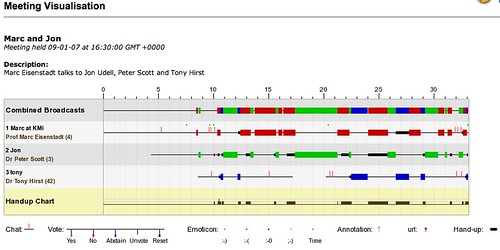
I expect the chunking is also handy for random-access navigation. In the conversation mapped here, for example, I spoke once at some length. If I were trying to recall what I said at that point, seeing the structure would help me pinpoint where to tune in.
Although Hexagon hasn’t caught on outside the lab, Peter says there’s been pretty good uptake of FlashMeeting because people “know how to have meetings.” I wonder if that’s really true, though. I suspect we know less about meetings than we think we do, and that automated analysis could tell us a lot.
The simple act of recording and playback can be a revelation. Once, for example, I recorded (with permission) a slightly tense phone negotiation. When I played it back, I heard myself making strategic, tactical, and social errors. I learned a lot from that, and might have learned even more if I’d had the benefit of the kinds of conversational x-rays that the OU researchers are developing.
Virtual worlds with exotic modes of social interaction tend to be headline-grabbers. Witness the Second Life PR fad, for example. By contrast, technology that merely reflects our real-world interactions back to us isn’t nearly so sexy. For most of us, though, in most cases, it might be a lot more useful.

With regards to Hexagon, I have to wonder what information a visual view of a person really gives you over and above, say, MSN or Jabber/XMPP presence status. Okay, they don’t really distinguish between on-the-phone-gesticulating-wildly and on-the-phone-on-hold (although Jabber/XMPP, at least, can do custom status messages), but they do get 80% there. On the other hand, setting a status message is much less confronting/privacy-invading than allowing people to watch you when you’re at work.
“On the other hand, setting a status message is much less confronting/privacy-invading than allowing people to watch you when you’re at work.”
I believe Peter would claim that part of the benefit is not having to explicitly set a status message — though you do have to explicitly “enter” the room.
Still, I agree that visual cues can be insufficient or even, in a case Peter cited, misleading. He showed a screenshot of himself, head buried in hands, which was captured by a coworker whose evaluation Peter had just done. The obvious conclusion was that Peter was in despair over the coworker, in fact it was due to news he’d just received about a completely different matter.
I mentioned to him that maybe, if you buy into this model, more context might be needed. So the system might, for example, show which (non-confidential) items people have recently read or posted, or are actively reading and posting.
Well, there are these things that help setting the status message. I think some of the latest VoIP-tech, for example, can actually automatically set “On the Phone” status messages, and I’m guessing I could get my Symbian handset with Python on it to set my status over Bluetooth if I really wanted it to… “Idle” is also easily automated; “Do Not Disturb” is the actual problem there, I guess.
Jon:
In your FlashMeeting discussion with Peter and Marc, he is describing my work as a building restoration carpenter and how I share my knowledge with this new internet/video media:
http://flashmeeting.open.ac.uk/fm/fmm.php?pwd=18b1a8-6923&jt=00:04:11
For about a year now I have been using FlashMeeting to train people in the building restoration skills. For example, here I show how to glaze a window sash with tradition putty:
http://flash.kmi.open.ac.uk:8080/fm/memo.php?pwd=444f34-4846&jt=00:45:41
I package and archive these sessions in a simple catalog that is indexed with text links that drill down into specific topics in each session. You can see that here, as FlashMeeting replays:
http://historichomeworks.com/hhw/conf/vidconf.htm
I’m currently working on upgrading the text index to an image index, for non-English speaking and illiterate viewers. Some of these training session replays have been used 5,000 times by 2,000 viewers on six continents:
http://flashmeeting.open.ac.uk/kmi_fm/replaymap.php?pwd=0f3ad1-5717
I’m hoping to work with Peter and Marc to analyze this viewership to extend my reach even further and help them more effectively.
The topics for these sessions are set by the participants. I often do a little preparation, but the session is live and the details covered are in direct response to participants questions and reactions. After the session I do a little rough editing in the FlashMeeting system, then catalog and index the material. I have just put together an outfit so I can shoot these session in my workshop, or on a worksite:
http://flashmeeting.open.ac.uk/fm/memo.php?pwd=514db8-6988&jt=00:52:55
I’m using a completely mobile and compact TC-1100 tablet PC, and a Sony PC330 video cam over my wireless LAN:
http://flashmeeting.open.ac.uk/fm/memo.php?pwd=514db8-6988&jt=00:41:04
You ask if this work captures the character of the preservation carpenter’s work. Well, the intent of these sessions to pass my own knowledge on to the very specific interests and needs of others. The thrust is more to cover particular procedures and drill right down to very detailed nuances of craft technique–something that can only be done INTERACTIVELY, in these LIVE sessions.
For capturing the character and essence of the work, I think my video blogging might become better at that. See my Reports from the Field video blog:
http://historichomeworks.phovi.com/
I’d be interested in your comments on what you think is working here, and how I might best carry this work forward.
John
by hammer and hand great works do stand
by cam and light he shoots it right
by Mind, Hand and Heart we share the Art
http://www.HistoricHomeWorks.com
JohnLeeke >>at>dot
Hexagon is a fascinating idea implemented in a way that I would never want to use. For my tastes, it is just too intrusive. That said, I would like the ability to publish more useful presence information.
I am not willing to set status messages in my IM client. It is not only disruptive, but if I forget to update it, it becomes counterproductive. It would be a huge improvement if my calendar and phone could set status with my IM client. Of course, that will add layers of complexity that would either require a more sophisticated IM client or an agent. Something needs to prioritize the information sent by the two (or more) devices. Beyond the basics, I’d want different calls to have different priorities (“Talking to boss–Do not disturb” v. “On phone”).
Using cameras is sort of a “Mechanical Turk” approach to the problem. It makes sense to me that it would be relatively easy to glean better presence information from a glance at video. (Funny how these things all weave together.) Kind of clever–it just comes at too high a price (the intrusiveness) for me. Perhaps if this issue is more widely recognized as a problem, other potential solutions will emerge.
I enjoyed this article. Distributed teams in my line-of-work are very common. I am a software developer and now work from home and often wish I had something like hexagon to use to sync-up with other developers that are working in the same (broad) areas as I. It could be tremendously valuable even if the group of developers were not working for the same company. Here are a few things that are in my opinion value-added to the process:
1. Motivation. I work in a room with one window all-day and often all-night to meet deliverable deadlines. Let’s face it. If you are any kind of social creature you would be motivated in an office setting because everyone else is working also. A virtual cam-based implementation would definitely help me IMO.
2. Support. I’ve been in the situation where I was deadlocked on an issue and even the people I worked with had no solutions. This happens very often when using new/cutting edge technologies where docs are sparse. Instead of having to wait for a posted request on a forum or mailing list I could ask someone right now and hopefully find someone in the group who could offer at least some sort of assistance and vice-versa.
I understand many people’s view of the lack of privacy with this type setup. However, the way I look at it I could either a) have an employer who REQUIRED it which would not be as favorable as voluntary IMO. b) I could be working in a office somewhere. c) it doesn’t have to be something you are forced to camp-out all day. This scenario would only apply to those individuals who would find it favorable.
Ryan
http://mindonstatic.com