A conversation with Bill Buxton about design thinking

In the latest episode of my Microsoft Conversations series I got together with Bill Buxton to talk about the design philosophy set forth in his new book Sketching User Experiences. Nowadays Bill is a principal researcher with Microsoft Research, and before that he was chief scientist at Alias/Wavefront, but his involvement in the design of software and hardware user interfaces goes all the way back to Xerox PARC. Along the way he’s accumulated a fund of wisdom about what he calls design thinking — a way of producing, illustrating, and winnowing ideas about how products could work.

I haven’t yet received my copy of his book, but my background for this conversation was a talk given last November at BostonCHI, the Boston chapter of the ACM’s special interest group on computer-human interaction. In that talk (which summarizes key themes from the book), and also in this conversation, Bill lays down core principles for designing effective user experiences.

He proceeds from the assumption that sketching is fundamental to all design activity, and explores what it means to sketch a variety of possible user experiences. His approach is aggressively low-tech and eclectic. He argues that although you can use software tools to create fully-realized interactive mockups, you generally shouldn’t. Those things aren’t sketches, they’re prototypes, and as such they eat up more time, effort, and money than is warranted in the early stages of design. What you want to do instead is produce sketches that are quick, cheap, and disposable.

How would you apply that strategy to the design of, say, the Office ribbon? When Bill talks about sketching, he means it literally:

You’d start with paper prototyping — quickly hand-rendered versions, and for the pulldown menus and other objects you’d have Post-It notes. So when somebody comes with a pencil and pretends it’s their stylus and they click on something, you’ve anticipated the things they’ll do, and you stick down a Post-It note.

What matters here isn’t the interaction between the test subject and the prototype, because it isn’t really a prototype, it’s a sketch. Rather, what matters is the interaction between the test subject and the designer. The sketch need do no more than facilitate that interaction.

Continuing with the same example, here’s how an eclectic strategy keeps things simple and cheap:

Now that will give you the flow and the sequence of actions, but it will not give you the dynamics in terms of response time. To show that, I’d use exactly the same things, photograph them, and then make a rough pencil-test video so I could play back what I think the timing has to be to show it in realtime. It’s a combination of techniques, where none is sufficient on its own.

Later in the conversation, he challenges some of my favorite themes. Bill’s skeptical about the notion (popularized by Eric von Hippel) that lead users can be co-designers of products. And he doesn’t think that logging interaction data is as useful as I think it is. But he agrees with me that a key weakness of paper prototypes is their inability to incorporate the actual data that animates our experiences of products and services. One of his examples: MP3 players think in terms of songs, not movements, so if you load one with classical music you’ll find a bunch of duplicate songs called Adagio. In such a case, Bill admits, you’d like to have used a more fully-realized prototype that could have absorbed real data and flushed out these kinds of problems. His point isn’t that you should never deploy heavier design artillery, but rather that you should reserve it for when it’s absolutely necessary. Much of the time, he believes, sketching is faster, cheaper, and more productive.
Unifying the experience of online identity

Several months ago my bank implemented an anti-phishing scheme called Site ID, and now my mortgage company has gone to a similar scheme called PassMark. Both required an enrollment procedure in which I had to choose private questions and give answers (e.g., mother’s maiden name) and then choose (and label) an image. The question-and-answer protocol mainly beefs up name/password security, and secondarily deters phishing — because I’d notice if a site I believed to be my bank or mortgage company suddenly didn’t use that protocol. The primary anti-phishing feature is the named image. The idea is that now I’ll be suspicious if one of these sites doesn’t show me the image and label that I chose.

When you’re talking about a single site, this idea arguably makes sense. But it starts to break down when applied across sites. In my case, there’s dissonance created by different variants of the protocol: PassMark versus Site ID. Then there’s the fact that these aren’t my images, they’re generic clip art with no personal significance to me. Another variant of this approach, the Yahoo! Sign-In Seal, does allow me to choose a personally meaningful image — but only to verify Yahoo! sites.

These fragmentary approaches can’t provide the grounded and consistent experience that we so desperately need. One subtle aspect of that consistency, highlighted in Richard Turner’s CardSpace screencast, is the visual gestalt that’s created by the set of cards you hold. In the CardSpace identity selector, the images you see always appear together and form a pattern. Presumably the same will be true in the Higgins-based identity selector, though I haven’t seen that yet.

I can’t say for sure, because none of us is yet having this experience with our banks and mortgage companies, but the use of that pattern across interactions with many sites should provide that grounded and consistent experience. Note that the images forming that pattern can be personalized, as Kevin Hammond discusses in this item (via Kim Cameron) about adding a handmade image to a self-issued card. Can you do something similar with a managed card issued by an identity provider? I imagine it’s possible, but I’m not sure, maybe somebody on the CardSpace team can answer that.

In any event, the general problem isn’t just that PassMark or Site ID or Sign-In Seal are different schemes. Even if one of those were suddenly to become the standard used everywhere, the subjective feeling would still be that each site manages a piece of your identity but that nothing brings it all together under your control. We must have, and I’m increasingly hopeful that we will have, diverse and interoperable identity selectors, identity providers, relying parties, and trust protocols. But every participant in the identity metasystem must also have a set of core properties that are invariant. One of the key invariant properties is that it must bring your experience of online identity together and place it under your control.

A conversation with Doug Kaye about PodCorps

Because of travel, last week’s ITConversations show was a rerun of my conversation with Lou Rosenfeld about a cluster of topics including information architecture, search analytics, print and online publishing, designing for usability, tagging, and microformats. This week’s show is a conversation with ITConversations founder Doug Kaye about his new project, PodCorps, which aims to connect producers of spoken-word events with stringers who can help get those events audio- or video-recorded and then published on the Web.

Here’s a fun fact I uncovered. Doug hadn’t heard of one of my favorite things lately, the LibriVox project. When I mentioned that Hugh McGuire cites AKMA’s collaborative recording of Larry Lessig’s Free Culture as a primary inspiration, Doug pointed out that he was the reader for the first chapter of that project. Small world!

RESTful Web Services

RESTful Web Services, by Leonard Richardson and Sam Ruby, was published this month. I interviewed the authors yesterday for an upcoming ITConversations show, but I also want to spell out here why I think it’s such an important book.

In the realm of IT you could hardly pick a more controversial topic. Or, in a way, a more unlikely one, given that the REST (Representational State Transfer) architectural style has its roots in what would normally have been an obscure Ph.D. thesis. Roy Fielding, the author of that thesis, told me in an interview that he was surprised by its breakout popularity. But he probably shouldn’t have been. There are not many technologies as foundational as the Hypertext Transfer Protocol (HTTP), whose principles that thesis defines.

But Fielding’s thesis is a thesis, not a practical guide. The effort to bridge from theory to practice has produced a considerable amount of folklore. “We’re writing a book,” the authors say in their web introduction, “to codify the folklore, define what’s been left undefined, and try to move past the theological arguments.” The mission is clearly defined in the first chapter:

My goal in this book is not to make the programmable web bigger. That’s almost impossible: the programmable web already encompasses nearly everything with an HTTP interface. My goal is to help make the programmable web better: more uniform, better structured, and using the features of HTTP to greatest advantage.

The book opens by usefully distinguishing between a set of architectural styles (REST, RPC [remote procedure call], REST-RPC hybrid) and suite of technologies (HTTP, XML-RPC, WS-*, SOAP). We tend to conflate architectures with technologies because they usually go together, but that’s not necessarily the case. The authors cite Google’s SOAP API (and other “read-only SOAP and XML-RPC services” as being “technically REST architecture” but nevertheless “bad architectures for web services, because they “look nothing like the Web.”

This book asserts that most services can, and should, “look like the Web,” and it spells out what that means. Among the key principles:

  • Data are organized as sets of resources
  • Resources are addressable
  • An application presents a broad surface area of addressable resources
  • Representations of resources are densely interconnected

To illustrate these principles, the authors work through a series of examples from which they distill gems of practical advice. When designing URIs, for example, they recommend that you use forward slashes to encode hierarchy (/parent/child), commas to encode ordered siblings (/parent/child1,child2), and semicolons to encode unordered siblings (/parent/red;green). Pedantic? Yes. And bring it on. Lacking a Strunk and White Elements of Style for URI namespace, we’ve made a mess of it. It’s long past time to grow up and recognize the serious importance of principled design in this infinitely large namespace.

Here’s another key principle: “When in doubt, model it as a resource.” To illustrate that principle in a dramatic way, the authors apply it to a problem that RESTful web services are normally thought incapable of solving: transactions. By modeling the transaction itself as a resource, they arrive at the following:

First I create a transaction by sending a POST to a transaction factory resource:

POST /transactions/account-transfer HTTP/1.1
Host: example.com

The response gives me the URI of my newly created transaction resource:

201 Created
Location: /transactions/account-transfer/11a5

I PUT the first part of my transaction: the new, reduced balance of
the checking account.

PUT /transactions/account-transfer/11a5/accounts/checking/11 HTTP/1.1
Host: example.com

balance=150

I PUT the second part of my transaction: the new, increased balance of
the savings account.

PUT /transactions/account-transfer/11a5/accounts/savings/55 HTTP/1.1
Host: example.com

balance=250

At any point up to this I can DELETE the transaction resource to roll
back the transaction. Instead I’m going to commit the transaction:

PUT /transactions/account-transfer/11a5 HTTP/1.1
Host: example.com

committed=true

I don’t think my bank’s going to be adopting this technique any time soon, but it’s a fascinating thought experiment which suggests that what the authors call resource-oriented architecture (ROA) is a young and in many ways still relatively unexplored discipline.

On the question of ROA versus SOA (service-oriented architecture), the authors say that for certain kinds of enterprisey problems — including advanced security protocols and complex coordinated workflows — only SOA meets the need. They recommend it for these purposes, when the need arises. But in the many situations where the need does not arise, they recommend starting with ROA.

I’m inclined to agree, but I’d feel better about that recommendation if the glide path from ROA to SOA were smoother. It isn’t. Toward the end of our interview I asked Sam Ruby, who has been a long and forceful advocate for a smooth glide path, whether he thinks we’ll achieve it. He doesn’t. That worries me, but I haven’t given up hope. I’ve always seen ROA and SOA as points along what Frank Martinez calls a tolerance continuum. Among its other accomplishments, this excellent book advances that important point of view.

Hosted lifebits

Today my digital assets are spread out all over the place. Some are on various websites that I control, and a lot more that I don’t. Others are on various local hard disks that I control, and a lot more that I don’t. It’s become really clear to me that I’d be willing to pay for the service of consolidating all this stuff, syndicating it to wherever it’s needed, and guaranteeing its availability throughout — and indeed beyond — my lifetime.

The scenario, as I’ve been painting it in conversations with friends and associates, begins at childbirth. In addition to a social security number, everyone gets a handle to a chunk of managed storage. How that’s coordinated by public- and private-sector entities is an open question, but here’s how it plays out from the individual’s point of view.

Grade 3

Your teacher assigns a report that will be published in your e-portfolio, which is a website managed by the school. Your parents tell you to write the report, and publish it into your space. Then they release it to the school’s content management system. A couple of years later the school switches to a new system and breaks all the old URLs. But the original version remains accessible throughout your parents’ lives, and yours, and even your kids’.

Grade 8

On the class trip to Washington, DC, you take a batch of digital photos. You want to share them on MySpace, so you do, but not directly, because MySpace isn’t really your space. So you upload the photos to the place that really is your space, where they’ll be permanently and reliably available, then you syndicate them into MySpace for the social effects that happen there.

Grade 11

You’re applying to colleges. You publish your essay into your space, then syndicate it to the common application service. The essay points to supporting evidence — your e-portfolio, recommendations — which are also (to a reasonable degree of assurance) permanently recorded in your space.

College sophomore

You visit the clinic and are diagnosed with mononucleosis. You’ve authorized the clinic to store your medical records in your space. This comes in handy a couple of years later, when you’ve transferred to another school, and their clinic needs to refer to your health history.

Working professional

You use your blog to narrate the key events and accomplishments in your professional life, and to articulate your public agenda. All this is, of course, published in your space where you are confident (to the level of assurance you can reasonably afford) that it will be reliably available for your whole life, and even beyond.

Although this notion of a hosted lifebits service seems inevitable in the long run, it’s not at all clear how we’ll get there. The need is not yet apparent to most people, though it will increasingly become apparent. The technical aspects are somewhat challenging, but the social and business aspects are even more challenging.

In social terms, I think it’ll be hard to get people to decouple the idea of storage as a service from the idea of value-added services wrapped around storage.

On the business side, my conversations with Tony Hammond and Geoffrey Bilder have given me a glimpse of how these issues are being approached in the world of scholarly and professional publishing. But it’s not yet apparent that the specialized concerns driving these efforts will, in fact, generalize in important ways to almost everybody.

Trusting, but verifying, your teenager’s use of the Internet

Parents nowadays face tough questions about whether to monitor or (try to) control their kids’ use of the Internet, and if so, how. Although my personal opinion is that trying to restrict access is a losing battle, I understand why the idea is appealing. You’d like your kids to have some maturity and some perspective under their belts before encountering some of what the Internet so readily brings to their attention. When my kids were younger, the Internet was younger too. I guess if they were still that young I’d be wishing I could create a sandbox for them, even though I don’t think you can. But they’re teenagers now, and they have their own computers. For two reasons, activating the parental controls on those computers isn’t the strategy I want to pursue.

The first reason is that I don’t think filtering the Internet is feasible. Even if we could agree on a definition of what may be harmful, which we never could, people will find ways to route around censorship. Meanwhile we’ll inevitably censor things we never meant to — like, for example, my InfoWorld blog.

The second reason is that I don’t want to incent my kids to route around controls I might try to impose. Nor do I want to force them to go elsewhere to experience an uncensored Internet. The reality of the Internet, like the reality of the world, is something they’ll be dealing with for the rest of their lives. I’d rather they engage with that reality at home where I can more easily keep track of their activities.

If you want to be able to monitor without imposing explicit controls — in other words, trust but verify — then it’s worth knowing about the feature of Windows Vista that supports that preference. It’s in Control Panel -> User Accounts and Family Safety -> Parental Controls. There are two On/Off choices. The first, Parental Controls, enforces any of the controls you elsewhere define. These include restrictions about which websites are accessible, when the computer may be used, and which games or other programs may be used.

My strategy is to leave Parental Controls off, but switch on the second On/Off choice: Activity Reporting. That produces a detailed report about which websites were visited, which applications were used when, which games were played, messages sent/received and contacts added (if the kids use Outlook and Windows Messager, which mine don’t), and more.

The crucial item here, for me, is websites visited. That’s recently become an issue that I want to keep an eye on. With this setup I can, in a way that’s browser-independent, persistent across flushes of the browser cache, and very unlikely to be disabled.

Windows XP and Mac OS X don’t offer the same capability out of the box, but there are of course lots of third-party add-ons. Not ever having tried them myself, I’d be interested to hear how effectively they can be used to implement a “trust but verify” policy. And more generally, I’d be interested to hear about how other parents of teenagers are dealing with the difficult tradeoffs involved in this thorny issue.

A conversation with Allen Wirfs-Brock about the history of Smalltalk and the future of dynamic languages

More than 25 years ago, Allen Wirfs-Brock created one of the early implementations of Smalltalk. He was working at Tektronix at the time, as was Ward Cunningham who became the first user of Tektronix Smalltalk. Allen later served as chief scientist of Digitalk-ParcPlace and CTO of Instantiations, then joined Microsoft four years ago. His original charter was to work on future strategies for Visual Studio, but recently — in light of growing interest in dynamic languages at Microsot — he’s returning to his roots.

In the latest installment of my Microsoft Conversations series we review the history of Smalltalk, and trace the evolution of the techniques that it (and Lisp) pioneered, from the early implementations to such modern descendants as Python and Ruby.

I’m always looking for ways to explain why dynamic programming techniques are so important, and a great explanation emerged from this conversation. A Smalltalk system is, among other things, a population of continuously evolving objects that communicate by passing messages. That same description applies to another kind of system: the Internet. I suggested — and Allen agreed — that this congruence is driving renewed appreciation for dynamic languages.

Motivation, context, and citizen analysis of government data

Matt McAlister heard “crackling firearms” in his San Francisco neighborhood and wrote a wonderful essay on a theme that was central to my keynote talk last week at the GOVIS conference: how citizens can and will work with governments to diagnose social problems and develop solutions. When the District of Columbia’s DCStat program rolled out last summer, I was delighted by the forward thinking involved. Publishing the city’s operational data directly to the web, for everyone to see and analyze, with the explicit goal of making the delivery of government services transparent and accountable, was and is an astonishingly bold move. And as Matt found when investigating crime in his neighborhood, it’s still part of the unevenly distributed future:

I then found the official San Francisco Police Department Crime Map. Of course, the data is wrapped in their own heavy-handed user interface and unavailable in common shareable web data formats.

Access to data is good, and access to data in useful formats is better, but these are only the first steps. We need to make interpretations of the data, compare and discuss those interpretations, and use them to inform policy advocacy. The mashups that Matt reviews are a glimpse of what’s to come, but these interactive visualizations have a long way to go.

Here’s another glimpse of what’s to come: I took a snapshot of the DC crime data, uploaded it to Dabble DB, built a view of burglary by district and neighborhood, and published it at this public URL. There are two key points here. First, discussion can attach to (and will be discoverable in relation to) that URL. Second, the data behind the view is also available at that URL, in a variety of useful formats, so alternate views can be produced, pointed to, and discussed.

Still, these are only views of data. There’s no analysis and interpretation, no statistical rigor. Since most ordinary citizens lack the expertise to engage at that level, are governments that publish raw data simply asking for trouble? Will bogus interpretations by unqualified observers wind up doing more harm than good?

That’s a legitimate concern, and while the issue hasn’t yet arisen, because public access to this level of data is a very new phenomenon, it certainly will. To address that concern I’ll reiterate part of another item in which I mentioned John Willinsky’s amazing talk on the future of education:

Willinsky talks about how he, as a reading specialist, would never have predicted what has now become routine. Patients with no ability to read specialized medical literature are, nonetheless, doing so, and then arriving in their doctors’ offices asking well-informed questions. Willinsky (only semi-jokingly) says the Canadian Medical Association decided this shouldn’t be called “patient intimidation” but, rather, “shared decision-making.”

How can level 8 readers absorb level 14 material? There are only two factors that govern reading success, Willinsky says: motivation, and context. When you’re sick, or when a loved one is sick, your motivation is a given. As for context:

They don’t have a context? They build a context. The first time they get a medical article, duh, I don’t know what’s going on here, I can’t read the title. But what happened when I did that search? I got 20 other articles on the same topic. And of those 20, one of them, I got a start on. It was from the New York Times, or the Globe and Mail, and when I take that explanation back to the medical research, I’ve got a context. And then when I go into the doctor’s office…and actually, one of the interesting things…is that a study showed that 65% of the doctors who had had this experience of patient intimidation shared decision-making said the research was new to them, and they were kind of grateful, because they don’t have time to check every new development.

When your loved one is sick, you’re motivated to engage with primary medical literature, and you’ll build yourself a context in which to do that. Similarly, when your neighborhood is sick, you’ll be motivated to engage with government data, and you’ll build yourself a context for that.

The quest for context could, among other things, lead to a renewed appreciation for a tool that’s widely available but radically underutilized: Excel. Most people don’t earn a living as quants, so Excel, for most people, winds up being a tool for summing columns of numbers and arranging text in tabular format. That may change as more public data surfaces, and as more people realize they want to be able to interpret it. In which case Chris Gemignani and the rest of the Juice Analytics team will emerge as leading resources available to motivated citizens wanting to learn how to make better use of Excel.

Shared navigation of online bureaucracies

In my talk on Friday at the GOVIS (government information systems) conference in Wellington, I wasn’t the only one to suggest that web 2.0 attitudes will change the relationship between governments and citizens. That notion now seems to be pretty firmly established, and the question is not whether citizens will collaborate with their governments, but rather how.

Among other developments, I think we’ll soon see a refreshing new approach to the consumption of government services. A couple of weeks ago at Berkeley’s school of information I met Anna Kartavenko, one of Bob Glushko’s graduate students, She’s working on ways to make the byzantine California regulatory apparatus more accessible. If you’re starting a business in that state, it’s really hard to figure out which licenses you need to apply for, as well as how (and in what order) to apply for them.

The problem is universal, of course, and folks at GOVIS were wrestling with it too. When you’re providing the information systems that both document and implement government services, you certainly want to do everything right in terms of system and information architecture. But I suspect there’s about to be a new force in the world that will work toward the same ends — easy discovery and effective use of services — by very different means. That force is shared experiential knowledge.

Yes, search should give the right answer, and the systems that search points you to should work well. No, these things don’t always happen. But even if they do, you’d still like to plug into somebody who’s been down the same path you are traveling. A formal description of a procedure is never enough. If possible, we’d always like to hear from somebody who’s been there, done that, knows the drill, and can point out the pitfalls.

What we loosely call social media are beginning to create that possibility. For a variety of reasons, people are beginning to document and share what they know. If you write it down, you’ll be able to remember it yourself in case you have to replay the steps. And writing it down in a shared information system in the cloud is becoming a more reliable way to assure your own future access to this documentation than writing it down locally.

To the extent your knowledge is a source of competitive advantage, you’ll want to be cautious about how much of it you publish. But then again, the reputation you establish by publishing some of your knowledge may lead to new opportunities to use that knowledge for your own gain.

Along with these incentives, which I classify as examples of enlightened self interest, there are also purely altruistic motives, and I don’t discount those. But let’s just stick with enlightened self interest for now. Given those incentives to share knowledge, how can we lower the activation threshold for sharing?

I think one answer will emerge from the intersection of social bookmarking and clickstream logging. Suppose that instead of bookmarking and tagging a single URL, you could bookmark and tag a sequence of page-visiting and form-filling events. The sequence corresponds to some complex multi-step task. The performance of the task crosses several (or many) online jurisdictions. The outcome might be successful or not: “Yes, I got the license,” or “No I didn’t.” But in either case, it would be qualified by an anecdotal report: “Yes, I got the license, but I found out that if you’re in my category you need an import license and you have to meet the following insurance requirement.”

You couldn’t reasonably expect very many people to reflect on their encounters with online bureaucracy and take time to write reports like that. But what if it were a much more lightweight activity, like the difference between writing a blog entry and tossing off a del.icio.us bookmark or a Twitter message? Then participation becomes much more likely.

The key ingredient here is identifying a sequence of events in the browser (or rich client), and enabling people to visualize and then categorize and describe that sequence. And that seems eminently doable.

Comparing notes on speaker preparation

Jeremy Zawodny describes his method for preparing talks and asks:

If you end up speaking in front of audiences on a semi-regular basis, is your preparation experience anything like mine?

My process used to be what Jeremy describes — composing slides — but now it’s turned into something completely different and quite surprising to me. As I discussed here, I’ve finally trained myself to use dictation effectively. I’ll go out for a long walk, like two or three hours, and dictate a rough draft of the talk. I’m not able to do that continuously, I have to stop and think and start again, but I turn the recorder off during the think time so when I’m done I’ve got something approximating what the talk will be. Then I go for another long walk and listen to what I recorded, making notes about what slides to use. For last week’s talk I didn’t take those notes in audio form, I scribbled them down while walking, but next time I’m going to go back to audio capture. If you distill the long narrative down to short titles or phrases, it’s quick and easy to listen to a spoken distillation and write down the titles which become the armature for the slides.

The obvious reason why this works is that speaking out loud is good practice for speaking out loud. One of the subtler reasons is that exercise and fresh air really help. Another is that when I’m away from my office and can’t fiddle with a computer or look things up on the web, I have to literally think on my feet.

As I acknowledged here, I’m indebted to John Mitchell for suggesting this technique to me. According to him, it dates back to “the BBC WW2 radio correspondents, and then Edward R. Murrow.” Thanks again for the tip, John, it’s been really helpful.

Internet access adventures in New Zealand’s south island

I’ve spent the last three days touring the top part of New Zealand’s south island, from Picton (where the ferry lands) over the scenic highway to Nelson, down the even more scenic west coast road to Greymouth, and across the spectacularly scenic Arthurs Pass to Christchurch on the east. It hasn’t been like a US roadtrip at all. The distances aren’t great, I’ve been going slowly in order to better enjoy the narrow twisty roads and ubiquitous one-lane bridges, and I’ve been stopping often to hike in the native forest or climb partway up a mountain. If you wanted to get a taste of this place and happened to only have a handful of days in which to do it, you could do worse to follow this itinerary.

Notwithstanding my rationalization the other day, you’ll certainly want to bring your camera. You might reasonably opt to leave your laptop home, though, because Internet access from hotels here is a comedy of errors. The most absurd moment came last night when I checked into a hotel in Christchurch. I bought an access card for the WiFi service for $10, scratched it to reveal the access code, and…it smudged completely! I could not believe it! This card has only one purpose in life — to reveal a string of hex digits — and it cannot even manage to do that. Incredible!

It wasn’t a fluke, either. I showed it to the hotel clerk and he tried another card. Same result, except almost legible this time. We debated whether a digit was a 5 or an S, and whether another was an S or a 3, and in the end I had to try about a half-dozen variations. They had that access point locked down pretty well, too. The code was a dozen hex digits, and I felt like I was burgling Fort Knox. Finally I cracked the code, checked email, called the person I was meeting for dinner, and headed out, 10 minutes into the two-hour session I’d bought. Later I powered up to continue the session and…you guessed it…token expired. Aaarrggghhh! The future is not yet evenly distributed.

So anyway, Internet cafes are the ticket here, and I’ve seen quite a variety of them. Most notable was the McDonalds in Greymouth. That town, like a lot of the towns around here, caters to backpackers. I bought an access card along with my coffee — in this case, one that revealed legible digits when scratched — and sat down at a PC equipped with a camera and a headset. I didn’t see any backpackers videoconferencing, but it was interesting to see that the capability is part of the standard kit rolled out to these locations.

Even more interesting was the list of applications installed on the machine. It included Internet Explorer, Firefox, Microsoft Office, various instant messaging clients including Skype and…wait for it…SSH. If you’re technically inclined, you’ll probably laugh at that. If not, here’s why it’s funny. SSH stands for secure shell, and it’s used to open up a command-line session with a remote computer — typically a Linux or Unix server, although Windows servers can receive SSH connections as well (mine do). You might SSH into a remote machine in order to read mail in a terminal-oriented mail reader, or to perform administrative tasks on a remote system, but these are fairly esoteric activities. You wouldn’t think there are enough backpackers wanting to do these things to warrant making SSH part of the standard setup. Who knew?

For photographic storytelling, cameras are becoming optional

I never would have chosen to be cameraless in one of the most photogenic parts of the world, but since I am it’s turned into an opportunity to reflect on my relationship to photography — past, present, and future. My dad likes to joke about the obsessive vacation photographer who, when asked how the trip went, would reply: “Don’t know, haven’t gotten the pictures back yet.”

There’s always been a tension between the desire to soak in experience through our primary senses, and the desire to augment our primary senses with gear that enables us to record, edit, preserve, and share what we experience. But here on the sundeck of the Kaitaki ferry, waiting to cross the Cook Strait from Wellington to Picton, augmentation is ascendant. You can see the whole spectrum of photographers and their gear on display. Happy snappers with their low-end digicams, videographers with camcorders, serious photographers with their digital SLRs.

Although skills and inclinations vary across that spectrum, everyone shares a common appreciation for the thrill of photography, and advancing technology keeps renewing that thrill. But as I watch my fellow passengers snapping and filming all around me, I’m aware that a sea change is underway. I am certain that some of the photos and videos being shot all around me today will turn up on Flickr and YouTube, and that I’ll be able to find them by searching for words like Kaitaki and Wellington and Picton and ferry, and for the date May 12 2007. There’s even a small but growing probability that some of this imagery will be geotagged and thus correlatable with precise locations along the way.

This collaborative annotation of the planet opens the door to a new dimension of pictorial storytelling. We will no longer be limited to the images that we ourselves have captured. We’ll be able to combine our own deeply personal images with the most interesting ones shot by others who have been to the same places. In some cases, those will be photos that no contemporary photographer could have taken. The other day, in the library of Wellington’s Te Papa museum, I was looking through drawers full of gorgeous black and white photos from New Zealand’s past. I don’t think many of those have yet been scanned and uploaded and tagged, but inevitably some will be.

Deeper layers of annotation are possible as well. At the GOVIS conference, a lunch companion mentioned the work of David Rumsey, whose digitizations of historical maps provoked a standing ovation at OSCON 2004. Rumsey has the wonderful idea that by making these exquisite hand-drawn maps available for everyone to curate and to use, he’ll enable us to add a historical dimension to the stories we tell with our own (and other) photographic images.

I can’t deny that I’m missing my camera, and that this essay is partly a rationalization of circumstances I wouldn’t have chosen. I really enjoy taking pictures, I’ve got an eye for taking decent ones, and I’d like to be doing that right now. But I also like the idea that it’s becoming less necessary to carry and use a camera in order to tell pictorial stories about the places we visit and the people we meet.

PS. In case you are wondering I did not post this from the ferry. The unevenly distributed future does not yet extend that far.

Amazing lifehack: Pack a starter pistol to deter luggage theft

It was really dumb of me to put a camera into a piece of checked luggage, but I did, and now an airport baggage handler somewhere is one camera richer. It’s my fault, of course. My only excuse is that I almost never check bags, so when I packed this one I was thinking carry-on, not checked.

In searching around for similar cases, I found this tale of a guy who found his stolen camera on eBay, tracked down the thief, and got him arrested.

In the comments, mixed in with the debate about whether or not Delta should have granted the refund he requested (they didn’t), there’s this amazing bit of advice lifted from a comment on another blog:

One note on using TSA rules to your advantage.

Weapons that travel MUST be in a hard case, must be declared upon check-in, and MUST BE LOCKED by a TSA official.

A “weapons” is defined as a rifle, shotgun, pistol, airgun, and STARTER PISTOL. Yes, starter pistols – those little guns that fire blanks at track and swim meets – are considered weapons…and do NOT have to be registered in any state in the United States.

I have a starter pistol for all my cases. All I have to do upon check-in is tell the airline ticket agent that I have a weapon to declare…I’m given a little card to sign, the card is put in the case, the case is given to a TSA official who takes my key and locks the case, and gives my key back to me.

That’s the procedure. The case is extra-tracked…TSA does not want to lose a weapons case. This reduces the chance of the case being lost to virtually zero.

It’s a great way to travel with camera gear…I’ve been doing this since Dec 2001 and have had no problems whatsoever.

What a brilliant hack!

Annotating online maps for offline use

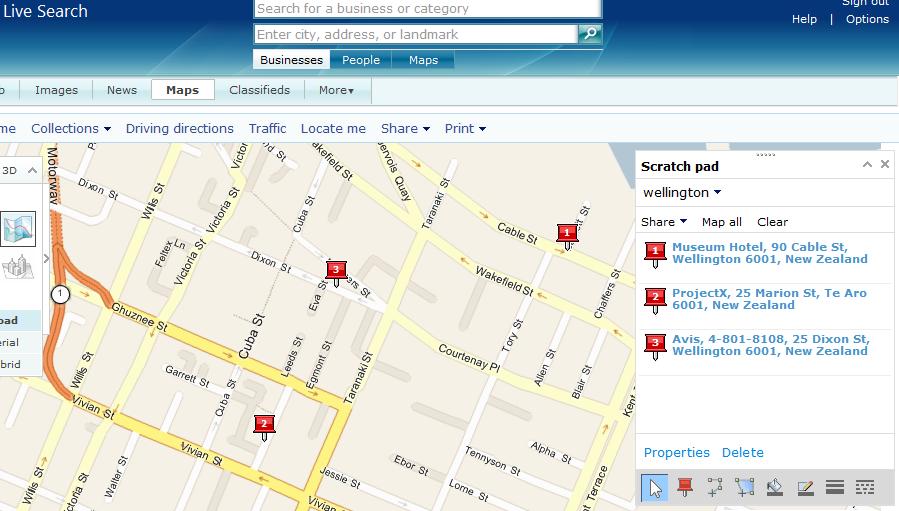
Last week I wrote about making a screencast to capture information about the MacArthur Maze detour for possible use offline. This week I’m in a similar situation. I’m scouting out places to go in Wellington, and elsewhere in New Zealond, and of course I’m doing that online. But I’ll probably be needing to refer to this research while I’m offline, so I’m annotating maps with that purpose in mind.

From that perspective, I’ve noticed some subtle differences between maps.google.com and maps.live.com. (maps.yahoo.com doesn’t seem to cover this part of the world.) In both cases, you can search for an address, add it to a saved map as a pushpin which includes the address you searched for, and then edit the blurb that appears with the pushpin. So, for example, I was able to change “25 Dixon Street” to the more useful “Avis, 4-801-8108, 25 Dixon Street.”

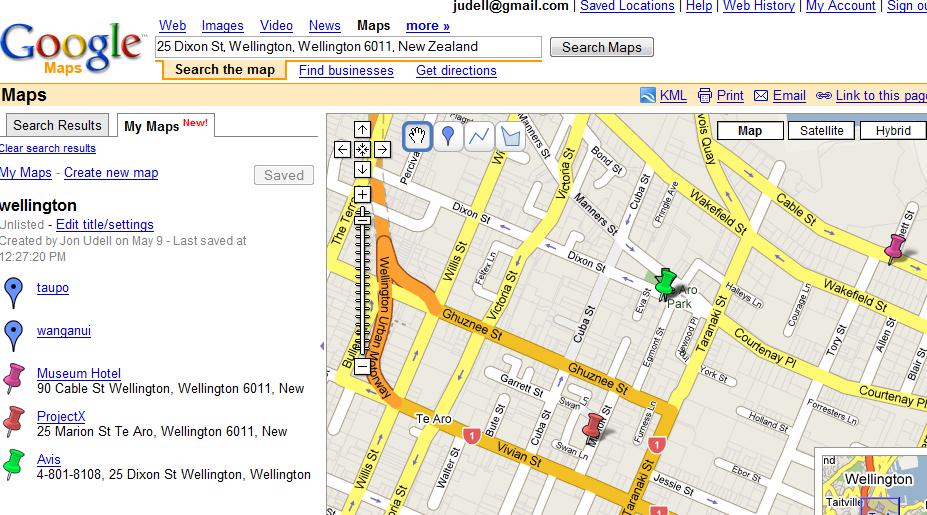
One subtle difference is that in Google Maps, the pushpins you add to your saved map all default to the same color. If you’ll be referring to a cached image, there’s no way to correlate between the legend and the locations on the map. To enable that, I had to edit each pushpin and vary its color.

In the Live Search product, by contrast, the pushpins are numbered which means there’s no extra step required to correlate between the legend and the locations. That makes it slightly easier to create something that’s useful in print — or, since printers are often hard to find when traveling, that’s useful as a saved image.

Another subtle difference is that in the Google case, varying the colors of your saved pushpins might not help if you send the map to a black-and-white printer.

I’d be curious to know to what extent these differences represent a conscious strategy on the part of the Live team to make annotated maps more useful offline. I’m also really interested in ways that a subset of the interactivity of online maps can be captured for offline use. The screencast I made last week was a crude step in that direction, there’s lots more that could be done.

Wellington bound

It is a long way from New Hampshire to New Zealand, where I’ll be speaking at the GOVIS conference in Wellington on Friday. A really long way, it’s dawning on me, as I prepare to leave on Monday afternoon in order to arrive (just past the International Date Line) on Wednesday afternoon. But hey, it’s doable thanks to 747s and laptop computers and MP3 players. Imagine making that trip 100 years ago!

I’ve always wanted to see New Zealand, so I’ll be taking some time to look around after the conference. If topics emerge that fit the themes of this blog, and if network access permits, I’ll blog them. Otherwise it’s likely to be quiet here for a while.

Happy Snappers and Happy Casters

When I interviewed Bill Crow about HD Photo, he talked about how the efforts of the Windows photo team — and more broadly the efforts of the whole digital photography ecosystem — were directed toward a persona called the Happy Snapper. Earlier generations of Happy Snappers used Brownie cameras, and later Polaroids, to achieve decent results without much skill. Our generation of Happy Snappers uses digital cameras in the same way. It makes sense to take care of the Happy Snapper because there are so many of them. So far, it hasn’t made sense to invest the same effort in the Happy Caster — that is, the Happy Snapper’s audio counterpart.

I doubt that podcasting alone will turn the tide. Although lots of people are discovering the possibilities of the medium, there will always be more interest in creating pictures than in creating sounds. But video of course includes sound, so maybe video will tip things in favor of the Happy Caster. That’d be good, because I’ve been doing a lot of audio recording lately, and it turns out to be harder to get decent results than I had imagined.

I was amused to note, in the credits for my latest ITConversations show, that my name appears as the audio engineer. That’s the moral equivalent of listing Alan Smithee as the director of a film. It’s what happens when things get screwed up and the real director doesn’t want his own name to appear. In this case I was the one who screwed up, and Paul Figgiani — ITC’s highly-experienced professional audio engineer — was the one who quite rightly declined to appear in the credits.

What happened was that I recorded the show using a new software/hardware combo and, although the levels looked OK, they were really too high. You can never really recover from a mistake like that, but I had to try. Thanks to the power of Adobe Audition the results were at least passable, albeit decidedly sketchy.

That’s an extreme example, but in general I’ve found that in the digital audio domain there are lots of ways to screw up, and that it takes a lot of specialized expert knowledge to avoid screwing up. I’m learning, but there’s still a lot to learn.

When I’m interviewing people on the phone, over the Internet, or in person, I’d rather spend less time worrying about gear and software settings and more time focusing on the conversation. I”m not a Happy Caster yet, but I’d sure like to be.

The question is whether there are (or will be) enough of us would-be Happy Casters to warrant the creation of the same kind of ecosystem in which the Happy Snappers flourish. I hope so!

A conversation with Gent Hito about RSSBus and the data web

The acronym RSS usually stands for Really Simple Syndication. Gent Hito thinks it should also stand for Really Simple Services. In this week’s ITConversations podcast we discuss RSSBus, a .NET-based engine — for desktops and for servers — that aims to simplify both the production and consumption of data expressed in terms of RSS (or Atom) feeds.

By normalizing all data feeds to flattened sets of name/value pairs, RSSBus trades away some of the power of advanced data modeling in order to reach a broad population of developers — and even, ideally, ordinary information workers who will be able to pull feeds into their spreadsheets, combine and filter them, and publish their transformed feeds back out to the Net.

If you’re handy with scripting languages and with data, you may or may not need something like RSSBus, because you can combine and manipulate feeds directly and pretty easily. But the amount of web screenscraping that I keep having to do tells me that providing the more structured outputs I’d rather work with still isn’t an obvious and easy thing for many developers. And while a growing minority of developers do produce XML outputs, information workers typically can’t make sense of those feeds. By helping to democratize the creation and use of simple feeds, Gent Hito hopes to accelerate the emergence of the data web.

Tagging is declarative programming for everybody

I’ve been searching for a pithy phrase to capture an idea, and the title of this piece takes my best shot. For ages, we’ve imagined that non-programmers can, on some level, learn to adapt the software that they use. Many did, most dramatically by engaging with Excel’s programming features, but most did not. And though I’m an admirer of Yahoo Pipes, I don’t think that a visual skin on top of a procedural programming model will appeal broadly to folks who otherwise aren’t inclined toward procedural programming.

Now arguably, the reason that most people aren’t so inclined is that we’ve failed to teach computational thinking1. Jeannette Wing’s manifesto on this topic invites us to imagine how the intellectual tools of programming — including abstraction, naming, composition, refactoring, heuristic reasoning, and separation of concerns — add up to “a universally applicable attitude and skill set that everyone, not just computer scientists, would be eager to learn and use.”

I’m sure Jeannette Wing is right, I hope she will persuade educators, and I’m delighted to discover that Microsoft Research is sponsoring the Center for Computational Thinking at Carnegie Mellon to explore this topic. Meanwhile, I wonder if we’re seeing the emergence, in the wild, of a very basic form of computational thinking that may prove to be intuitive and broadly accessible.

As I mentioned in my talk at Berkeley earlier this week, the elmcity.info project invites people to use tags not only to describe things, but also to compose and coordinate simple services. So for example, by posting a geotagged photo of a restaurant menu to Flickr, with the right set of tags, you’re both helping to create a directory service and enhancing that directory with Flickr’s image services and Yahoo’s mapping services. By posting a video clip of a candidate’s appearance to YouTube, along with the tag nhprimary, you’re helping to build a database of clips. By posting an event to Eventful along with the tag podcorps, you’re making a request for service — that is, you’re inviting one of the PodCorps.org stringers to help you record and publish a podcast of your event.

One of the trends in programming is the transition to a more declarative style. Where possible, you specify what you want to retrieve from the database, rather than how to retrieve it. Where possible, you specify which transactional or security behaviors your service should have, rather than how to implement those behaviors.

Among other things, tagging may become to ordinary folks what attributes are becoming to programmers: a language that doesn’t just describe things, but also invokes and coordinates behaviors.


1
Thanks to Patrick Phelan for pointing me to Jeanette Wing’s work.

Screencasting and map exploration

I’m always finding surprising new uses for screencast technology, and yesterday was another revelation. On Tuesday I left the MIX show for Berkeley, where I gave a talk at the School of Information to a group that included some of the students whose projects I discussed in my podcast with Bob Glushko and AnnaLee Saxenian. From the San Francisco airport, the normal route to Berkeley would have involved the MacArthur maze, but its recent meltdown dictated an elaborate detour.

I assumed the detour wouldn’t yet be available in the mobile navigation systems, so I spent some time reviewing the route online. Normally I’d print out a couple of maps but I was in a hotel room with no printer handy, so I wound up making a screen recording of the route. It was screencast, sort of, but one that I’d never show anyone, just a reference in case I needed it.

What I captured was a much richer representation of the route than a sequence of still screenshots interspersed with written instructions. At various points along the way, I’d zoom in for more detail, zoom out for context, and toggle back and forth between map view for the roads and hybrid view for buildings and landscape. It would be awkward to have to pull over, pop open the laptop, and review this movie, but I figured if I had to, I could.

As soon as I finished capturing the screencast, though, I knew I wouldn’t need to refer to it, for reasons that remind me of the dynamics of writing down lists of things to do. More often than not, once I write things down, I don’t need to refer back to them. The act of writing gives them a mental permanence they otherwise wouldn’t have.

Making the screencast of my route seems to have had a similar effect.  It would be interesting to run the following experiment. Have one group of subjects explore a route in an online mapping service, then measure how well they can follow the route. Have another group of subjects use the mapping software in the same way, while also requiring them to capture a movie of that interaction, and then measure their performance. I predict that the latter group will perform better because recording things that you might (or might not) later play back has a similar effect to writing things down that you might (or might not) later read. The process makes you think in a more active and intentional way, which leads to a more permanent mental representation.

It’s occurred to me before that every online mapping service should offer the ability to record an interactive exploration of a route, play it back online, and also make the screencast available for downloading and offline viewing. I still think that’s a great idea. What I hadn’t considered is that the most valuable part of this process might not be the use of the final output, but rather the act of producing it.

Watching Anders Hejlsberg reinvent the relationship between programs and data

Although Silverlight is the star of MIX 07, this is a big Microsoft developer show and there are all kinds of things going on. My favorite session from yesterday was Anders Hejlsberg’s mega-demonstration of LINQ. It’s come a long way since I first saw it at the 2005 PDC, and since my mid-2006 screencast with Anders. All along, he’s been very patiently and persistently reinventing the relationship between programming languages and data.

You have to be a certain kind of person to enjoy watching Anders run LINQ through its paces, Intellisensing his way through the construction of C# queries against object, SQL and XML data, but I am that kind of person, and I find it utterly hypnotic. In this particular demo, he spent a lot of time creating snippets of C# code to generate SQL queries, and peeking under the covers at the SQL that gets generated. There were two key takeway points. First, obviously, that some dodgy SQL effects become available to average developers who might otherwise not be able to achieve them. But second, and more subtly, that even the simplified query syntax in the C# code can be made simpler. The tool-generated code that represents SQL tables, for example, can now express relationships among tables directly. Given a table of Products and a table of Categories, you can eliminate the join syntax from a LINQ query and treat Categories as a property of Products. The bottom line is not only writing (and reading) less SQL code, but also less C# code.

There is, however, a connection between Silverlight and LINQ. As I mentioned yesterday, LINQ for in-memory objects is part of Silverlight. I haven’t had a chance to try this yet, but I do have a good example of the kinds of things I’d want to use it for.

The first version of my InfoWorld metadata explorer was actually a client-side application — still available here (for Firefox only) — that pulled a bunch of metadata into local memory and used XPath queries and JavaScript list filtering to produce its effects.

The server-based version uses Python to accomplish the same effects. With Silverlight it should now be possible to move that Python version back to the client, where it would probably run faster than the JavaScript version. But what I’m really interested to see is whether I can use LINQ in Silverlight to simplify the gnarly XPath and list-filtering logic in order to make the thing easier to understand and maintain.

To take this a step further, recall my earlier observations about Greasemonkey and Silverlight. A lot of the time, when we use the web, we’re effectively performing joins among data sources. You visit one site to look up some data, then you grab some of it and plug it into another site. If you’re lucky, somebody will have built a mashup, on a third site, to facilitate that join. But what if your browser had the data manipulation chops to help you do that mashup directly? I’m hoping that technologies like Silverlight and LINQ will enable things like that to happen.

A conversation with John Lam about the dynamic language runtime, Silverlight, and Ruby

On the Friday before MIX, I recorded this podcast with John Lam. He’s the creator of RubyCLR and, as it happens, he joined Microsoft on the same day I did. John’s been running silent since then, but no longer. In this conversation we discuss the dynamic language runtime (DLR), a generalization of Jim Hugunin’s work on IronPython, and a quartet of languages that make use of its services. They include a refactored IronPython, a new managed implementation of JavaScript, Visual Basic, and a new implementation of Ruby which, unlike RubyCLR, does not rely on the C-based Ruby runtime.

We also explore the ability of these languagues to run inside Silverlight-equipped browsers. Key benefits include cross-language interoperability, access to Silverlight’s subset of the .NET Framework, and more broadly, a new approach to writing ambitious browser-based software.

Among other things, that approach restores and reinvigorates a capability that’s been around for a decade. I can well remember, back in the day, running ActiveState’s Perl as a scripting engine inside Internet Explorer. It made for an interesting demo, but I never wound up using it for anything and I never heard of anyone else who did either. In retrospect I think there were two reasons why. First, the notion of running serious amounts of software inside the browser hadn’t taken hold. Now it clearly has.

Second, it’s risky to deploy a standalone language runtime — like Perl’s, or Python’s or Ruby’s — inside the browser. But the Silverlight languages are nicely sandboxed because they ride atop the dynamic language runtime, and it doesn’t rely on any privileged operations.

The DLR-based version of Ruby isn’t quite ready, and it doesn’t yet run Rails. That’s the acid test because, as John says, Rails uses every metaprogramming trick in the book. But the intent is to get it working, and I think that’s the kind of thing that’ll open up possibilities nobody can fully predict. The AJAX model has succeeded despite the fact that JavaScript arguably isn’t well suited to programming in the medium-to-large. DLR-based implementations of Ruby and Python should be better suited to that purpose. What’s more, in this environment they can not only interoperate with each other — so you can use a Python library directly from Ruby, or vice versa — but with statically typed languages like C#. So they can leverage capabilities that depend on static typing, like LINQ (language integrated query).

It’s hard to talk about a topic like this without sounding hopelessly geeky. “Look, I’ve got IronPython using ActiveRecord and LINQ, all inside the Safari browser on my Mac, and I’m debugging it in Visual Studio remotely from my PC.” These kinds of scenarios are in fact becoming possible, and those of us who appreciate all of these components individually will rightly pronounce it cool that they can come together in these ways.

But it’s more than a parlor trick, though it’s hard to explain why that’s so, or why anyone other than a code monkey and dynamic language junkie should care. In view of that challenge, I referred at the beginning of this podcast to my interview with Avi Bryant and Andrew Catton about Dabble DB, which is built on top of the Squeak implementation of Smalltalk. Dabble DB surfaces the virtues of the underlying dynamic language engine — direct manipulation, always-live data, continuous refinement — to people who create and use Dabble DB applications. Yes, dynamic languages can make programmers more productive. But when used properly, they can also produce software that makes everyone more productive for the same reasons.

We’ve seen the proof. JavaScript is a dynamic language, and it’s at the heart of a new breed of web applications that make things easier for everyone. I hope that expanding the range of dynamic languages available in the browser, while at the same time basing them on a common runtime, will accelerate the trend.

A conversation with Art Rhyno about library information systems and community newspapers

Art Rhyno is a systems librarian at the University of Windsor, in Ontario, Canada. He’s a self-proclaimed library geek with a passion for innovative ways to make library information systems more useful. In this week’s ITConversations podcast we discuss the themes that emerged from the recent code4lib conference. We also talk about Art’s ongoing interest in making connections between systems that live on the desktop and systems that live in the cloud. For background on his ideas in this area, see this item on his experiments with XML pipelines.

Art and his wife are also the owners of the Essex Free Press, a weekly community newspaper that’s been published since 1896. We reflect on the mission of local newspapers, and on how emerging Internet technologies can support and extend that mission.

Web standards and IE at MIX

As the MIX 07 show approaches (I’ll be there Sunday/Monday, then giving a talk at UC Berkeley on Tuesday), I’ve been focusing on what might seem like trailing-edge issues. Last night, for example, I was up way too late rewriting my cross-browser LibraryLookup script — partly to fix a bug, but partly to improve my understanding of how the two supporting technologies, Greasemonkey and Turnabout, could work together to deliver powerful capabilities to millions of people who have yet to experience those capabilities. (See below for some specific notes on Turnabout.)

Also, since I have a couple of talks upcoming, and since I prefer to make and use web-style presentations rather than PowerPoint presentations, I’ve been revisiting HTML Slidy. Here too, I’m paying close attention to cross-browser compatibility issues. After updating to the latest version of Slidy, I’m getting decent results on IE7, Firefox, and Safari.

Although the star of MIX 07 will be Silverlight, it’s important to note — as I mentioned the other day — that Silverlight is a browser-agnostic citizen of the web. Which raises the question: How is Internet Explorer’s own web citizenship coming along? There will be four MIX sessions on IE. One’s by Chris Wilson, who co-chairs the W3C HTML Working Group and whom I interviewed here. Another is by Molly Holzschlag, who is a leading web standards expert and advocate now partnering with Microsoft to advance standards and interoperability, and whom I hope to interview for a future Channel 9 podcast.

Now, more than ever, this work is critically important. It’s true that a more interoperable web is a rising tide that lifts all boats. But we’re also about to break some new ground with Microsoft Silverlight and Adobe Apollo, technologies that build on existing web standards but will also (in my opinion) lead to new ones. As the competition to create those new standards heats up, it will be crucial to ground it in cooperative agreements about the foundation they’re built on.


Notes on Turnabout:

  1. Installing scripts.
    It should be possible to right-click the link to a script, like this one, and install it that way. But that’s not working for me, and the alternative — downloading the script and installing from Turnabout’s options dialog — will be offputting for most folks.
  2. Uninstalling scripts.
    As a script developer, I’ve noticed that uninstalled scripts don’t seem to go away. In order to reliably test new versions I’ve had to completely uninstall/reinstall Turnabout.

Multitasking tradeoffs: individual versus group productivity

Lots of people are starting to question the degree to which people can, or should, multitask. For example, Scott Berkun’s recent Ignite Seattle talk was a version of an essay on the price we pay for our increasingly multitasked lifestyle. In that essay he writes:

It’s true that the hunt and intensity of multitasking can be fun — there are thrills in chasing things, physical or virtual, but most evidence shows we perform worse at all things multitasked. Despite how it feels, it appears our minds don’t work best when split this way.

Agreed. I’m lucky enough to be able to block out a lot of distractions and interruptions, and to spend an unusually large fraction of my working life in a state of flow. To the extent that I’m able to get a decent amount of quality work done, I tend to cite long periods of focused concentration as the reason why.

Even so, I’m in the habit of periodically questioning all my habits, including that one. So here’s a contrary view to consider. When I interviewed Mary Czerwinski on the subject of multitasking, interruptions, and context reacquistion, she made a fascinating observation about her teenage daughter, and tied it to some research findings. The observation was that her daughter has learned to operate in group mode, and that the groups she belongs to optimize themselves by moving tasks around to the members with the right knowledge, skill, and inclination for each task. The research finding was that although the resulting multiasking effect is suboptimal for the individuals and clearly damages their productivity, it can be the optimal way for the group to achieve its goal.

Since we don’t really have a choice about whether to multitask or not, the real issue becomes: What’s the right way to do it? The answer may be very different depending on whether you’re optimizing for individual or group productivity.

Rewriting the enriched web

When I interviewed Bill Gates at the September 2005 Professional Developers Conference, one of the topics we discussed was the just-announced WFP/E (Windows Presentation Foundation/Everywhere). Amusingly, he remarked:

…WPF/E — which they say they’re going to rename, but that’s the best they could do for now…

In the usual course of events, a Microsoft project starts out with a cool name like Indigo, and winds up with a clunky name like “Windows Communication Foundation (WCF).” This time, refreshingly, things happened the other way around. What was announced as WPF/E will now permanently be known as Silverlight. It was unveiled at the National Association of Broadcasters show, and as Tim Sneath has hinted, there will be more Silverlight-related announcements at MIX.

For now, I just want to surface an implicit connection between yesterday’s item about Reify Software’s Turnabout (Greasemonkey for IE) and Silverlight. As Tim noted:

Every XAML element can be accessed or manipulated from the same client-side JavaScript that would be used to interact with any DHTML element.

If you’ve installed the Silverlight preview, you can see an example of this dynamic interplay here — on Windows or on the Mac.

Now here’s an interesting point. Because the Silverlight DOM (document object model) is accessible from JavaScript, the same Greasemonkey-style scripts that rewrite HTML pages will be able to rewrite Silverlight inclusions.

Why might this be useful? Suppose you’re using a site that includes a Silverlight media player on a web page. You’d like to modify the player’s controls or its annotation features. A Greasemonkey-style script should be able to rewrite the player’s XAML (the Silverlight and Windows Presentation Foundation’s XML markup) just as it can rewrite the page’s HTML.

Greasemonkey unleashed a flood of creativity by enabling developers who are not the authors of web pages to enhance the behavior of those web pages in ways that can be profoundly useful. I hope we’ll see similar effects in the realm of Silverlight. And if we do, I hope they’ll enjoy the same cross-browser reach that Silverlight itself does.

Greasemonkeying with IE

I’ve long been fascinated with Greasemonkey, the Firefox extension that hosts scripts for rewriting web pages to achieve a variety of effects. I’ve written a number of these scripts. One of my favorites was this version of LibraryLookup which orchestrates a trio of services: Amazon, the OCLC’s xISBN, and my local library’s catalog.

I think these kinds of lightweight, client-side service orchestrations are interesting and important, but they haven’t been accessible to very many people. Greasemonkey appeals only to a minority of those who use Firefox, who are themselves a minority of those who browse the web. Running Greasemonkey scripts in Internet Explorer would at least enable those scripts to reach a larger minority, so I’d been meaning to explore that option and I finally got around to it.

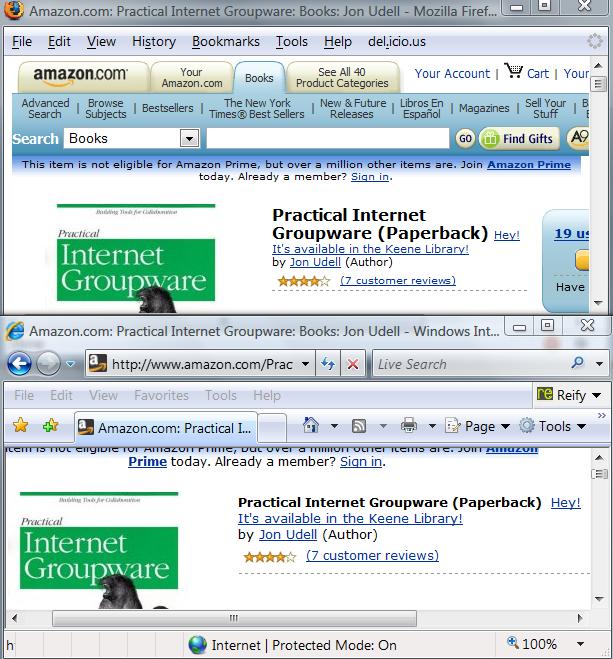
Here’s a picture of Firefox and IE running the same Greasemonkey script to do the same thing: Rewrite the Amazon page for my book to show that it’s available in the Keene Public Library.

In this case, the Greasemonkey support in IE is provided by Reify Software’s Turnabout. There have been several Greasemonkey-for-Internet-Explorer projects. This is the one that Chris Wilson recommended in my interview with him. What Chris particularly liked about this implementation was the fact that it comes in two versions: basic and advanced. If you download the basic version it only runs a small set of scripts that the Reify folks have blessed. You have to download the advanced version in order to be able to install other scripts, such as my LibraryLookup script.

I realize that relatively few IE users are likely to run Turnabout, just as relatively few Firefox users run Greasemonkey. But a small fraction of IE’s large share is still a healthy number, and I’d like to do what I can to encourage interesting, important, and of course safe and responsible uses of this technology.


Notes for adapters

If you want to adapt this script to work with another library that uses the Innovative catalog, like my Keene library does, it’s easy, just change this:

var libraryBaseURL = 'http://ksclib.keene.edu';
var libraryName = 'Keene';

to, in the case of the Kings County libraries around Seattle:

var libraryBaseURL = 'http://catalog.kcls.org';
var libraryName = 'Kings County';

If you want to adapt this script to work with one of the other catalog systems supported by the LibraryLookup bookmarklet generator, you can use that page as a guide to forming the necessary queries. You’ll also need to inspect the responses to those queries for text that, when matched, indicates a successful query.

Notes for developers

Here’s what I learned when I converted my script so that it works identically in Greasemonkey and Firefox.

XPath. As noted on Turnabout’s page for developers, you can’t use XPath to perform structured searches of web pages. In the original script, I used Firefox’s XPath feature to locate the title of the book in the Amazon page, in order to be able to append a message to that title if the book turns out to be available in the library. In the new version I rely on more basic capabilities: searching the DOM (document object model) using the getElementsByTagName method, and then scanning the found subset for the element with a particular class name.

AddEventListener. In the original script I used this advanced feature to asynchronously notify my script that the call to the OCLC’s xISBN service had completed. The feature unsupported in IE. In this particular case, though, my use of it was gratuitous, and made my script more complicated than it needed to be. Why’d I do that? I think the idea was simply to explore what was possible with AddEventListener. In any event, Greasemonkey’s encapsulation of the core AJAX component, XMLHTTPRequest, was all that was really needed. And Turnabout emulates that same encapsulation.

Redirection. There was one glitch with Turnabout’s GM_xmlhttpRequest, however. The original URL I was using for the OCLC xISBN service was http://labs.oclc.org/xisbn/. That URL now redirects to http://old-xisbn.oclc.org/webservices/xisbn/, but Turnabout doesn’t follow the redirect so I had to encode the latter URL in the script to make it work in both browsers.

Debugging. Reify’s page for developers points to the Microsoft Script Debugger. I installed it, and I’m able to debug other scripts using it, but haven’t figured out how to get it to debug Turnabout scripts.

A conversation with Hugh McGuire about LibriVox

LibriVox is a volunteer project to make great books (specifically those out of copyright) available to everyone as free audiobooks. Launched in August 2005 by Hugh McGuire, a Montreal-based writer and engineer, LibriVox has become a vibrant community of people who are passionate about books, and about recording them to share with the world. In March alone, LibriVox added 70 new titles to its catalog. Building on Project Gutenberg and related projects such as Distributed Proofreaders, LibriVox has achieved critical mass and continues to build momentum.

In this week’s ITConversations podcast, Hugh McGuire discusses the origins of LibriVox, its organic growth, and its distinctive architecture of participation. Central to the philosophy of the project is the idea that readers come first. And in this case, that means the people who produce the audiobooks. For an average book-lover, who may have no prior experience with the technologies of digital audio or with the art of reading books aloud, it’s no small challenge to make a good recording of a chapter of a book. LibriVox respects the efforts of these fledgling audiobook creators, and organizes itself to protect and encourage them. As you’ll see (and hear) if you check out the LibriVox catalog, the results have been impressive.

By the way, as a result of our conversation I realized that the LibriVox catalog pages lacked RSS feeds for convenient downloading of whole books into podcatchers, so I wrote a little script to create them. I’m happy to report that the script is now in use, and RSS feeds are being phased in to LibriVox catalog pages. Cool!

Darwin’s rhetorical strategy

While we’re on the subject of communicating new ideas, I’ve been meaning to mention a lecture I heard while on a bike ride last spring, when I was sampling the Biology 1B course in the Berkeley webcast series. It was the introductory lecture for the evolution section of the course, taught by Montgomery Slatkin. The second half of the lecture focuses on Darwin’s On the Origin of Species — and in particular, on the rhetorical strategy in the early chapters.

Darwin, says Slatkin, was like a salesman who finds lots of little ways to get you to say yes before you’re asked to utter the big yes. In this case, Darwin invited people to affirm things they already knew, about a topic much more familiar in their era than in ours: domestic species. Did people observe variation in domestic species? Yes. And as Darwin piles on the examples, the reader says, yes, yes, OK, I get it, of course I see that some pigeons have longer tail feathers. Did people observe inheritance? Yes. And again, as he piles on the examples, the reader says yes, yes, OK, I get it, everyone knows that that the offspring of longer-tail-feather pigeons have longer tail feathers.

By the time Darwin gets around to asking you to say the big yes, it’s a done deal. You’ve already affirmed every one of the key pillars of the argument. And you’ve done so in terms of principles that you already believe, and fully understand from your own experience.

It only took a couple of years for Darwin to formulate the idea of evolution by natural selection. It took thirty years to frame that idea in a way that would convince other scientists and the general public. Both the idea, and the rhetorical strategy that successfully communicated it, were great innovations.

Several comments on yesterday’s item pointed out that you can’t get ahead of the curve, that early adopters are by definition a minority, that the cool new stuff will transfer from the elite to the masses in due time, and that fun, useful, and compelling products will be the vector for that transfer.

I agree with all that. At the same time, I believe there are world-changing ideas in the air, that those ideas can take root in many minds, and that if they do, lots of people will start to influence the technology pipeline in healthy ways.

How do you sell those ideas? Darwin’s rhetorical strategy provides a great example.

Talking to everyone: the framing of science and technology

In an item that asks How big is the club?, Tim Bray writes:

We who read (and write) blogs and play with the latest Internet Trinkets (and build them) have been called an echo chamber, a hall of mirrors, a teeny geeky minority whose audience is itself.

Very true. What’s more, I believe this tribe is, over time, growing farther away from the rest of the world. That’s happening for an interesting and important reason, which is that the tools we are building and using are accelerating our ability to build and use more of these tools. It’s a virtuous cycle in that sense, and it’s the prototype for methods of Net-enabled collaboration that can apply to everyone.

But for the most part, we’re not crossing the chasm with this stuff. I’ve thought, written, and spoken a lot about this issue lately. It’s why I’m reaching out to public radio, why I’ve been speaking at conferences other than the ones frequented by my geek tribe, and why I am working for a company whose products reach hundreds of millions of people.

How do you talk to everyone about the transformative benefits of the technologies we’re so excited about, in ways that don’t make people flip the bozo switch and tune you out? How do you tell stories that make the benefits of the technology come alive for people, in ways they can understand, without overwhelming them with technical detail, but at the same time without dumbing down your explanation of the technology?

It’s a huge challenge, and not just for us. As those of you who sample the scientific blogosphere will know, the publication of this brief commentary in Science, reprised here in the Washingon Post, was a bombshell that triggered a huge debate about how, or even whether, scientists should try to frame the stories they tell about science in order to connect with mainstream audiences.

I’m not a scientist myself, and I won’t presume to try to summarize what scientists are saying to one another about the Nisbet/Mooney commentary in Science. But I will observe that it has provoked intense passion on all sides. At some point, I hope that “our tribe” will find itself similarly energized by a discussion of how to communicate beyond the borders of the tribe.