Surprise! Your Facebook visibility isn’t what you thought it was.

I’ve long wanted to be able to add Facebook to the list of sources that my elmcity service queries for local event information. It was never possible before, but the recent changes to the Facebook API (and terms of service) prompted me to take another look.

At first glance, it seems doable. Here are some sample queries:

http://elmcity.info/fb_events?location=keene,nh

http://elmcity.info/fb_events?location=ann arbor, mi

http://elmcity.info/fb_events?location=portsmouth,nh

You can see what turns up for your town by swapping in your city and state. A lot of the events are public and could reasonably be included in a citywide aggregation. But then there are ones like this:

SURPRISE Lantheaume Baby Shower
1000 Market Street, Portsmouth, NH 03801
2010-06-26T20:00:00+0000

Clearly this baby shower should not appear on a citywide public calendar. Why does search find it? Let’s look at the data about this event that’s visible to the world:

{ “id”: “314667046847”,
“owner”: {
“name”: “Jesse Barnes”,
“id”: “11000551”},
“name”: “SURPRISE Lantheaume Baby Shower”,
“description”: “Baby \”Ox\” is on his or her way! Come and celebrate with the mom-to-be and her closest friends and family! Please remember to bring your decorated onesie so that we can display them for Kris. \n\nLook on this site for additional details that are still being determined. “,
“start_time”: “2010-06-26T20:00:00+0000”,
“end_time”: “2010-06-26T23:00:00+0000”,
“location”: “1000 Market Street, Portsmouth, NH 03801”,
“privacy”: “CLOSED”,
“updated_time”: “2010-04-02T15:01:10+0000”}

When you create a private event, there are three options:

Open: Anyone can see this Event and its content.

Closed: Anyone can see this Event, but its content is only shown to guests.

Secret: Only people who are invited can see this Event and its content.

Clearly Jesse should have marked this event Secret, not Closed. Until very recently, an error like that would be unlikely to result in an embarrassing information leak. But now things have changed, and people are going to start learning harsh lessons about the visibility of their Facebook stuff.

I don’t see any way to teach my service to exclude events that people marked as Closed because they thought it meant Secret. So I guess elmcity’s Facebook feature is going to have to wait until those lessons are learned.

ottawatrash.ca: Nice! Now let’s make it unnecessary

Kingsley Idehen pointed me to this nice little Ottawa Trash Schedule app, based on a set of iCalendar feeds derived by Shawn Hooper from a set of PDF files published by the city.

These iCalendar feeds were Shawn’s contribution to the Open Data Ottawa Hackfest. In a letter to the city councillors Shawn writes:

If you are not yet familiar with the topic of Open Data, the basic idea is that information should be made available in standard formats that can be read by a variety of computer programs. This data should be available for use by the public, without restrictions.

For example, the City currently publishes its Garbage Collection Calendar as a PDF file on its website. Although PDF files are a popular format in which to present data, they are not open. All you can do with a PDF-based calendar is look at it, or print it.

An open version of this same calendar would be, in its simplest form, a list of dates on which garbage collection would occur and which types of garbage and recycling are collected on those dates. Although not as visually appealing as the current PDF calendar, this list of dates can be read by many different pieces of software to provide value-added services such as sending reminders to your cell phone or e-mail address the night your recycling should be put out, or adding the collection schedule to your calendar software of choice.

In addition to http://www.ottawatrash.ca, another service that can work with these feeds is the Ottawa hub of the elmcity calendar syndication service.

It’s great to see these kinds of things happening. But we shouldn’t depend on inspired citizen activism to make them happen. The publication of data is a routine act that will increasingly be performed by individuals, groups, non-profit and for-profit organizations, governments. The default setting, in almost all cases, involves publishing that data in formats that people can read but that machines can’t. We’ve got to flip the default setting. Publication of machine-readable formats along with human-readable formats has to be the new default.

In my own town, Keene, NH, I’m delighted to be able to point to an example. Last year, the schedule for hazardous household waste collection was only available as a PDF file. But now it’s in iCalendar. The next collection date shows up on the combined calendar: Saturday, May 8. It got there by way of the city’s calendar which is available both as a human-readable HTML page and an iCalendar feed available for syndication. So simple, so useful.

Talking with Herbert Van de Sompel about a web that remembers

The endnotes for the book I’m now reading are a mixture of conventional citations and URLs. The former, expressed as publisher, book or journal title, author, date, and page number, seem not nearly so useful as the latter. Would you rather visit the library or click a link? But nowadays cited URLs also come with disclaimers like this: Accessed July 27, 2009. It might be inconvenient to verify a conventional citation in its original context, but I know that if I had to, I could. There’s no guarantee that I’ll be able to revisit a cited URL. Even if the page itself has not gone missing, there’s no way to know that the page I view on April 22, 2010 is the same one that the author viewed on July 27, 2009.

This anecdote was the springboard for my conversation with Herbert Van de Sompel about Memento, a proposed (and prototyped) method for adding the dimension of time to the web’s existing mechanism for content negotiation.

That mechanism has, to be sure, not taken the world by storm. The most common scenario involves a browser telling a multilingual server that its user prefers to read, say, French. A paper about Memento published last fall walks through the HTTP protocol that enables this negotiation. Odds are, though, that you’ve never seen this actually happen. It’s much more likely for a multilingual website to present itself as “a multiplication of language-specific mini-sites, instead of thinking of it as one site, with one set of URIs, only with different versions and languages available.” Wikipedia, for example, works that way.

The quote comes from a 2006 W3C article, Content Negotiation: Why it is useful, and how to make it work. The article blames the awkwardness of Apache’s implementation of the protocol (since corrected):

For a long time, with the most popular negotiation-enabled Web server (the ubiquitous apache), failed negotiation (for instance, a reader of french being proposed only english and german variants of a document), resulted in a nasty “406 not acceptable” HTTP error, which, while technically conforming to HTTP, failed to follow the recommendation that a server should try to serve some resource rather than an error message, whenever possible.

Is there any reason to suppose that time negotiation will succeed where language negotiation has so far mainly failed? That’s a hard question, and one I wish I’d thought to ask Herbert in the interview, but maybe we can continue the dialogue here.

Meanwhile, the fact that content negotiation is tricky to get right doesn’t invalidate the core of the Memento proposal. Time is fundamental, the web could have a reliable memory, and if we can build such a memory into the fabric of the web the benefits will be profound.

Examples are everywhere. Consider mediabugs.org. Founded by Scott Rosenberg, whom I interviewed last week, the site is dedicated to finding and fixing errors in media reports. A few days ago, the first bug was marked Closed:Corrected. The mediabugs.org bug page initially said:

Listing for Josh Kornbluth’s show “Andy Warhol: Good for the Jews?” says the show is at the Jewish Community Center in SF, but actually it’s at The Jewish Theater in the Theater Artaud building.

There’s a comment pointing out the error but it’s still showing with the wrong info on the Express home page.

And later:

This is fixed now!

If you visit the original news report, though, there’s no record of the correction. It’s no big deal in this particular case, but media organizations should want to be transparent about when and how they alter published items.

Likewise governments. The Citability project aims to account for the history of changes made to items published on government websites. As with mediabugs.org, the approach will initially require third-parties to monitor and chronicle the changes.

The Memento idea is that media organizations, governments, and other kinds of web publishers will be accountable for their own change histories.1 And they’ll do so in a standard way, so that people viewing these sites in browsers can straightforwardly say: “Show me this page as it existed on July 7, 2009.”

This is wildly ambitious, but I applaud the ambition. Every since I made the Heavy Metal umlaut screencast, I have imagined what it would be like to scroll back and forth along the timelines of evolving web pages. At one point Andy Baio sponsored a contest to write a script that would animate the revision history for any Wikipedia page, and I made a screencast of Dan Phiffer’s solution.

Clearly we want this. Will it be hard to arrive at a well-known and well-used standard? Sure. Is it worth doing? Absolutely.


1 Third-party watchdogs will often be needed, of course. We’d like to trust self-reported change histories, but we’d also like to verify them. Even so, third parties shouldn’t be the only mechanisms. Self-reported histories should exist.

PowerPivot + Gridworks = Wow!

While reading Jonathan Safran Foer’s Eating Animals I got to wondering about global and national trends in the production of meat and fish. He mentions, for example, that US chicken production is way up over the past few decades. How do we compare to other countries? Here’s how I answered that question:

The screenshot is of Excel 2010 augmented by PowerPivot, the business intelligence add-in that’s the subject of last week’s Innovators show with John Hancock.

Using the same spreadsheet, I asked and answered some questions about fish production:

What’s the worldwide trend for capture versus aquaculture?

How much fish are certain countries capturing?

On a per capita basis?

How much fish are certain countries growing?

On a per capita basis?

The book raises very different kinds of questions. How should we treat the animals we eat? How much land should we use to raise crops that feed the animals we eat, instead of raising crops that feed people directly? We won’t find the answers to these kinds of questions in spreadsheets. But what I hope we will find — in spreadsheets, in linked databases, in data visualizations — is a framework that will ground our discussion of these and many other issues.

In order to get there, a number of puzzle pieces will have to fall into place. The exercise that yielded this particular spreadsheet led me to explore two that I want to discuss. One is PowerPivot. It’s a tool that comes from the world of business intelligence, but that I think will appeal much more widely as various sources of public data come online, and as various kinds of people realize that they want to analyze that data.

The other piece of this puzzle is Freebase Gridworks, which I’m testing in pre-release. The exercise I’ll describe here is really a collaboration involving Excel, PowerPivot, and Gridworks, in a style that I think will become very common.

My starting point, in this case, was data on fish and meat production from the Food and Agriculture Organization, via a set of OData feeds in Dallas. These series report total production by country, but since I also wanted to look at per-capita production I added population data from data.un.org to the mix.

To see how Gridworks and Excel/PowerPivot complement one another, let’s look at two PowerPivot tables. First, population:

Second, fish production:

PowerPivot is relational. Because these tables are joined by the concatenation of Country and Year, the PerCapita value in the production table is able to use that relationship. Here is the formula for the column:

=[value] / RELATED(‘population'[Pop in Millions])

In other words, divide what’s in the Value column of the production table by what’s in the Pop in Millions table for the corresponding Country and Year. This declarative style, available in PowerPivot, is vastly more convenient that Excel’s procedural style which requires table-flattening and lookup gymnastics.

But here’s the thing. In the world of business intelligence, the tables you feed to PowerPivot are likely to come from relational databases with strong referential integrity. In the realm of open-ended data mashups from a variety of sources, that’s not likely. For example, the Food and Agriculture series has rows for United States, but the population series has rows for United States of America. You have to reconcile those names before you can join the tables.

Enter Gridworks. To feed it the list of names to reconcile, I took this population table from Excel:

And stacked it on top of this food production table from Excel:

The only column that lines up is the Country column, but that’s all that mattered. I read the combined table into Gridworks, and told it to reconcile that column against the Freebase type country:

On the first pass, 8146 rows matched and 868 didn’t.

I focused on the rows that didn’t match.

And then I worked through the list. To approve all the rows with British Indian Ocean Territory, I clicked on the double checkmark shown here:

Sometimes the reconciled name differs:

Sometimes Gridworks doesn’t know what match to propose. One problem name that came up was Côte d’Ivoire, not Côte d’Ivoire, which is something that happens commonly when the proper character encoding is lost during data transfer. In that case, you can search Freebase for a match.

Proceeding in this manner I quickly reduced the set of unmatched names until I got to one that should not match.

Should it be Belgium? Luxembourg? Actually neither. At this point I realized that the population table was a mixture of country names and region names. I wanted to exclude the latter. So I matched up everything else, and was left with 202 rows that had names like Belgium/Luxembourg, Australia/New Zealand, Northern America, Western Africa, and World. When I selected just the matching rows for export, these unmatched rows were left on the cutting room floor.

I split the tables apart again, took them back into the Excel/PowerPivot environment, and found that things still didn’t quite work. In cases where the original and reconciled names differed, Gridworks was exporting the original name (e.g. Iran, Islamic Republic of) rather than the reconciled name (e.g., Iran). To export the reconciled names, I added a new column in Gridworks, based on the country column, and used a Gridworks expression to display the reconciled name.

There will be much more to say about PowerPivot and Gridworks. Each, on its own, is an amazing tool. But the combination makes my spidey sense tingle in a way I haven’t felt for a long time.

The voice of Frederick Brooks

Part of my weekend bicycling sound track was a 2007 talk by Frederick Brooks, author of the seminal book The Mythical Man-Month. I found it on John D. Cook’s blog, which sums up the themes of the talk and of Brooks’ new book, The Design of Design. Here, amusingly, is the result of a Worldcat Find a copy in the library for that book:

Something tells me that inter-library loan may not work in this case!

Anyway, as noted in John D. Cook’s blog, the theme of the talk (and of the book) is how to maintain the conceptual integrity of a large and complex design. Although Brooks fiercely opposes the waterfall model, he asserts that you do need to have a single mind — or pair of minds — running the show.

Assuming that’s the case, how do you organize the work? At one point, reflecting on the task of reinventing the air traffic control system, Brooks argues that the open source model could not produce a system he’d trust. Challenged on that point in the Q and A, he allowed that the Linux development process has cathedral-like as well as bazaar-like aspects.

What if you’re not part of the aristocracy? What motivates you to get out of bed in the morning and go to work? Here Brooks makes a wonderful point. The many who implement designs can have as much scope for creative expression as the few who specify the designs. If we fail to teach and celebrate that, shame on us.

I also loved Brooks’ take on remote collaboration. When he looked at the literature he found it was always about tools for document-sharing and telepresence, never about the biological, social, and organizational issues that such tools might (or might not) address. He cites, by way of example, a separated team of engineers who have easy access to a world-class videoconferencing system but prefer to use screensharing in combination with a voice-only call.

This happens a lot, and we don’t yet understand all the reasons why. Clearly the emotional bandwidth of the voice channel dwarfs its network bandwidth. I am starting to wonder if that’s because mirror neurons can sync up over the voice channel. In any event, having read The Mythical Man-Month so long ago, it was delightful to finally hear the voice of Frederick Brooks.

The “it just works” kind of efficiency

I’m editing an interview with John Hancock, who leads the PowerPivot charge and championed its support of OData. During our conversation, I told him this story about how pleased I was to discover that OData “just works” with PubSubHubbub. His response made me smile, and I had to stop and transcribe it:

Any two teams can invent a really efficient way to exchange data. But every time you do that, every time you create a custom protocol, you block yourself off from the effect you just described. If you can get every team — and this is something we went for a long time telling people around the company — look, REST and Atom aren’t the most efficient things you can possibly imagine. We could take some of your existing APIs and our engine and wire them together. But we’d be going around and doing that forever, with every single pair of things we wanted to wire up. So if we take a step back and look at what is the right way to do this, what’s the right way to exchange data between applications, and bet on a standard thing that’s out there already, namely Atom, other things will come along that we haven’t imagined. Dallas is a good example of that. It developed independently of PowerPivot. It was quite late in the game before we finally connected up and started working with it, but we had a prototype in an afternoon. It was so simple, just because we had taken the right bets.

There are, of course, many kinds of efficiency. Standards like Atom aren’t most efficient in all ways. But they are definitely the most efficient in the “it just works” way.

Jazz in Madison, Wisconsin: A case study in curation

The elmcity project’s newest hub is called Madison Jazz. The curator, Bob Kerwin, will be aggregating jazz-related events in Madison, Wisconsin. Bob thought about creating a Where hub, which merges events from Eventful, Upcoming, and Eventbrite with a curated list of iCalendar feeds. That model works well for hyperlocal websites looking to do general event coverage, like the Falls Church Times and Berkeleyside. But Bob didn’t want to cast that kind of wide net. He just wanted to enumerate jazz-related iCalendar feeds.

So he created a What hub — that is, a topical rather than a geographic hub. It has a geographic aspect, of course, because it serves the jazz scene in Madison. But in this case the topical aspect is dominant. So to create the hub, Bob spun up the delicious account MadisonJazz. And in its metadata bookmark he wrote what=JazzInMadisonWI instead of where=Madison,WI.

If you want to try something like this, for any kind of local or regional or global topic, the first thing you’ll probably want to do — as Bob did — is set up your own iCalendar feed where you record events not otherwise published in a machine-readable way. You can use Google Calendar, or Live Calendar, or Outlook, or Apple iCal, or any other application that publishes an iCalendar feed.

If you are very dedicated, you can enter invidual future events on that calendar. But it’s hard, for me anyway, to do that kind of data entry for single events that will just scroll off the event horizon in a few weeks or months. So for my own hub I use this special kind of curatorial calendar mainly for recurring events. As I use it, the effort invested in data entry pays recurring dividends and builds critical mass for the calendar.

Next, you’ll want to look for existing iCalendar feeds to bookmark. Most often, these are served up by Google Calendar. Other sources include Drupal-based websites, and an assortment of other content management systems. Sadly there’s no easy way to search for these. You have to visit websites relevant to the domain you’re curating, look for the event sections on websites, and then look for iCalendar feeds as alternatives to the standard web views. These are few and far between. Teaching event sponsors how and why to produce such feeds is a central goal of the elmcity project.

When a site does offer a Google Calendar feed, it will often be presented as seen here on the Surrounded By Reality blog. The link to its calendar of events points to this Google Calendar. Its URL looks like this:

1. google.com/calendar/embed?src=surroundedbyreality@gmail.com

That’s not the address of the iCalendar feed, though. It is, instead, a variant that looks like this:

2. google.com/calendar/ical/surroundedbyreality@gmail.com/public/basic.ics

To turn URL #1 into URL #2, just transfer the email address into an URL like #2. Alternatively, click the Google icon on the HTML version to add the calendar to the Google Calendar app, then open its settings, right-click the green ICAL button, and capture the URL of the iCalendar feed that way.

Note that even though a What hub will not automatically aggregate events from Eventful or Upcoming, these services can sometimes provide iCalendar feeds that you’ll want to include. For example, Upcoming lists the Cafe Montmartre as a wine bar and jazz cafe. If there were future events listed there, Bob could add the iCalendar feed for that venue to his list of MadisonJazz bookmarks.

Likewise for Eventful. One of the Google Calendars that Bob Kerwin has collected is for Restaurant Magnus. It is also a Eventful venue that provides an iCalendar feed for its upcoming schedule. If Restaurant Magnus weren’t already publishing its own feed, the Eventful feed would be an alternate source Bob could collect.

For curators of musical events, MySpace is another possible source of iCalendar feeds. For example, the band dot to dot management plays all around the midwest, but has a couple of upcoming shows in Madison. I haven’t been able to persuade anybody at MySpace to export iCalendar feeds for the zillions of musical calendars on its site. But although the elmcity service doesn’t want to be in the business of scraping web pages, it does make exceptions to that rule, and MySpace is one of them. So Bob could bookmark that band’s MySpace web page, filter the results to include only shows in Madison, and bookmark the resulting iCalendar feed.

This should all be much more obvious than it is. Anyone publishing event info online should expect that any publishing tool used for the purpose will export an iCalendar feed. Anyone looking for event info should expect to find it in an iCalendar feed. Anyone wishing to curate events should expect to find lots of feeds that can be combined in many ways for many purposes.

Maybe, as more apps and services support OData, and as more people become generally familiar with the idea of publishing, subscribing to, and mashing up feeds of data … maybe then the model I’m promoting here will resonate more widely. A syndicated network of calendar feeds is just a special case of something much more general: a syndicated network of data feeds. That’s a model lots of people need to know and apply.

How to create a Pivot visualization of a WordPress blog

I’ve posted the Python script I used to make the Pivot visualization of this blog. I need to set it aside for now and do other things, but here’s a snapshot of the process for my future self and for anyone else who’s interested.

Using deepzoom.py to create Deep Zoom images and collections

I’m using this Python component to create Deep Zoom images and collections. I made the following changes to it:

1. tile_size=256 (not 254) at line 59, line 160, and line 224

2. source_path.name instead of source_path at line 291

3. destination + '.xml' instead of destination at line 341

Let’s assume that Python is installed, along with the Python Imaging Library, and that your current directory contains the files 001.jpg, 002.jpg, and 003.jpg:

001.jpg
002.jpg
003.jpg

For each image file, you could run deepzoom.py thrice from the command line, like so:

python deepzoom.py -d 001.xml 001.jpg
python deepzoom.py -d 002.xml 002.jpg
python deepzoom.py -d 003.xml 003.jpg

My script doesn’t actually do it that way, it enumerates JPEGs and instantiates deepzoom.py’s ImageCreator object once for each. But either way, for each JPEG you end up with a DZI (Deep Zoom Image) package that consists of (for 001.jpg):

  • A settings file: 001.xml
  • A subdirectory: 001_files
  • More subdirectories (named 0, 1, etc.) inside 001_files
  • JPG files inside those subdirectories

Now, in this case, the current directory looks like this (using -> to mark additions):

001.jpg
-> 001.xml
-> 001_files
002.jpg
-> 002.xml
-> 002_files
003.jpg
-> 003.xml
-> 003_files

To build a collection, do something like this in Python:

from deepzoom import *
images = ['001.xml','002.xml', '003.xml']
creator = CollectionCreator()
creator.create(images, 'dzc_output')

Now the current directory looks like:

001.jpg
001.xml
001_files
002.jpg
002.xml
002_files
003.jpg
003.xml
003_files
-> dzc_output.xml
-> dzc_output_files

The Pivot collection’s CXML file will refer to dzc_output.xml, like so:

<Items ImgBase="dzc_output.xml">

Using IECapt to grab screenshots

This tool uses Internet Explorer, so only works on Windows. There is also CutyCapt for WebKit, which I haven’t tried but would be curious to hear about.

Here’s an example of the IECapt command line I’m using:

iecapt –url=http://blog.jonudell.net/… –delay=1000 –out=tmp.jpg

The result in most cases is a tall skinny JPEG, because it renders the whole page — which can be very long — before imaging it. When I ran it over a 600-item collection, it hung a couple of times because of JavaScript errors. So I went to Internet Options->Browsing in IE, checked Disable script debugging, and unchecked Display a notification about every script error.

Using ImageMagic to crop screenshots

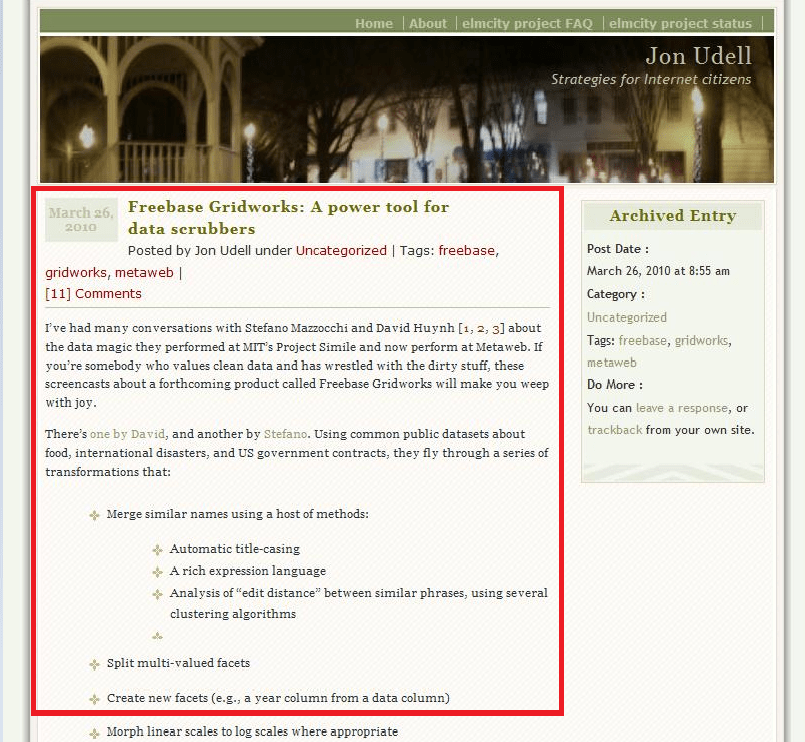
Here’s a picture of an image produced by IECapt, overlaid with a rectangle marking where I want to crop:

The rectangle’s origin is at x=30 and y=180. Its width is 530 pixels, and height 500. Here’s the ImageMagick command to crop a captured image in tmp.jpg into a cropped image in 001.jpg:

convert -quality 100 -crop 530×500+30+180 -border 1×1 -bordercolor Black tmp.jpg 001.jpg

I’m writing this down here mainly for myself. ImageMagic can do everything under the sun, but it always takes me a while to dig up the recipe for a given operation.

Parsing the WordPress export file

I found to my surprise that WordPress currently exports invalid XML. So the script starts with a search-and-replace that looks for this:

xmlns:wp="http://wordpress.org/export/1.0/"

And replaces it with this:

xmlns:wp="http://wordpress.org/export/1.0/"
xmlns:atom="http://www.w3.org/2005/Atom"

Then it walks through the items in the Atom feed, extracting the various things that will become Pivot facets. For the description, it tries to parse the content:encoded element as XML, and find the first paragraph element within it. If that fails, it just treats the element as text and grabs the beginning of it.

Weaving the collection

There are two control files that need to be synchronized. First, there’s dzc_output.xml, for the Deep Zoom collection. It has elements like this:

<I Id=”596″ N=”596″ Source=”2245.xml”>

Then there’s pivot.cxml which drives the visualization. It has elements like this:

<Item Id="596" Img="#596" 
  Name="Freebase Gridworks: A power tool for data scrubbers" 
  Href="http://blog.jonudell.net/2010/03/26/...
<Description><![CDATA[
I've had many conversations with Stefano Mazzocchi and David Huynh [1, 2, 3] 
about the data magic they performed at MIT's Project Simile and now perform 
at Metaweb. If you're somebody who values clean data and has wrestled with 
the dirty stuff, these screencasts about a forthcoming product called 
Freebase Gridworks will make you weep with joy.
]]></Description>
<Facets>
  <Facet Name="date">
    <DateTime Value="2010-03-26T00:00:00-00:00" />
  </Facet>
<Facet Name="tag">
<String Value="freebase" />
<String Value="gridworks" />
<String Value="metaweb" />
</Facet>
  <Facet Name="comments">
    <Number Value="24" />
  </Facet>
</Facets>
</Item>

In this example, Source="2245.xml" in dzc_output.xml refers to a Deep Zoom image whose name comes from the WordPress post_id for that entry, which is:

<wp:post_id>2245</wp:post_id>

But Id="596", which is the connection between dzc_output.xml and pivot.cxml, comes from a counter in the script that increments for each item processed. I don’t know why the numbering of items in the WordPress export file is sparse, but it is, hence the difference.

Things to do

Here are some ideas for next steps.

1. Check the comment logic. I just noticed the counts seem odd. Maybe because I’m counting all comments instead of approved comments?

2. Use HTML Tidy to ensure that item content will parse as XML, and then count various kinds of elements within it: tables, images, etc.

2. Use APIs of various services — Twitter, bit.ly, etc. — to count reactions to each item.