A conversation with John Lam about the dynamic language runtime, Silverlight, and Ruby

On the Friday before MIX, I recorded this podcast with John Lam. He’s the creator of RubyCLR and, as it happens, he joined Microsoft on the same day I did. John’s been running silent since then, but no longer. In this conversation we discuss the dynamic language runtime (DLR), a generalization of Jim Hugunin’s work on IronPython, and a quartet of languages that make use of its services. They include a refactored IronPython, a new managed implementation of JavaScript, Visual Basic, and a new implementation of Ruby which, unlike RubyCLR, does not rely on the C-based Ruby runtime.

We also explore the ability of these languagues to run inside Silverlight-equipped browsers. Key benefits include cross-language interoperability, access to Silverlight’s subset of the .NET Framework, and more broadly, a new approach to writing ambitious browser-based software.

Among other things, that approach restores and reinvigorates a capability that’s been around for a decade. I can well remember, back in the day, running ActiveState’s Perl as a scripting engine inside Internet Explorer. It made for an interesting demo, but I never wound up using it for anything and I never heard of anyone else who did either. In retrospect I think there were two reasons why. First, the notion of running serious amounts of software inside the browser hadn’t taken hold. Now it clearly has.

Second, it’s risky to deploy a standalone language runtime — like Perl’s, or Python’s or Ruby’s — inside the browser. But the Silverlight languages are nicely sandboxed because they ride atop the dynamic language runtime, and it doesn’t rely on any privileged operations.

The DLR-based version of Ruby isn’t quite ready, and it doesn’t yet run Rails. That’s the acid test because, as John says, Rails uses every metaprogramming trick in the book. But the intent is to get it working, and I think that’s the kind of thing that’ll open up possibilities nobody can fully predict. The AJAX model has succeeded despite the fact that JavaScript arguably isn’t well suited to programming in the medium-to-large. DLR-based implementations of Ruby and Python should be better suited to that purpose. What’s more, in this environment they can not only interoperate with each other — so you can use a Python library directly from Ruby, or vice versa — but with statically typed languages like C#. So they can leverage capabilities that depend on static typing, like LINQ (language integrated query).

It’s hard to talk about a topic like this without sounding hopelessly geeky. “Look, I’ve got IronPython using ActiveRecord and LINQ, all inside the Safari browser on my Mac, and I’m debugging it in Visual Studio remotely from my PC.” These kinds of scenarios are in fact becoming possible, and those of us who appreciate all of these components individually will rightly pronounce it cool that they can come together in these ways.

But it’s more than a parlor trick, though it’s hard to explain why that’s so, or why anyone other than a code monkey and dynamic language junkie should care. In view of that challenge, I referred at the beginning of this podcast to my interview with Avi Bryant and Andrew Catton about Dabble DB, which is built on top of the Squeak implementation of Smalltalk. Dabble DB surfaces the virtues of the underlying dynamic language engine — direct manipulation, always-live data, continuous refinement — to people who create and use Dabble DB applications. Yes, dynamic languages can make programmers more productive. But when used properly, they can also produce software that makes everyone more productive for the same reasons.

We’ve seen the proof. JavaScript is a dynamic language, and it’s at the heart of a new breed of web applications that make things easier for everyone. I hope that expanding the range of dynamic languages available in the browser, while at the same time basing them on a common runtime, will accelerate the trend.
A conversation with Art Rhyno about library information systems and community newspapers

Art Rhyno is a systems librarian at the University of Windsor, in Ontario, Canada. He’s a self-proclaimed library geek with a passion for innovative ways to make library information systems more useful. In this week’s ITConversations podcast we discuss the themes that emerged from the recent code4lib conference. We also talk about Art’s ongoing interest in making connections between systems that live on the desktop and systems that live in the cloud. For background on his ideas in this area, see this item on his experiments with XML pipelines.

Art and his wife are also the owners of the Essex Free Press, a weekly community newspaper that’s been published since 1896. We reflect on the mission of local newspapers, and on how emerging Internet technologies can support and extend that mission.

Web standards and IE at MIX

As the MIX 07 show approaches (I’ll be there Sunday/Monday, then giving a talk at UC Berkeley on Tuesday), I’ve been focusing on what might seem like trailing-edge issues. Last night, for example, I was up way too late rewriting my cross-browser LibraryLookup script — partly to fix a bug, but partly to improve my understanding of how the two supporting technologies, Greasemonkey and Turnabout, could work together to deliver powerful capabilities to millions of people who have yet to experience those capabilities. (See below for some specific notes on Turnabout.)

Also, since I have a couple of talks upcoming, and since I prefer to make and use web-style presentations rather than PowerPoint presentations, I’ve been revisiting HTML Slidy. Here too, I’m paying close attention to cross-browser compatibility issues. After updating to the latest version of Slidy, I’m getting decent results on IE7, Firefox, and Safari.

Although the star of MIX 07 will be Silverlight, it’s important to note — as I mentioned the other day — that Silverlight is a browser-agnostic citizen of the web. Which raises the question: How is Internet Explorer’s own web citizenship coming along? There will be four MIX sessions on IE. One’s by Chris Wilson, who co-chairs the W3C HTML Working Group and whom I interviewed here. Another is by Molly Holzschlag, who is a leading web standards expert and advocate now partnering with Microsoft to advance standards and interoperability, and whom I hope to interview for a future Channel 9 podcast.

Now, more than ever, this work is critically important. It’s true that a more interoperable web is a rising tide that lifts all boats. But we’re also about to break some new ground with Microsoft Silverlight and Adobe Apollo, technologies that build on existing web standards but will also (in my opinion) lead to new ones. As the competition to create those new standards heats up, it will be crucial to ground it in cooperative agreements about the foundation they’re built on.


Notes on Turnabout:

  1. Installing scripts.
    It should be possible to right-click the link to a script, like this one, and install it that way. But that’s not working for me, and the alternative — downloading the script and installing from Turnabout’s options dialog — will be offputting for most folks.
  2. Uninstalling scripts.
    As a script developer, I’ve noticed that uninstalled scripts don’t seem to go away. In order to reliably test new versions I’ve had to completely uninstall/reinstall Turnabout.

Multitasking tradeoffs: individual versus group productivity

Lots of people are starting to question the degree to which people can, or should, multitask. For example, Scott Berkun’s recent Ignite Seattle talk was a version of an essay on the price we pay for our increasingly multitasked lifestyle. In that essay he writes:

It’s true that the hunt and intensity of multitasking can be fun — there are thrills in chasing things, physical or virtual, but most evidence shows we perform worse at all things multitasked. Despite how it feels, it appears our minds don’t work best when split this way.

Agreed. I’m lucky enough to be able to block out a lot of distractions and interruptions, and to spend an unusually large fraction of my working life in a state of flow. To the extent that I’m able to get a decent amount of quality work done, I tend to cite long periods of focused concentration as the reason why.

Even so, I’m in the habit of periodically questioning all my habits, including that one. So here’s a contrary view to consider. When I interviewed Mary Czerwinski on the subject of multitasking, interruptions, and context reacquistion, she made a fascinating observation about her teenage daughter, and tied it to some research findings. The observation was that her daughter has learned to operate in group mode, and that the groups she belongs to optimize themselves by moving tasks around to the members with the right knowledge, skill, and inclination for each task. The research finding was that although the resulting multiasking effect is suboptimal for the individuals and clearly damages their productivity, it can be the optimal way for the group to achieve its goal.

Since we don’t really have a choice about whether to multitask or not, the real issue becomes: What’s the right way to do it? The answer may be very different depending on whether you’re optimizing for individual or group productivity.

Rewriting the enriched web

When I interviewed Bill Gates at the September 2005 Professional Developers Conference, one of the topics we discussed was the just-announced WFP/E (Windows Presentation Foundation/Everywhere). Amusingly, he remarked:

…WPF/E — which they say they’re going to rename, but that’s the best they could do for now…

In the usual course of events, a Microsoft project starts out with a cool name like Indigo, and winds up with a clunky name like “Windows Communication Foundation (WCF).” This time, refreshingly, things happened the other way around. What was announced as WPF/E will now permanently be known as Silverlight. It was unveiled at the National Association of Broadcasters show, and as Tim Sneath has hinted, there will be more Silverlight-related announcements at MIX.

For now, I just want to surface an implicit connection between yesterday’s item about Reify Software’s Turnabout (Greasemonkey for IE) and Silverlight. As Tim noted:

Every XAML element can be accessed or manipulated from the same client-side JavaScript that would be used to interact with any DHTML element.

If you’ve installed the Silverlight preview, you can see an example of this dynamic interplay here — on Windows or on the Mac.

Now here’s an interesting point. Because the Silverlight DOM (document object model) is accessible from JavaScript, the same Greasemonkey-style scripts that rewrite HTML pages will be able to rewrite Silverlight inclusions.

Why might this be useful? Suppose you’re using a site that includes a Silverlight media player on a web page. You’d like to modify the player’s controls or its annotation features. A Greasemonkey-style script should be able to rewrite the player’s XAML (the Silverlight and Windows Presentation Foundation’s XML markup) just as it can rewrite the page’s HTML.

Greasemonkey unleashed a flood of creativity by enabling developers who are not the authors of web pages to enhance the behavior of those web pages in ways that can be profoundly useful. I hope we’ll see similar effects in the realm of Silverlight. And if we do, I hope they’ll enjoy the same cross-browser reach that Silverlight itself does.

Greasemonkeying with IE

I’ve long been fascinated with Greasemonkey, the Firefox extension that hosts scripts for rewriting web pages to achieve a variety of effects. I’ve written a number of these scripts. One of my favorites was this version of LibraryLookup which orchestrates a trio of services: Amazon, the OCLC’s xISBN, and my local library’s catalog.

I think these kinds of lightweight, client-side service orchestrations are interesting and important, but they haven’t been accessible to very many people. Greasemonkey appeals only to a minority of those who use Firefox, who are themselves a minority of those who browse the web. Running Greasemonkey scripts in Internet Explorer would at least enable those scripts to reach a larger minority, so I’d been meaning to explore that option and I finally got around to it.

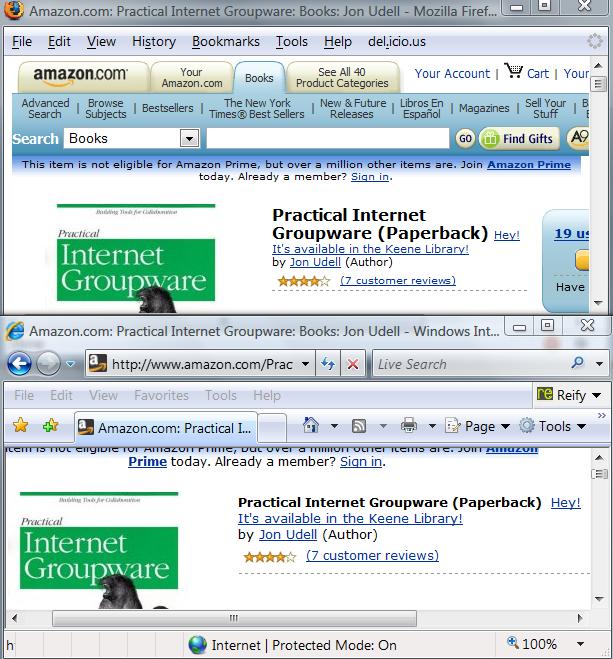
Here’s a picture of Firefox and IE running the same Greasemonkey script to do the same thing: Rewrite the Amazon page for my book to show that it’s available in the Keene Public Library.

In this case, the Greasemonkey support in IE is provided by Reify Software’s Turnabout. There have been several Greasemonkey-for-Internet-Explorer projects. This is the one that Chris Wilson recommended in my interview with him. What Chris particularly liked about this implementation was the fact that it comes in two versions: basic and advanced. If you download the basic version it only runs a small set of scripts that the Reify folks have blessed. You have to download the advanced version in order to be able to install other scripts, such as my LibraryLookup script.

I realize that relatively few IE users are likely to run Turnabout, just as relatively few Firefox users run Greasemonkey. But a small fraction of IE’s large share is still a healthy number, and I’d like to do what I can to encourage interesting, important, and of course safe and responsible uses of this technology.


Notes for adapters

If you want to adapt this script to work with another library that uses the Innovative catalog, like my Keene library does, it’s easy, just change this:

var libraryBaseURL = 'http://ksclib.keene.edu';
var libraryName = 'Keene';

to, in the case of the Kings County libraries around Seattle:

var libraryBaseURL = 'http://catalog.kcls.org';
var libraryName = 'Kings County';

If you want to adapt this script to work with one of the other catalog systems supported by the LibraryLookup bookmarklet generator, you can use that page as a guide to forming the necessary queries. You’ll also need to inspect the responses to those queries for text that, when matched, indicates a successful query.

Notes for developers

Here’s what I learned when I converted my script so that it works identically in Greasemonkey and Firefox.

XPath. As noted on Turnabout’s page for developers, you can’t use XPath to perform structured searches of web pages. In the original script, I used Firefox’s XPath feature to locate the title of the book in the Amazon page, in order to be able to append a message to that title if the book turns out to be available in the library. In the new version I rely on more basic capabilities: searching the DOM (document object model) using the getElementsByTagName method, and then scanning the found subset for the element with a particular class name.

AddEventListener. In the original script I used this advanced feature to asynchronously notify my script that the call to the OCLC’s xISBN service had completed. The feature unsupported in IE. In this particular case, though, my use of it was gratuitous, and made my script more complicated than it needed to be. Why’d I do that? I think the idea was simply to explore what was possible with AddEventListener. In any event, Greasemonkey’s encapsulation of the core AJAX component, XMLHTTPRequest, was all that was really needed. And Turnabout emulates that same encapsulation.

Redirection. There was one glitch with Turnabout’s GM_xmlhttpRequest, however. The original URL I was using for the OCLC xISBN service was http://labs.oclc.org/xisbn/. That URL now redirects to http://old-xisbn.oclc.org/webservices/xisbn/, but Turnabout doesn’t follow the redirect so I had to encode the latter URL in the script to make it work in both browsers.

Debugging. Reify’s page for developers points to the Microsoft Script Debugger. I installed it, and I’m able to debug other scripts using it, but haven’t figured out how to get it to debug Turnabout scripts.

A conversation with Hugh McGuire about LibriVox

LibriVox is a volunteer project to make great books (specifically those out of copyright) available to everyone as free audiobooks. Launched in August 2005 by Hugh McGuire, a Montreal-based writer and engineer, LibriVox has become a vibrant community of people who are passionate about books, and about recording them to share with the world. In March alone, LibriVox added 70 new titles to its catalog. Building on Project Gutenberg and related projects such as Distributed Proofreaders, LibriVox has achieved critical mass and continues to build momentum.

In this week’s ITConversations podcast, Hugh McGuire discusses the origins of LibriVox, its organic growth, and its distinctive architecture of participation. Central to the philosophy of the project is the idea that readers come first. And in this case, that means the people who produce the audiobooks. For an average book-lover, who may have no prior experience with the technologies of digital audio or with the art of reading books aloud, it’s no small challenge to make a good recording of a chapter of a book. LibriVox respects the efforts of these fledgling audiobook creators, and organizes itself to protect and encourage them. As you’ll see (and hear) if you check out the LibriVox catalog, the results have been impressive.

By the way, as a result of our conversation I realized that the LibriVox catalog pages lacked RSS feeds for convenient downloading of whole books into podcatchers, so I wrote a little script to create them. I’m happy to report that the script is now in use, and RSS feeds are being phased in to LibriVox catalog pages. Cool!

Darwin’s rhetorical strategy

While we’re on the subject of communicating new ideas, I’ve been meaning to mention a lecture I heard while on a bike ride last spring, when I was sampling the Biology 1B course in the Berkeley webcast series. It was the introductory lecture for the evolution section of the course, taught by Montgomery Slatkin. The second half of the lecture focuses on Darwin’s On the Origin of Species — and in particular, on the rhetorical strategy in the early chapters.

Darwin, says Slatkin, was like a salesman who finds lots of little ways to get you to say yes before you’re asked to utter the big yes. In this case, Darwin invited people to affirm things they already knew, about a topic much more familiar in their era than in ours: domestic species. Did people observe variation in domestic species? Yes. And as Darwin piles on the examples, the reader says, yes, yes, OK, I get it, of course I see that some pigeons have longer tail feathers. Did people observe inheritance? Yes. And again, as he piles on the examples, the reader says yes, yes, OK, I get it, everyone knows that that the offspring of longer-tail-feather pigeons have longer tail feathers.

By the time Darwin gets around to asking you to say the big yes, it’s a done deal. You’ve already affirmed every one of the key pillars of the argument. And you’ve done so in terms of principles that you already believe, and fully understand from your own experience.

It only took a couple of years for Darwin to formulate the idea of evolution by natural selection. It took thirty years to frame that idea in a way that would convince other scientists and the general public. Both the idea, and the rhetorical strategy that successfully communicated it, were great innovations.

Several comments on yesterday’s item pointed out that you can’t get ahead of the curve, that early adopters are by definition a minority, that the cool new stuff will transfer from the elite to the masses in due time, and that fun, useful, and compelling products will be the vector for that transfer.

I agree with all that. At the same time, I believe there are world-changing ideas in the air, that those ideas can take root in many minds, and that if they do, lots of people will start to influence the technology pipeline in healthy ways.

How do you sell those ideas? Darwin’s rhetorical strategy provides a great example.

Talking to everyone: the framing of science and technology

In an item that asks How big is the club?, Tim Bray writes:

We who read (and write) blogs and play with the latest Internet Trinkets (and build them) have been called an echo chamber, a hall of mirrors, a teeny geeky minority whose audience is itself.

Very true. What’s more, I believe this tribe is, over time, growing farther away from the rest of the world. That’s happening for an interesting and important reason, which is that the tools we are building and using are accelerating our ability to build and use more of these tools. It’s a virtuous cycle in that sense, and it’s the prototype for methods of Net-enabled collaboration that can apply to everyone.

But for the most part, we’re not crossing the chasm with this stuff. I’ve thought, written, and spoken a lot about this issue lately. It’s why I’m reaching out to public radio, why I’ve been speaking at conferences other than the ones frequented by my geek tribe, and why I am working for a company whose products reach hundreds of millions of people.

How do you talk to everyone about the transformative benefits of the technologies we’re so excited about, in ways that don’t make people flip the bozo switch and tune you out? How do you tell stories that make the benefits of the technology come alive for people, in ways they can understand, without overwhelming them with technical detail, but at the same time without dumbing down your explanation of the technology?

It’s a huge challenge, and not just for us. As those of you who sample the scientific blogosphere will know, the publication of this brief commentary in Science, reprised here in the Washingon Post, was a bombshell that triggered a huge debate about how, or even whether, scientists should try to frame the stories they tell about science in order to connect with mainstream audiences.

I’m not a scientist myself, and I won’t presume to try to summarize what scientists are saying to one another about the Nisbet/Mooney commentary in Science. But I will observe that it has provoked intense passion on all sides. At some point, I hope that “our tribe” will find itself similarly energized by a discussion of how to communicate beyond the borders of the tribe.

Doug Kaye’s PodCorps launches today

When Doug Kaye first told me about the idea that was launched today as PodCorps, he had me at hello. Every day there are events somewhere that might usefully be audio-recorded and published on the Internet: lectures, meetings, political rallies. In many cases the participants would be happy to have their spoken words recorded and published, but wouldn’t have a clue about the mechanics of digital audio recording and Internet publishing.

Doug’s idea is to create a corps of volunteer stringers who can show up at these events with their digital recorders, process the digital audio, and then publish it — typically at the Internet Archive.

To ask a PodCorps volunteer to show up at an event, the event producer posts the event on Eventful.com with the tag podcorps. This is a lovely example of a technique that Esther Dyson calls visible demand. It’s also an illustration of another key idea: that most people will achieve lightweight service integration by simply using agreed-upon tags. I explore this idea at my own experimental community information site, elmcity.info, which hosts nothing directly but instead gathers tagged items from elsewhere. That idea has, to be honest, gotten very little traction so far. In particular, I’ve had no success getting people in my community on board with eventful.com or upcoming.org or any other online event service. But now that PodCorps reinforces the idea, I’ve got another arrow in my quiver and another chance to make the case.

There’s a huge opportunity here to transform communication patterns in a fundamental way. Checking my local events calendar, for example, I see that the following event is scheduled for tonight at the local college:

Mon., Apr. 16
7 to 8:30pm
Pond Side 2 located on Bruder St – Keene State College

Building Smart – Highlighting Local Best Practices

Come and join us in discussing the challenges and successes of implementing innovative building materials, technologies, and design solutions into the built environment.

The information exchanged at that meeting, and at countless meetings like it, has historically been available only to those who attend. There are a million reasons why local folks who might want to attend nevertheless cannot: no babysitter, schedule conflict, etc. And of course remote folks have no opportunity to attend, even though the information exchanged might be highly relevant to them.

In the same way that blogging can help you make optimal use of your keystrokes, podcasting can help you make optimal use of your spoken words.

Of course even if tonight’s smart building discussion were recorded and published, it would be unlikely to attract many listeners. But so what? If it only benefits a few, that’s fine. This isn’t podcasting to build audiences and “monetize” downloads. It’s podcasting to expand access to public discussion. And that’s just an inherently good idea. A few listeners who otherwise wouldn’t have been able to attend an event, multiplied by lots of events, adds up to a big collective benefit.

Podcast feeds for LibriVox

Yesterday I interviewed Hugh McGuire about LibriVox for next week’s ITConversations podcast. In the course of our conversation I was reminded that LibriVox catalog pages — like this one for White Fang — include MP3s and Oggs for individual chapters, plus a zip file containing the whole book, but not an RSS feed suitable for automatic downloading into a podcatcher. And as Hugh and I discussed, a typical reaction to the zip file is: “Now what?”

So I’ve written a little script to produce RSS feeds. It seems useful to me, and I hope it’ll prove useful to the LibriVox community, but before I release it I’d like to check my assumptions.

Here are three sample feeds.

William Blake, Songs of Innocence and Experience

Arthur Conan Doyle, The Hound of the Baskervilles

Jack London, White Fang

I mostly use a Creative MuVo, and sometimes an iPod, so these are the two scenarios I’ve tested. For my purposes, the requirements in both cases are:

  • The files display and play in order in iTunes and Windows Media Player1
  • The files display and play in order on the player
  • Both the name and index of each file are easily legible on the player

The flash-memory-based MuVo seems to need the filenames shortened to 28 characters. And as I realized on a long bike ride last summer, when a book was playing out of order, it also seems to want the generated index numbers before, rather than after, the filenames. So I think the format should be:

01_hound-of-the-baskerv.mp3
02_hound-of-the-baskerv.mp3
...

I’m assuming this format will work for other flash-memory-based non-iPod players out there, but that’s something I’d like to check. If you have one of those players I’d be curious to know it handles these feeds.

For the iPod and iTunes, a different hack was required. A podcast feed is not the natural format for a multi-chapter book. The software expects to display and play items in reverse chronological order. I thought that if everything had the same pubDate the secondary sort would ascend by name, but that didn’t seem to work. So in these feeds, the (arbitrary) pubDate decrements by seconds as the index counter increments. You wind up with a format like this:

file: 01_hound-of-the-baskerv.mp3 pubdate: Sat, 14 Apr 2007 05:00:15 -0000
file: 02_hound-of-the-baskerv.mp3 pubdate: Sat, 14 Apr 2007 05:00:14 -0000
...

Kinda hokey, but it seems to work for me, see what you think. I’d like to be able to give something back to LibriVox. I haven’t gotten around to recording any chapters, but maybe this will help the cause.


1 Forgot WMP’s not a podcatcher yet, alas.

A conversation with Bob Glushko and AnnaLee Saxenian about the interdisciplinary science of service design

For this week’s ITConversations podcast I got together with Bob Glushko and AnnaLee Saxenian to discuss their new program in services design at UC Berkeley’s school of information. I had earlier interviewed Bob Glushko about the book he co-authored, with Tim McGrath, on document engineering. Now a professor in the school of information at Berkeley, Bob headed up Commerce One’s XML architecture and technical standards activities from 1999 to 2002, and is now a member of the OASIS board.

AnnaLee Saxenian is the dean of Berkeley’s school of information. Her 1996 book, Regional Advantage: Culture and Competition in Silicon Valley and Route 128, is the classic and often-cited study of how gregarious engineers in the Valley created social capital that produced a competitive advantage for the region. In 1996 2006 she followed that with The New Argonauts: Regional Advantage in a Global Economy.

To commemorate the announcement of their new program, Information and Service Design, a symposium was held in early March. Graduate students gave presentations based on papers they’d written, and in preparation for this podcast I watched more of the videos of those presentations than I had planned to. These are mostly older students who have returned to school with a combination of work experience and an appreciation for the contemporary digital lifestyle. Now they’re learning how to apply those perspectives to the new interdisciplinary science of service design. You can see, in those videos, that they’re having fun learning about this stuff. And you can hear, in this podcast, that Bob Glushko and AnnaLee Saxenian are having fun figuring out how to teach it.

Skype podcasting revisited

My podcasts are almost invariably recordings of phone calls. Following the advice of my audio guru, Doug Kaye, I’m using a Telos ONE to achieve decent audio quality using POTS (plain old telephone service). But from time to time I revisit the question of whether Internet calling, using Skype or another voice-over-IP solution, can produce results of equal (or better) quality.

The good news, since the last time I tried this, is that it’s easier to record Skype calls. The recipes used to involve a whole lot of baling wire and black magic. But now there are Skype add-ins that simplify things quite a bit.

For today’s test I used two different products: MX Skype Recorder for Windows, and the Ecamm Call Recorder for the Mac. Because friends and family now refuse my requests to involve them in audio recording experiments — and who can blame them? — I manned both ends of a Skype call, shuttling between a PC in one room (with an analog headset) and a Mac in the other (with a USB headset).

Doug Kaye’s recipe for using the Telos ONE involves splitting the caller and callee onto separate channels of a stereo recording. That enables the kind of editing I illustrated in this brief screencast. I’m happy to report that both of these Skype recorders enable the same kind of thing. MX Skype Recorder will directly produce a split-channel WAV file. The Ecamm Call Recorder produces a QuickTime movie with two stereo tracks, one for each half of the call, but you can extract them and recombine the parts to achieve the same result.

So that’s all good. But when I finished my test call and reviewed both recordings, I found in both cases that while the quality was fine for the local voice, it was sketchy for the remote voice. In particular, listening to the recordings made from each end of the call, I hear the occasional dropouts and compression artifacts that I always hear in every Internet call, whether it’s on Vonage or Skype or iChat or Windows Messenger.

Just for kicks, I took the two recordings apart, swapped channels, and put them back together to create two new versions of the test call. One combines both local voices and it sounds like this. The other combines both remote voices and it sounds like this.

I’ll be recording a podcast tomorrow and, since it’ll be an international call, I’d like to be able to use voice-over-IP. Based on these results, though, my conclusion is that combining two locally-made recordings — one of which the interview will upload and I will download after the call — will yield the best outcome.

In this case my interviewee is willing to play along, so we’ll give it a shot and see how it goes. In general, of course, that isn’t something you can expect an interviewee to do. But I don’t see a workable alternative. Skype-based podcasting still doesn’t feel like a first class option. Am I missing something?

Too busy to blog? Count your keystrokes.

Some years ago, very suddenly, I ran into the brick wall of repetitive stress injury. I had to lay off keyboards entirely for a couple of weeks, and wound up writing most of the first draft of my book in longhand on yellow legal pads. I got through it thanks to an innovative keyboard plus stretching and some weightlifting. Nowadays I’m fine so long as I’m diligent about stretching and lifting. And as a bonus, a strategy I developed at that time continues to serve me well. I call it the principle of keystroke conservation.

Although I no longer have to ration my keystroke output in order to avoid crossing a pain threshold, I still find it useful to think of keystroke output as a scarce resource, the use of which can (and should) be optimized. Blogging is a key part of that optimization, though I don’t think many people see it that way yet.

When people tell me they’re too busy to blog, I ask them to count up their output of keystrokes. How many of those keystrokes flow into email messages? Most. How many people receive those email messages? Few. How many people could usefully benefit from those messages, now or later? More than a few, maybe a lot more.

From this perspective, blogging is a communication pattern that optimizes for the amount of awareness and influence that each keystroke can possibly yield. Some topics, of course, are necessarily private and interpersonal. But a surprising amount of business communication is potentially broader in scope. If your choice is to invest keystrokes in an email to three people, or in a blog entry that could be read by those same three people plus more — maybe many more — why not choose the latter? Why not make each keystroke work as hard as it can?

I explored this idea in Practical Internet Groupware, and it’s coming around again now that I’m working for Microsoft. Although the company makes incredibly good use of public-facing blogs, internal communication revolves mostly around face-to-face meetings and one-to-few email. As a remote employee steeped in the blogosphere’s many-to-many communication pattern, I’d love to make more internal use of that pattern.

To that end, when people tell me they’re too busy to blog I invoke the principle of keystroke conservation. Was the email message you wrote to three people possibly of use to thirty, or three hundred, or thirty thousand? If so, consider blogging it — externally if that’s appropriate, or internally otherwise. Then, if you want to make sure those three people see the message, go ahead and email them a pointer to it.

That simple maneuver can have powerful network effects. To exploit them, you have to realize that the delivery of a message, and the notification of delivery, do not necessarily coincide. Most of the time, in email, they do. The message is both notification and payload. But a message can also notify and point to a payload which is available to the recipient but also to other people and processes in other contexts. That arrangement costs hardly any extra keystrokes, and hardly any extra time. But it’s an optimization that can radically expand influence and awareness.

Online incunabula

My latest podcast is up at ITConversations. Here’s the intro I wrote for the show:

Although Tim Berners-Lee once famously declared that “Cool URIs don’t change,” factors beyond our control make it hard for most of us to avoid link rot. Geoffrey Bilder is the director of strategic initiatives for CrossRef, a company whose mission is “to be the citation linking backbone for all scholarly information in electronic form.” CrossRef, in other words, is in the business of combating link rot.

The world of scholarly and professional publishing revolves around reliable citation. In previous podcasts with Tony Hammond and Dan Chudnov I’ve explored some of the technologies and methods used by these publishers — including digital object identifiers and OpenURL — to assure that reliability.

CrossRef plays a key role in that technological ecosystem. In this conversation, Geoffrey and I discuss how everyday blog publishing systems could offer the same kinds of persistence, integrity, and accountability provided by scholarly and professional publishing systems. And we explore why that might matter more than most people would think.

The title of this item refers to a fascinating riff by Geoffrey toward the end of the show. The word incunabula isn’t something you run into every day, or even (in my case) every decade. It refers to books that were produced before 15011, during the infancy of printing when, as Geoffrey explains:

People were clearly uncomfortable moving from manuscripts to printed books. They’d print these books, and then they’d decorate them by hand. They’d add red capitals to the beginnings of paragraphs, and illuminate the margins, because they didn’t entirely trust this printed thing. It somehow felt of less quality, less formal, less official, less authoritative. And here we are, trying to make our online stuff more like printed stuff. This is the incunabula of the digital age that we’re creating at the moment. And it’s going to change.

So much of the apparatus that we take for granted when we look at a book — the table of contents, page numbers, running heads, footnotes — that wasn’t common currency. It got developed. Page numbers didn’t make much sense if there was only one edition of something. This kind of stuff got developed and adopted over a fairly long period of time.

If you treat Vannevar Bush as Gutenberg, we haven’t even gotten to Martin Luther yet, we haven’t even gotten to 1525. In fact, whereas people stopped trying to decorate manuscripts by 1501, we’re still trying to replicate print online. So in some ways they were way ahead of us in building new mechanisms for communicating, and new apparatus for the stuff they were dealing with.

When I try to tell people what we’re doing at CrossRef, I say that we’re trying to help define what the new apparatus and infrastructure will be.

And that’s what we’re doing in the blogosphere too. One of the bridges I’d like to help build is one between these two domains, each of which has so much to learn from the other.


1 It’s unclear (to me) why that cutoff date is always given as 1501.

It isn’t (yet) all about the Internet

I’ve been doing an occasional series of commentaries for New Hampshire Public Radio on topics at the intersection of technology and society. The latest one, which aired this weekend, riffs on an item posted here about using sites like YouTube and Blip to catalog video clips about candidates who visit New Hampshire.

About an hour after the spot first aired, on Friday evening, I received a heartwarming response from an independent documentary filmmaker who said in part:

Just heard your commentary on NHPR, and jumped on YouTube to see your clip.

I wanted to say that your idea is profound and powerful. It’s one of those ideas which is so simple and so obvious you wonder why we all didn’t think of it.

A database of significant clips from candidates is the first thing I’ve come across in a long time that feels fresh and hopeful.

So, the next time a candidate comes to Warner (and lots are scheduled) I’ll bring my camera and upload the clip.

Excellent!

There’s a lesson here for me as well. It’s profound, powerful, simple, and obvious, and I wonder why it has taken me so long to think of it. The lesson is that it isn’t (yet) all about the Internet. Using new media for all they’re worth, blogging and podcasting like crazy, I’ve mostly failed to make connections between a number of important ideas and the vast majority of the folks who could apppreciate and advance them. By reaching out to public radio, I connect with people I’ve never reached before — people who mostly aren’t reading blogs or downloading podcasts, but who are listening to the radio while driving or making dinner.

I haven’t made many of those connections yet, but when I do it feels great and inspires me to try to make more. For example, I’ve struggled for several years to make concrete for people the abstract idea that tags are second-order addresses that create rendezvous points in information space. We in the vanguard just take that for granted. We’re used to attending conferences whose opening announcements include the declaration of the tag (e.g., etech2007) that will be used to aggregate photos and blog entries related to the event. But most people haven’t had that experience yet. So it was a real thrill to see NHPR’s primer on how to tag election-related clips on YouTube and Blip. Thanks to a single two-minute spot on the radio, I’ve helped make that idea concrete for people who will never read this blog.

Exploring Office Live


Today’s four-minute screencast explores Office Live. It shows how to codelessly create a database table in the cloud, add data-collection and -display widgets to pages of an Office Live site, and then manage that data through the web and also from a remote Access client. To be clear, although Office Live Basics, which includes domain name and web hosting plus email service, is free, I made this screencast using the $20/month Office Live Essentials which adds contact management, document libraries, blog and wiki features, secure private workspaces, and the ability to create customized data collection and display as shown in the screencast.

Among technical folk, the elevator pitch for Office Live is: hosted SharePoint. But that will mean nothing to many of the SMBs (small-to-medium businesses) that Office Live seeks to attract as customers. Which is fine because those folks don’t need to know anything about SharePoint. What they do need, but mostly don’t know that they need, is a way to manage public and private data in the cloud — but with an umbilical cord that connects back to the desktop applications they have and use.

Although Office Live can in fact meet that need, it’s not obvious that it can. When Walt Mossberg and Joe Wilcox tire-kicked the service, they produced nothing more than a couple of brochureware sites, and I can hardly blame them. Although the data-gathering and data-display features of my otherwise brochureware-only site required no coding to implement, I had to use a lot of technical savvy to achieve the codeless solution.

So, commentators — including Walt Mossberg and Robert Scoble — were shocked to discover that Office Live isn’t a hosted version of Office along the lines of Google Docs and Spreadsheets. Meanwhile, developers are scoping out the opportunity to build on the platform. And customers, so far as I can see, are mostly responding to free web hosting and email.

What about all the small-to-medium businesses who today manage data on the desktop, and who could benefit enormously from the ability to push some of that data management into the cloud while retaining the umbilical cord to the desktop? There’s an interesting do-it-yourself opportunity here which I’m pretty sure those folks are not seeing. And again, who can blame them? Although the screencast shows what’s possible, SharePoint is an ungainly contraption that I had to wrestle into submission in order to produce it.

Nevertheless, I’m fascinated by the possibilities here. Hundreds of millions of people manage data in desktop applications Excel and Access. They’re the base. Vastly fewer people manage data in web applications like QuickBase or Dabble DB. They’re the vanguard. If Office Live can become a bridge between the base and the vanguard, that would be a good thing for everyone.

History or technology: Which is the better defense of identity? Both.

Kim Cameron had the same reaction to the Sierra affair as I did: Stronger authentication, while no panacea, would be extremely helpful. Kim writes:

Maybe next time Allan and colleagues will be using Information Cards, not passwords, not shared secrets. This won’t extinguish either flaming or trolling, but it can sure make breaking in to someone’s site unbelievably harder.

Commenting on Kim’s entry, Richard Gray (or, more precisely, a source of keystrokes claiming to be one of many Richard Grays) objects on the grounds that all is hopeless so long as digital and real identities are separable:

For so long identity technical commentators have pushed the idea that a person’s digital identity and their real identity can be tightly bound together then suddenly, when the weakness is finally exposed everyone once again is forced to say ‘This digital identity is nothing more than a string puppet that I control. I didn’t do this thing, some other puppet master did.’

Yep, it’s a problem, and there’s no bulletproof solution, but we can and should make it a lot harder for the impersonating puppet master to seize control of the strings.

Elsewhere, Stephen O’Grady asks whether history (i.e., a person’s observable online track record) or technology (i.e., strong authentication) is the better defense.

My answer to Stephen is: You need both. I’ve never met Stephen in person, so in one sense, to me, he’s just another source of keystrokes claiming to represent a person. But behind those keystrokes there is a mind, and I’ve observed the workings of that mind for some years now, and that track record does, as Stephen says, powerfully authenticate him.

“Call me naive,” Stephen says, “but I’d like to think that my track record here counts for something.”

Reprising the comment I made on his blog: it counts for a lot, and I rely on mine in just the same way for the same reasons. But: counts for whom? Will the millions who were first introduced to Kathy Sierra and Chris Locke on CNN recently bother explore to their track records and reach their own conclusions?

More to the point, what about Alan Herrell’s1 track record? I would be inclined to explore it but I can’t, now, without digging it out of the Google cache.

The best defense is a strong track record and an online identity that’s as securely yours as is feasible.

The identity metasystem that Kim Cameron has been defining, building, and evangelizing is an important step in the right direction. I thought so before I joined Microsoft, and I think so now.

It’s not a panacea. Security is a risk continuum with tradeoffs all along the way. Evaluating the risk and the tradeoffs, in meatspace or in cyberspace, is psychologically hard. Evaluating security technologies, in both realms, is intellectually hard. But in the long run we have no choice, we have to deal with these difficulties.

The other day I lifted this quote from my podcast with Phil Libin:

The basics of asymmetric cryptography are fundamental concepts that any member of society who wants to understand how the world works, or could work, needs to understand.

When Phil said, that my reaction was, “Oh, come on, I’d like to think that could happen but let’s get real. Even I have to stop and think about how that stuff works, and I’ve been aware of it for many years. How can we ever expect those concepts to penetrate the mass consciousness?”

At 21:10-23:00 in the podcast2, Phil answers in a fascinating way. Ask twenty random people on the street why the government can’t just print as much money as it wants, he said, and you’ll probably get “a reasonable explanation of inflation in some percentage of those cases.” That completely abstract principle, unknown before Adam Smith, has sunk in. Over time, Phil suggests, the principles of asymmetric cryptography, as they relate to digital identity, will sink in too. But not until those principles are embedded in common experiences, and described in common language.


1 In various blog postings I have seen this name spelled Alan Herrell, Allan Herrell, and Allen Herrell. I presume the first spelling is probably correct, because it returns orders of magnitude more search hits. In principle, the various people who share each of these spellings could claim their unique identities by declaring biographical details about themselves (“I am the author of _____,” “I worked for _______”) and digitally signing those declarations. In practice nobody does, yet, but it’s starting to become clear why we’d want to.

2 Hey Doug and Phil, the clip feature is gone?

Simple and automatic services

Concept count is a useful metric when you’re trying to figure out which technologies will or won’t be adopted. I mentioned this idea in a discussion of calendar cross-publishing, where I enumerated the numbingly long list of concepts I had to understand in order to achieve bidirectional synchronization of my Outlook (business) and Google (family) calendars.

Yesterday, when my Jurassic-era (i.e., 2003) LG cellphone died, I went out and bought a Motorola KRZR. Then, despite my best intentions, I stayed up way too late figuring out all the things it can do. Talk about concept count! MP3 player, still camera, video camera, USB drive, calendar, voice recognition and dialing, speakerphone, voice recorder, wired and wireless file transfer, assorted Bluetooth services, assorted data services, installable applications (email, news, weather), text messaging, multimedia messaging, GPS…oh, and by the way, it makes phone calls too.

One thing missing from this cornucupia, though, was contact and calendar synchronization. The old LG lasted long enough to surrender this data to U.S. Cellular’s all-purpose synchronizer, which squirted it into the new phone, but I lacked an ongoing solution. The salesman, of course, knew nothing about the available synchronization options. I guess most people don’t even expect that the data they accumulate on their phones will get backed up anywhere.

That is my expectation, though. So immediately I descended into the circle of hell where random postings on web forums lead you to obscure applications, strange device drivers, and contradictory advice.

Because I’d been down this road before, I had a clue where I was going. My first stop was BitPim which almost worked on my Mac but in the end didn’t, and sort of worked on my Vista laptop once I installed the Motorola driver that makes the phone’s USB port look like a COM port.

Next I tried Sync Cell on Vista and got better results. It seems to connect to the emulated COM port more reliably than BitPim, and can perform the full range of transfers: contacts, calendar events, files.

But wait a second, this is a Bluetooth phone, can’t the synchronization go wireless? Yes, no, it depends what you mean. Both computers can pair with the phone, and both operating systems can natively see the phone’s file system and transfer its files back and forth. But contact (and calendar) synchronization requires third-party software. In the end I got Synch Cell to work on Vista, but achieving that result required a number of steps, the last of which was to enable a Bluetooth service called Dial-Up Networking to make the Bluetooth connection look like a COM port.

Let’s add up some of the key concepts involved in just the single activity of backing up your contacts:

  1. Device drivers
  2. File systems
  3. Network services
  4. Wired networks
  5. Wireless networks
  6. Pairing
  7. Port emulation

This is clearly unsustainable, which is why the salesfolk don’t even discuss the possibility of backing up your contacts.

There’s an obvious right answer: Provide a service that just works. On a recent episode of the Technometria podcast David Platt gave a nice example. Like most people he was backup-challenged. Then he found a service that quietly, in the background, squirts his data into the cloud.

Why can’t there be something like that for my phone?

Heh. As it turns out, there is. Simple and automatic services. That’s a concept people will be able to wrap their heads around.

Online accountability and the threat of impersonation

Tim O’Reilly has distilled the lessons of the Kathy Sierra affair, and Tim Bray further distills them into a single dictum: “You’re accountable for what appears on your Web site.” He elaborates:

if a Web site is yours, you are ethically and perhaps legally responsible for what’s there, whoever wrote it. This is reality; deal with it.

Agreed. I’ve always believed that, which is why for over a decade I’ve advocated cryptographically strong ways to assert online identity. So long as we depend on authentication by name and password, we are frighteningly vulnerable to impersonators who could irreparably damage our online reputations.

Let’s not lose sight of the message that Doc Searls received from Alan Herrell, who says in part:

Just about every online account that i have has been compromised. Most importantly my digital identity and user/password for typepad and wordpress.

The Kathy Sierra mess is horrific. I am not who ever used my identity and my picture!!

I’ve never read Alan Herrell’s now-discontinued blog, and know nothing about his involvement in this whole affair, but the fact is that we’re all vulnerable to the kind of impersonation that Alan Herrell describes.

There’s no perfect defense. But if I had to use cryptographically strong multi-factor authentication to log into my blog publishing system, and if I also had to digitally sign every one of my entries, I’d be far less vulnerable to malicious impersonation.

As we project more of our personal and professional identities into the Net, we create new demands for supporting infrastructure, and thus new opportunities for commercial services. To the extent that you are your website, you will need — and will pay for — a website that’s as secure, as reliable, and as persistent as you can afford to make it.

Update: I’ve just learned that the anonymous sploggers who run biginternetmall convinced someone that this anonymous ripoff of this item of mine was a legitimate posting. Yet another facet of the same issue.

A conversation with Bill Crow about HD Photo

For the last five years, Bill Crow has been working on HD Photo, a new image file format that’s intended to supplant the JPEG format currently at the heart of the digital photography ecosystem.

I first met Bill many years ago when he came to BYTE to show us HP NewWave, which was probably the earliest effort to produce an object-oriented file system for Windows — originally, believe it or not, for Windows 1.0. The connection between NewWave and HD Photo is tenuous, but it does exist in the sense that the metadata strategies we’re seeing today (see the truth is in the file) point the way toward ending the tyranny of the hierarchical file system.

Today’s podcast begins by revisiting NewWave, but it’s mostly about HD Photo: Why it was created, how it works, what it will mean to both amateur photographers (“happy snappers”) as well as pros, and how it will be standardized and baked into a next generation of digital cameras.

Along the way I learned a huge amount about the current state of digital photography. For example, I knew that pros prefer to shoot in RAW format, but I wasn’t clear what that meant. According to Bill, a RAW image is just sensor data from a high-end camera, which photo processing software later turns into an image. The professional photographer trades away convenience for control and flexibility. In the case of the JPEG images produced by the vast majority of digicams, though, it’s the other way around. We get usable images without any fuss, but we give up the ability to reinterpret the data. HD Photo aims for the best of both worlds: ultimate control and flexibility if you desire, convenience when you don’t.

Although Bill guesses we’re two years away from commercial HD Photo cameras, the format is being used today to support Photosynth. As he explains on his blog, a compressed Photo HD image has a regular structure that makes it possible to extract images at various levels of detail without decoding the entire image.

There’s a whole lot more to the story. I hugely enjoyed this conversation, and I think you will too.